Is it possible to pass an argument to an action? I currently set a hub variable then run a rule action that uses it. It would be nice to just pass that value as an argument
Answering this requires more information, including what app you're using (or if you're writing a custom Groovy app). It sounds like a Rule Machine rule, and using literal values instead of variables as arguments is possible (and really easier in most cases than using a variable), but more information -- possibly including a screenshot of your rule or app -- will help.
2 Likes

TellAlexa just sends echoMessage to all of my echos.
I just want to know if I could pass the string to TellAlexa or not
Ok, looks like like maybe Echo Speaks is a part of this, which I am not familiar with though can't imagine there wouldn't be a way to do this without the variable. Otherwise, that screenshot is too cropped to see what is really going on, as it is still not clear where this is being used. Looks like maybe you have two rules involved, too, and seeing both might be helpful.
1 Like
Let me simplify...
In a rule I would like to run a rule, any rule with an argument, or parameter.
run rulex arg1="Hello", where arg1 would be filled in on the run rule action area, and I think I have convinced myself this is not possible 
You cannot pass "parameters" from one rule to another. But that is one purpose hub variables can effectively serve. You could also move the actions from that other rule to this rule and avoid the variable altogether.
To answer my question, your question appears to be about the "Run Rule Action" action in Rule 5.1 in case knowing what kind of information to share about your question is helpful in the future. I am also moving your post to a better-matching category to make it clearer.
1 Like
I will explain in a bit more detail.
I have several echo devices. I got tiered of making actions to "send speak" the whole list of them in each rule I use that capability , which is many. So I made one rule, TellAlexa where I send what ever is in EchoMessage to each echo so I hear it throughout the house.
I recently added a variable "PhoneMessage" and a rule NotifyPhone that does the same thing to send messages to my phone. The reason being I am on my fourth new phone and I have like 20 rules that send my phone notifications. Every time I get a new phone I have to edit ALL of those rules to send to my new phone. The next time I get a new phone I will only have to edit one rule, NotifyPhone. Make sense?
I am a programmer / developer by trade so I was looking for a shortcut for calling NotifyPhone with an arg to avoid the hub variable. Not a big deal was just asking in case I missed something.
Thanks for listening
One of your use cases is actually why I wrote my Notification Proxy app and driver:
- Hubitat/apps/NotificationProxy/NotificationProxyApp.groovy at master · RMoRobert/Hubitat · GitHub and
- Hubitat/drivers/NotificationProxy.groovy at master · RMoRobert/Hubitat · GitHub (need both pieces, app and driver -- not well documented since I mostly wrote it for me, but I think pretty straightforward; use the "proxy" device instead of the real ones, and use the app to configure it to work with your "real" devices)
I once did something similar for TTS devices but must not have shared this code. This code would be pretty easy to modify to do something similar for the speak() command if you have the ability, or I can find what I wrote.
Otherwise, I don't see anything wrong with your current approach, either.
3 Likes
That is what I was looking for. You are making me want to start writing my own stuff, groovy does not look too tough.
Well, you did give yourself the Developer tag. 
5 Likes
I am doing something very similar.
You discovered one way: using a global variable to pass the string. You don't have to explicitly invoke the TellAlexa rule; you could set the rule's trigger on any change to the variable.
Being a programmer, you probably find this as distasteful as I did. There is another way: call the rule via a local url, passing the string as a parameter.
In your TellAlexa rule, set your trigger event to Local end point and where it says "Use this local URL to trigger", copy the URL. It will look something like this:
http://10.0.2.10/apps/api/175/trigger?access_token=...
Modify the url to look like this:
http://10.0.2.10/apps/api/175/trigger/some%20message?access_token=...
In your TellAlexa rule, set a local variable to URLDecode(%value%), and it will contain "some message" when you invoke that URL in a browser.
Now, when you want to send a string parameter to TellAlexa, use a Send HTTP Get action to invoke it. Use something like this to include the message string (message will be a local variable you have set in the sending rule)
http://10.0.2.10/apps/api/175/trigger/%message%?access_token=...
You'll probably want to call URLEncode(%message%) first to properly encode spaces, etc. .
It's a bit clunky but the closest thing we have for passing a value from one rule into another.
2 Likes
Been a developer since 1987, C,C++, Java , Assembler, too many MS things, and C# .Net now! Yeah, groovy looks easy enough. Finding the time is my only issue, I still work full time (rewmote 100% yay!) and my wife likes me around after work!
That is awesome! I think I will try that.

I think you may be missing the obvious - there is a device called WHA created if desired by echo speaks. You send to it and you get audio syncronized on all devices. WHA is 'Whole House Audio' or something like that. Could that solve you?
I use it in a number of rules:

1 Like
WHA is not supported by older Echo devices.
How is the WHA device created?
it has been years since it appeared on my unit - I believe it comes from 'Create Multiroom Devices":
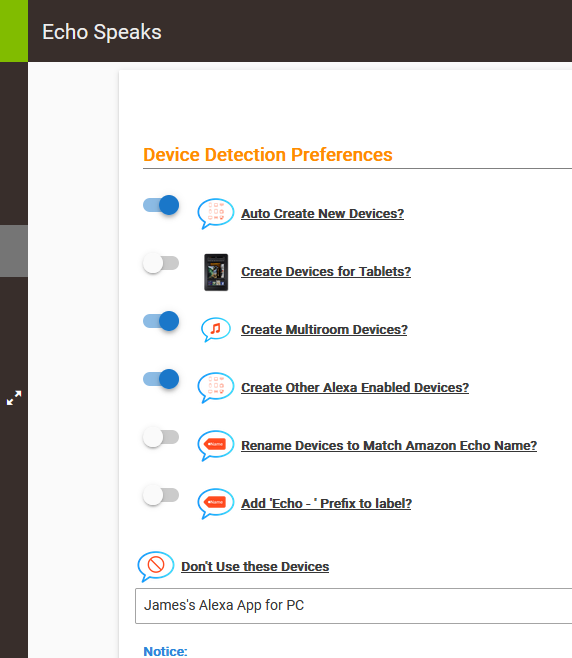
The question is great - I'm really not sure where it comes from! Might have to sift through the Echo Speaks threads from long ago...

Unsure about the post about old units. I've got gen 2, 3, 4 - old echo shows... 5", 8", 10"
Sorry to go back to an earlier point, but I thought it might be useful.... I don't believe you need to setup a different mobile device in HE if you are replacing your phone or tablet, you could just continue to select the same mobile device in the app when connecting to the hub. This doesn't solve the "send notifications to multiple devices" situation. For that I would also recommend @bertabcd1234 's proxy, works great for me.
1 Like

I believe I found the source of 'WHA - Everywhere'. In my Alexa - I have a Speaker Group called 'Everywhere'. At the bottom of 'Groups' on the Alexa app, is 'speaker groups'. I created one for Multi-Room Music. My config looks like this:
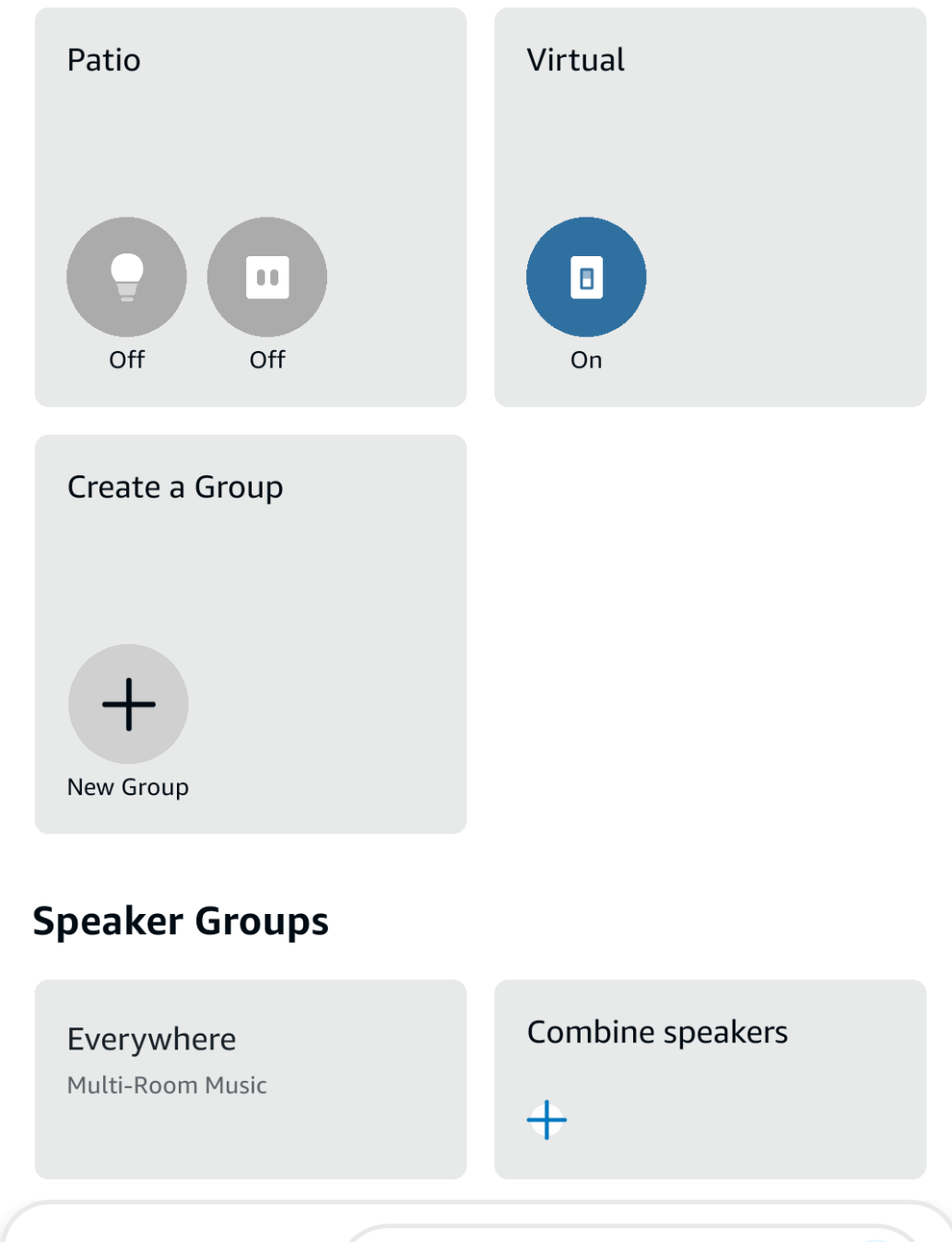
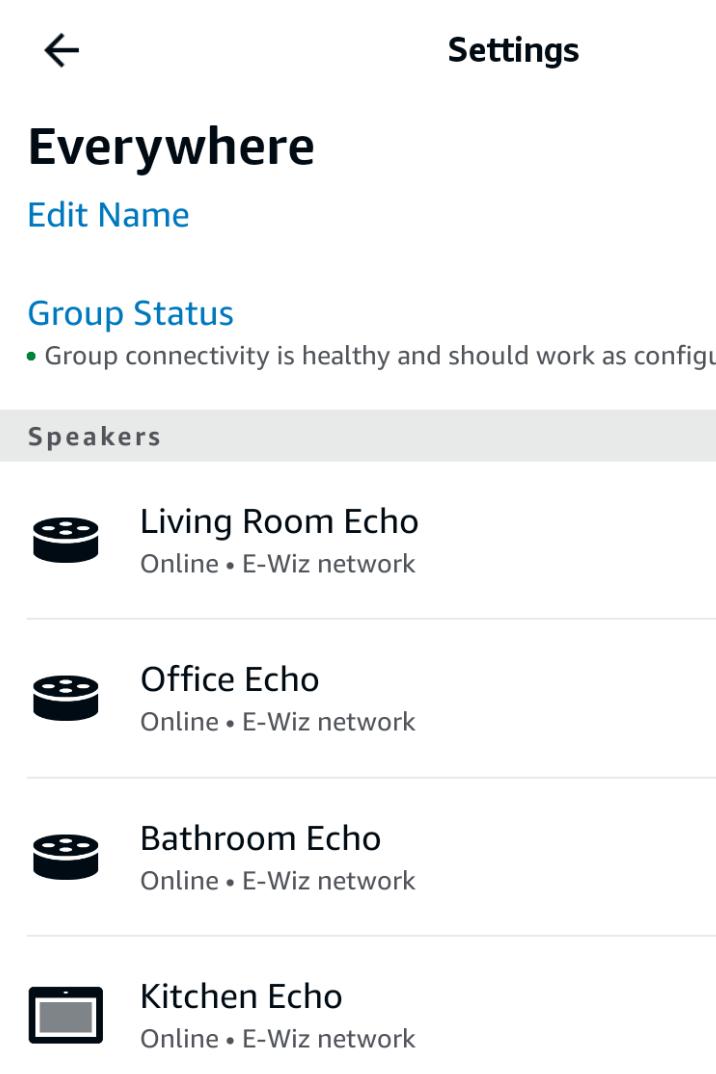
Regarding Gen 1, I'm unsure as I don't have that ancient unit, BUT, I did until earlier this year, and it was a part of the Group so I'm believe it did work - my garage unit was an old Gen 1 - but the mic was horrible and the speaker crap!

