Has anyone else done this? I was making some changes to one of my apps. I find it easier to do it with a separate editor and then paste the revised code into the app code. When I then went to the apps to input the devices I saw the app there twice. OH, OH.. Apparently I selected the wrong app code to paste into and didn't realize it. Then I had to figure out what app was now gone and get it re-configured. What a mess... 
1 Like
hope you have a backup ?
2 Likes
I have backups of my apps. It was a little tricky figuring out which one I had overwritten.
1 Like
I think the suggestion may been to restore a hub backup and then at least look at the app code ID (which would let you match things up after you restore to the new/bad state more easily) -- or just leave it there if that's good enough. At least that's what I'd do (and probably have). 
7 Likes
This kind of situation is probably one justification for using one of those IDE plugins to deploy the code, not that I have gone down that road myself, but may look at doing it at some point.
1 Like
I've done this a few times. Would love a "are you sure" check if you're saving code that has a different app name than the current app name.
1 Like
Been there. Usually just putting the code back restores everything, might just need to hit done on the app again. In use by on the apps code page can help find it.
I have the push set up in Visual Studio Code to update it, and I still forget to use it I am so in the habit of ctl-a, ctl-c --> ctl-a, delete, ctl-v.
1 Like
How do you do that?
I'll let @chrisbvt explain how he does it, but this was the kind of thing I had seen before and was referring to in my comment... I believe others have also come up with their own variations on this theme, including in other IDE's...
1 Like
I just searched for it in the Marketplace sidebar.
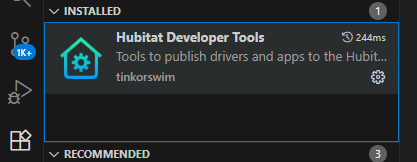

Comes with instructions, you just need your hub IP, and user/pass if your hub needs authorization.
3 Likes

