I have one dimmer (generic Z wave) that is in "my devices", but I cannot identify it at all. So, I would like to exclude it, but it just doesn't want to go. I tried several times to exclude (and it said that it was excluded, but still is in my devices...
Is the device still listed on your Z-Wave Details page? Settings>ZWave Details.
Or is it only shown on the Devices tab?
Was it included with smart start? If so you need to delete it from there too. Otherwise it will get re-added after it get excluded.
2 Likes
You cannot exclude a device if you dont know what physical device it is, because you have to start exclusion on the hub and he physical device.
So how it is saying it is successful? Sounds impossible.
It is a "Generic Z-Wave Smart Dimmer". Also, I can't change anything in the command section (ON/OFF, Dimmer %, etc.)
It only shows on the device tab, not in the Z wave detail page
WHat hub platform/firmware are you on?
Should be able to just click the remove button at the bottom and wait for it timeout, then click force remove.
You could also try editing the "DNI" and change it some nonsense in hopes that the UI will not think it is a zwave node anymore and remove it easier. Not sure if that will work or not.
1 Like
version: 2.4.0.151
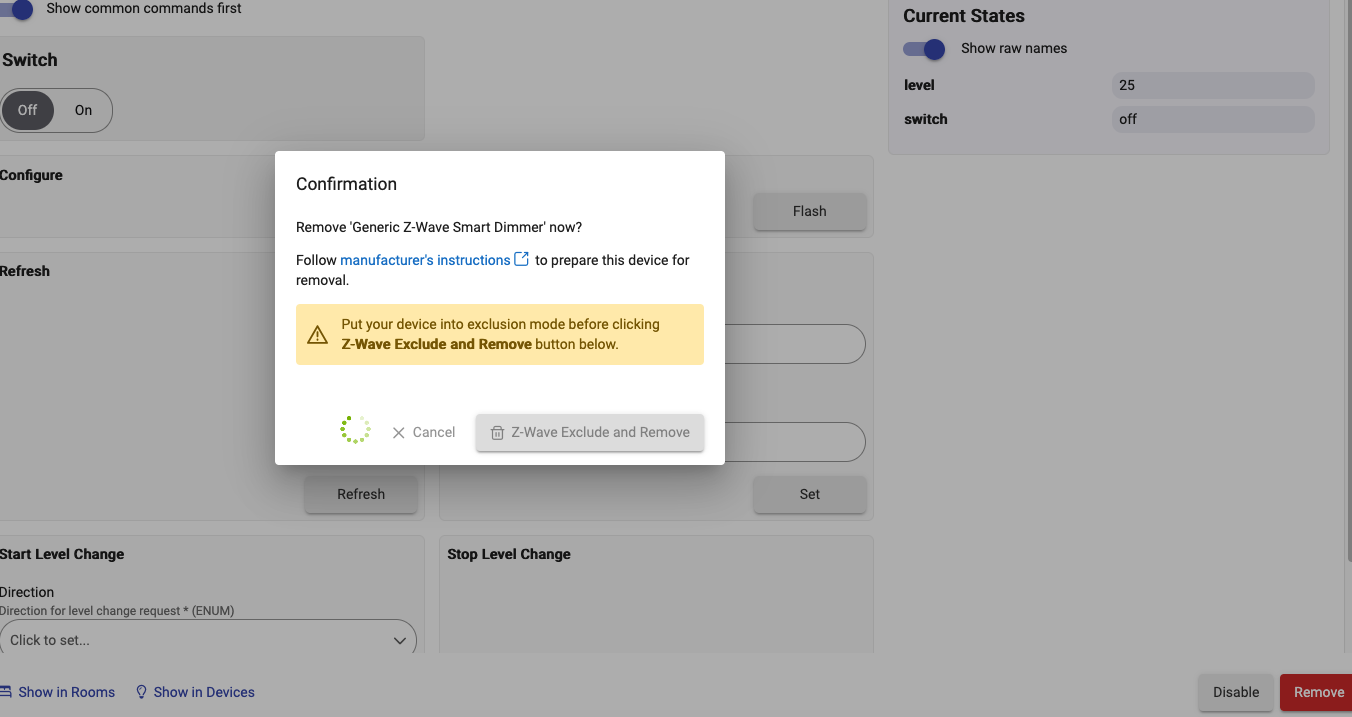
I tried "remove and exclude" and it freezes the screen. So it doesn't timeout and I have to reload the application
Shut down your hub, then when LED goes red pull power, wait 30s and plug in again.
After your hub boots up wait a minute or so and then try the red Remove button on the Device page again.
There have been some bugs with the force remove recently, not sure when it started exactly and if/when it was fixed so that could be your issue.
Did you try renaming the DNI like I suggested?
Please show a screenshot of where you are getting stuck.
It has no DNI in details can I add one ?
Yes you can try, but not sure if that will work to trick it into thinking its not z-wave.
Should be here, they renamed it to the full name now, Device Network ID (DNI for short):

Just put some garbage in there.
Again, not sure if this will work, just a long shot.
@gopher.ny how to get past the z-wave exclude and force remove?
Was that busted in 2.4.0.151?
2 Likes
Interesting.
Can you change the driver to "Device" (just plain Device) and then remove it?
1 Like
You don't get a force remove option after exclusion fails?
Nope, as shown on the screen shot i sent prior, the page freezes and I have to quit the app and reload it to use it.
This topic was automatically closed 365 days after the last reply. New replies are no longer allowed.