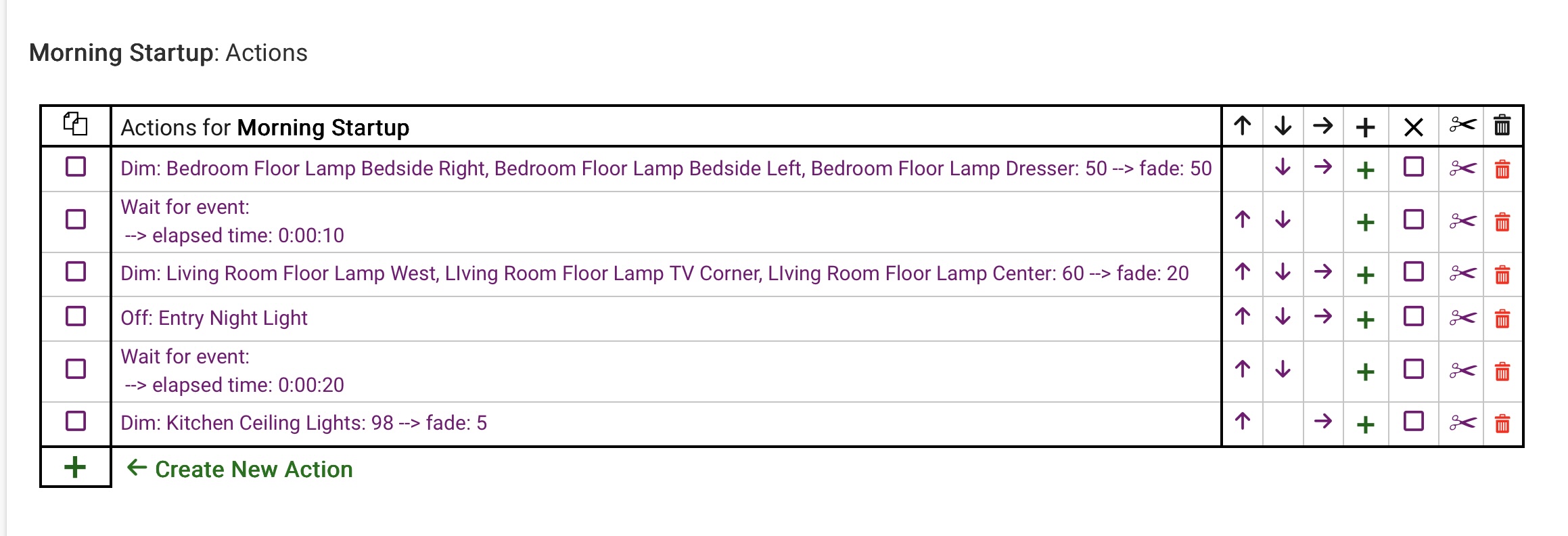
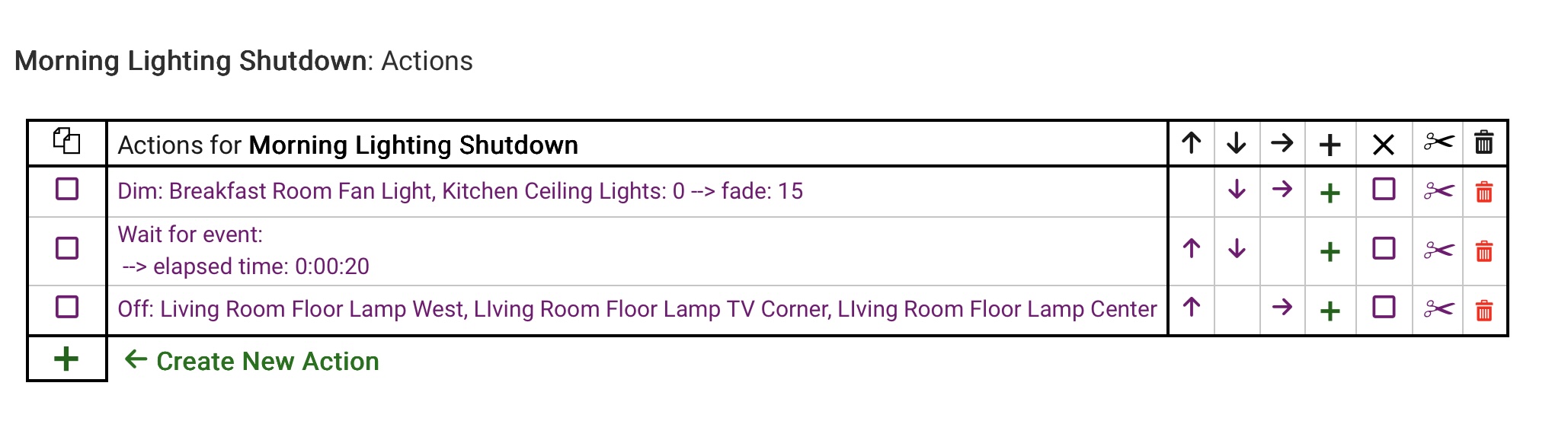
The Situation: Up until a week or so ago, I was running a lot of dimmable LED lamps ("bulbs") on plug-in dimmers, either Lutron through the Lutron hub, or Leviton Zigbee dimmers. One very low wattage LED is in a lamp run by a Third Reality smart Zigbee plug. All was fine. My Rules were running like clockwork.
What I did: For various reasons including scratching my experimenter itch I decided to dig out a hoard of Third Reality RGBW lamps and get rid of the dimmers. They are in floor lamps, each of which have 3 bulbs. I added them all with no problems, then made each of those three-bulb lamps into a group. "Living Room Floor Lamp E Lower" and the other two into a group called Living Room Floor Lamp E".
The Problem: My Rule Machine scripts used to turn things on and off perfectly. Now, some individual bulbs will remain on, either in the floor lamps or sometimes the night light. I am attaching both the morning startup Rule, which works perfectly, and the morning shutdown, which sometimes does not shut everything off. Please note: The TV corner floor lamp has regular bulbs and runs on a Minoston plug-in dimmer.
Any ideas? Break things up with "Wait" to let the C-8 "catch up"? Is there some setting I am missing? Thanks, gang!
When I had a C-5 hub I had a rule that turned off a bunch of lights. And sometimes not all of them would actually turn off. I split that action into two, with half the lights in the first action and the other half in the second, and I put a 1-second delay on the second action. And all of the lights turned off reliably after that. Now I have a C-8 Pro, but I've never changed that rule because it ain't broke. So you might try something like that.
Somehow, at the back of my mind, I suspected tossing in some time delays, even a little one, would solve this problem. This suspicion is now confirmed. Why? Because my night-time shutdown routine simulates someone walking through the house, shutting things off. [this lamp] off. Wait for 30 seconds. [that lamp goes off]. Wait for 12 seconds. [the other lamp] goes off and so forth.
Just a question. Is Delay any different from Wait?
For this use case I wouldn't think that it made a great deal of difference.
I just found Delay to be handy so used it and I'm not trying to simulate a person turning the lights out. One thing to note in general is that Delay has to be explicitly cancelled. There's a write-up on Delay and Wait in the Rule 5.1 documentation here.
I have seen a similar problem on one of my networks. The other network is newer 800 type devices and all off all on commands run within a few seconds (2-3) for 30 or so end devices. The other network is a mix of old and new about 50/50 and it is slightly bigger network with 50 or so devices. This network take 20-35 seconds to process an all on all off ( an sometimes it stubles even longer). RSSI on the bigger network is a bit lower (and more notably PERs are higher) which may compound the problem. The problem house had metal boxes and conduit for house wiring (Chicago thing)nwhich might also be a factor.
I tried delays, grouping like devices together and handling groups one at a time, enabled logic so it only tuns on/off if it isn't in that state, supervision,... None of it helped much. Still poor response. I looked at the ZWave logs but an all on/off generates about 200-300 lines of logs so not the easiest to review. Sadly my 10 year old Vera (since retired) handled this pool of devices better than Hubitat does...