I'll make a somewhat ill-informed comment that I am happy to have corrected...
I would suspect the logs are in more of a database-style storage, which I will admit is often file-like. These are likely kept lean and only a certain level of history is kept. I would also expect the logs are kept in a part of the platform that is not made available to the general user, aside from what is made available through the logs UI and HTTP stream options. The combination of these points would mean it could be problematic to offer a "file" to download.
But... there's probably 4-6 things I am likely to be wrong about there, which could dispel my conclusion. It may at least offer enough questions to indicate it is not as simple as may be first thought, but not rule out entirely the possibility of a log file being a thing...
That might be really useful if there was a way to specify the record age - "http://[hub ip address]/logs/past/json?age=3" giving the last 3 hours, or some such.
As i understand it the log data is in a flat file. Why you can't download it is probably just a choice from the Hubitat team. It is fairly easy to parse with the built in tools if you want to from the UI. The problem is the file has a file size limit so it gets purged of old data regularly.
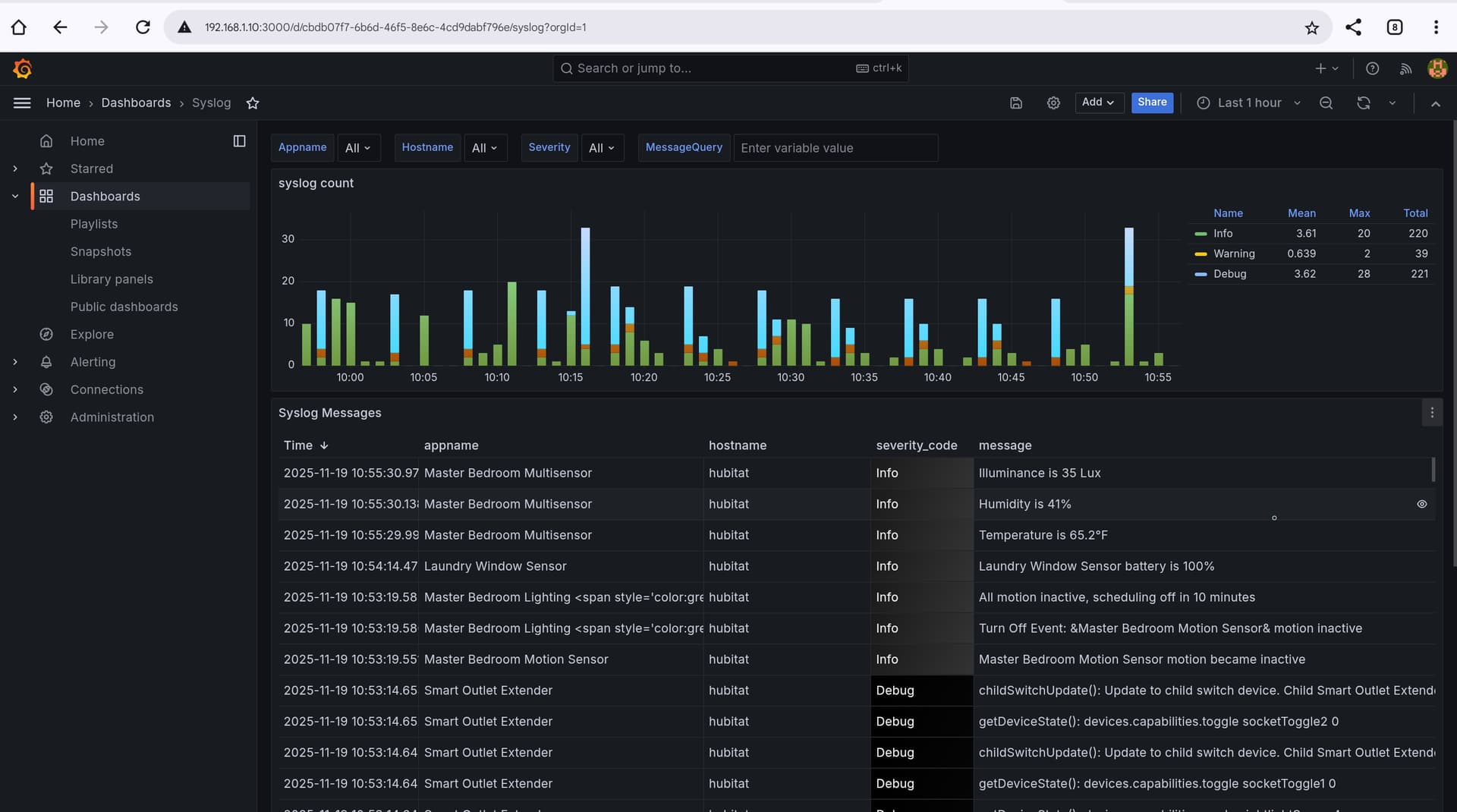
I use the Logs websocket and dump the data into a InfluxDB and use Grafana to view it. Here is an example of my grafana dashboard. I use a driver i wrote to put all log data into InfluxDB for this dashboard.
I have been using websocket and a nodejs script on my SERVER 'puter to save errors and warnings for inclusion in a regular status report, but I'm now testing some new code that just downloads and parses the logs as-needed to the same end. Much better (IMO) than a constant background job that would fail and need restarting after hub updates.
My process uses a virtual device that uses a websocket to recieve the log events as they happen and then sends them to a external InfluxDB hosted on a home server. It doesn't faile and has code to reconnect to the websocket if for somer eason it looses that. It has worked flawlessly since i set it up. It could probably be modified fairly easy to only send certain types of events as well. At this point i have been using it for years.
It's impressive but unfortunate to see the clever and complex user-created workarounds for functionality that should exist on the Hubitat. Network accessible logging has well established methods such as syslog (appropriate for device and app logging as well as reporting HE events) and SNMP (better suited for monitoring the HE platform itself for conditions such as low memory, high load, etc).
Right but the Hubitat hub isn't a wintel server or nearly as robust as a server that normally uses those services to do things. For general home use the built in tools are generally sufficient. SNMP and Syslog would be a waist to implement for a device for home automation except for rare niche cases.
Right but the Hubitat hub isn't wintel server or nearly robust as a server that normally uses those services to do things. For general home use the built in tools are sufficient SNMP and Syslog would be a waist to implement for a device for home automation except for rare niche cases.
You seem to have misunderstood.
I am pointing out that Hubitat could have used standard, light weight methods to send network messages out using network protocols for syslog or SNMP, not that HE should be a syslog server or SNMP trap receiver.
I understood correctly. My point is that syslog and SNMP though are light weight in a enterrprise server may not be so on a 4 core arm base system intended for home use. To that point as well how many home users are going to have a syslog server or a snmp trap to control it via snmp at home. I know about these tech because i work in IT, but allot od people would have no clue.
Thanks to everyone who posted here; it was a great source of information. I thought I would offer a different perspective on using log information rather than recording it in a database. I setup a Claude CoWork project that downloads the latest logs each day and then runs an analysis of the information and provides a report. It is quite a straightforward process and gives some rich information:
Once setup it will create a report (similar to above) but can also do things like answer "The Kitchen Pendant light isn't switching off", it analysed the logs and responded that the "Kitchen Corner Motion Sensor had stopped responding and its last state was active, which looked like a battery issue."