If its any consolation I installed HA by accident cos Id bought a Raspberry Pi cos I needed to deploy another feature to sort out my multicast WiFi issue with older shellys. I just followed the step by step tutorials to also install HA and then paired it to hubitat. It was so easy it felt too easy. And even though I dont get HA automations or desktops etc... cos I cant be arsed to try work it out as the Hubitat ecosystem is so bloody awesome for me. The HA does automatically add bloody everything. I just added the ThinQ, (even though it works for me on Hubitat) for shits and giggles.....Also wasnt difficult. What Ive learned after several years is, One eco system doesnt cancel out the other....it just compliments it. I have a apple homekit, hubitat, HA, Alexa and Google Home as well as some IFTTT and now Node Red stuff. I do try to roll it all back to hubitat as I find that environment more friendly for me. But run at everything and drink the water as well as upend the bar fridge.
I’ve just pushed the code for the integration using the new ThinQ Connect API. It’s still in testing, but feel free to try it out! Currently, it supports only Dishwashers, Dryers, and Washers, as those are the devices I’ve been able to test with. However, it should be fairly straightforward to extend it to other device types. The structure closely follows dcmeglio’s original integration, and you can even reuse the CSR and private key if you’re already using his app.
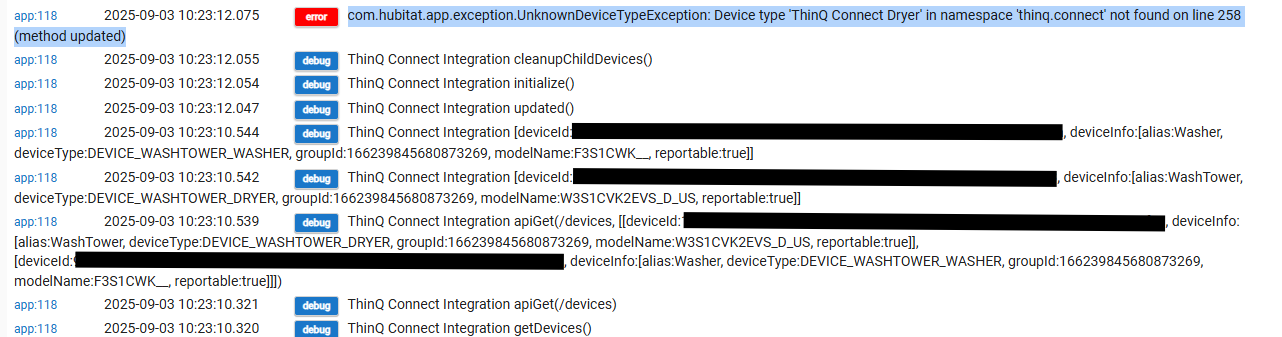
I'm trying to set this up but getting an error in the logs:
com.hubitat.app.exception.UnknownDeviceTypeException: Device type 'ThinQ Connect Dryer' in namespace 'thinq.connect' not found on line 258 (method updated)
I have the washer and dryer device drivers installed. My devices are a combo "Washtower", but I don't know if that matters. They were detected as a separate washer and dryer using the old integration.
Edit: I was able to make it work by changing the namespace in the device driver code from 'jonozzz' to 'thinq.connect' for both the washer and dryer devices. I'm not sure if that's the right way to fix it, or if the namespace reference should be fixed in the app code.
@jonozz, may I suggest you start a new thread for this updated driver, it will soon be buried in a "no longer maintained" thread and not many will ever find it. Place a link to the new thread here and maybe ask an admin to close this thread so that the last message is a link to yours so it's easier to find.
I might be wrong but the trigger even has to be true all the time for the actions to execute. I'm not a rule machine expert, but this is how I'd do it: Trigger Events:
Dryer currentState *changed*
Actions to Run:
IF (Dryer currentState = "RUNNING") THEN
    Send notification: "Dryer is now running."
ELSE-IF (Dryer currentState = "END") THEN
    Send notification: "Dryer cycle has finished."
END-IF
That did not fix the problem. I will have to turn on logging. Although last night I did not see any event post when the dryer was running or stopping. So, it seems like it is either not polling the dryer or the dryer is not sending any updates.
That's very odd, you should at least see a currentState transition from POWER_OFF to INITIAL when you flip the power button on the appliance. Can you enable debug logs in both the app and driver and see what you get?
Nice! Unfortunately bit late for me, I gave up on the old unworking integration, and I ended up using the ThinQ integration on HA and HADB. I even created an app to consolidate all the HADB entity devices into single appliance device attributes for my LG washer and dryer, to mimic the old app.
Good work though, I know there are people out there who are looking for this. I agree with @nclark that this should be in its own [RELEASE] thread to get the word out and be found by people searching for it.
There are some differences between this and the HA integration. I get washer door state open/closed from HA, for example, as well as spin speed and water temperature, but I don't see those included in your integration for washer.
That's interesting, I'm also using the ThinQ Integration in HA and I've never seen door states or speed, temperature updates for my washer. I wonder if only some models push that kind of data. I've also looked at the official pythinqconnect Python package and there are no references to those states for the washer type.
If you could enable debug logging for the washer, then hit Refresh and look for processStateData() logs. I'm wondering if any of those states show up in there. This is an example for a dishwasher:
I enabled debug logging on my SmartThinQ LGE Sensors main page, and reloaded the integration. Where are logs with processStateData()? I downloaded diagnostics, and it was a json file, and it has info on devices, but no process state data.
I also looked at the SmartThinQ integration and it seems to be based on the old/internal API which might be exposing more data from the appliances. I do have that SmartThinQ integration on my HA and I see the door_open and temperature sensors for my washer but they never get any values.


 Custom Apps and Drivers - Hubitat
