2 Likes
I have 20+ of the red series dimmers (Z-Wave version of this). You can program the config button too. I set that button on each of mine to the lowest light level that still turns on the lights. We use that all the time in the morning and late at night. They also support multiple multi taps so you can do all kinds of things with them with Hubitat. For example I have a hutch with 2 lights (an upper and lower). With Hubitat I made the "up" button a toggle for the top light (1 push in Hubitat speak) and the "down" button a toggle for the lower light (1 held in Hubitat speak) but a double tap of either will act to toggle them both on or off.
Like many, my kitchen is by my dining room and we often want both lights on or off - in comes the handy double tap here too.
I've even used triple taps in a few places. I once did a 4 tap, but I had to remember what it did, but that and more is possible.
I also have an Inovelli RGBW bulb (which they stopped making) and you can do things with that like make a double tap turn it on to a low level red, etc.
2 Likes
That is some cool stuff. Hopefully the Zigbee version has the same features.
1 Like
Yes, it does.
1 Like
Being able to decouple the light switch and light (aka "smart bulb" mode) is a very cool feature.. you can create a set of light switches in a "Virtual N-Way" arrangement unrelated to the physical wiring. I do this for my upstairs hall lighting control.
4 Likes
That is fantastic. The reliability of Zigbee with the features of the hottest Z-wave switch. I do not think you can ask for more 
1 Like
I am going to use those for security; I will think of new things in the future.
These Inovelli red switches already do everything that the blue does, but are z-wave?
Are the Inovelli considered high end switches? Compared to Caseta pro?
1 Like
Caseta switches are very reliable and also support HomeKit. Caseta is definitely considered higher end.
Actually, Blue can do a bit more (e.g., individual LED control on the bar) but they are indeed pretty similar aside from protocol--and a new/different manufacturer. I find they work better with every bulb I've tried the with and don't have the noticeable "stepping" the Reds exhibit with some, and they work better on low watt no-neutral-at-switch loads that the Red struggled with in my experience (with a bypass in both cases), though this will vary depending on your bulbs and whatnot. I just am quite impressed so far.
"Premium" is, I suppose, in the eye of the beholder. I couldn't go to Lutron after using these (I like the multi-taps and LED bar control too much), but everyone's needs are different, and Lutron has earned a rock solid reputation--and a price to match. Inovelli's product line used to be segmented into a "budget" Black Series and a "more featured" Red Series, but the Red is all that remains after some SKU streamlining a while back--plus the new Zigbee (Blue) and add-on (White) offerings. I suppose their flagship products, Red and hopefully soon Blue, could be considered premium in some sense. 
5 Likes
I agree with you fully. Lutron is great for third party installations because of that reliability but they do not look as good.
Ah thanks for mentioning the "White" addon companion switches.. completely forgot to include those as part of my order. Don't need 10 though.
1 Like
I have 10 of the new Blue switches and I do like them. One of my new Blue switches has issues with my hubitat dashboard. I can create a tile for the switch, but when I click on the tile to turn the blue switch off or on, the action DOES take place, but the tile says "Sending..." and that is all it does. The word "Sending.." should go away and the tile should turn color to reflect the switch state. Also, if I turn the light on manually the tile should reflect the state of the switch, which it does NOT.
I just got an email from Inovelli stating that there is a manufacturing defect in some of these new switches. I'm not sure if my tile issue is caused by the defect or if this is a hubitat issue. Your thoughts are appreciated.
1 Like
The first thing I'd do is run the "Configure" command on the device (I'd probably choose "All" as the parameter when doing so--this is a bit of a nonstandard implementation but should do something either way). For Zigbee devices, this normally configures what/how they report back to the hub, which could be your Dashboard problem. You could tell for sure by leaving Dashboard out of the picture and just looking at "Current States" on the device detail page to see if "switch" updates to "on" or "off" as expected.
But, yes, there are also Zigbee problems with a couple batches of these. Check the "Zigbee Id" on the device detail page (or from the QR code on the device or the "EUI" on the sticker included in the box). If it starts with 94:34 or 38:5B, they could be a problem. You should have (recently) received an e-mail from them with the replacement process information for that, which it seems they just finalized today.
2 Likes
bertabcd1234, running the configure command with "all" fixed the issue. Thank you for your assistance!
1 Like
I have found that deleting and reinstalling Zigbee devices solves problems with bad installations. Once properly setup they are "forget-mes". Glad to see you got your switches.
I am glad you are all setup now. They should be extremely reliable!!!!!
“Configure” with no parameters does the standard things (reporting back to the hub)
Selecting the “All” parameter does the standard things and also sends all the Hubitat preference settings to the device.
1 Like
Thanks Mark!
When the driver is updated (I noticed an update was available earlier this afternoon in HPM), do we need to hit "Configure" (All or otherwise) for each Blue?
If yes, should it be "Configure - All" or just plain "Configure"?
In your experience thus far with the Blues -- when you make a change to some existing parameters for a switch, do you hit "Config - All" (or maybe just plain Config?) after clicking "Save Preferences"?
I'm noticing that some of my parameters don't seem to "stick" in the UI if I go back later to check them again -- not any major parameters, but some of them then show up blank or unselected later. I've tried Config / Config-All / no Config at all, but it doesn't seem to make a difference.
Basically, I'm just seeking any "Config" button related best practices you may be able to share -- thanks very much!!
1 Like
It depends on what has changed. For example, if a new parameter is added you should do Config All. But at a minimum you should do a Config, just to get the driver and firmware State Variable updated:
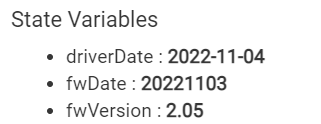
It never hurts to do a Configure All to make sure all settings are updated and in sync. Config All does everything a 'plain' Config does plus more 
If everything is installed, paired, initialized, and running normally but you want to change a setting then you just change that setting and click Save Preferences. Don't use Config for that. Config is more for initial install or re-install or sometimes, like in this case, just to force everything to a known state.
Again, it depends on what has changed. This typically happens when you set something back to its default value. If the UI displays blank or unselected values that means its set to the default value
IMHO best practice is to do a Config All any time you update the driver or the firmware.
2 Likes

