I previously had an issue where I left my garage door open and didn't know about it. So I created a notification using Inovelli LED Notification so that when the garage door is open, the switch LED flashes yellow.
I'm trying to create a similar rule for my new Schlage Encode (couldn't get my hands on the plus when I ordered).
So far, I've connected schlage to Alexa, created a virtual switch, so there is an Alexa routine that when the lock is UNLOCKED the switch is turned on (and LOCKED turns the switch off).
Then in the new Rule 5.1 I tried to create a rule to take advantage of the above notification. IT DID NOT WORK. I'm unclear where my error was. The old instructions are not for RM 5.1 so it's possible that I just made the rule incorrectly.
Is there an updated version of the instructions for 5.1? Or maybe I made some other error along the way.
What Inovelli device are you using? Those instructions are for the Z-Wave 700-series Fan/Light controller (LZW36-SN). Nearly the same thing should work for the LZW30-SN or LZW31-SN (Red Series/500-series switches and dimmers), except you won't need the second parameter for the startNotification() command.
This will also depend on what driver you're using. For example, Inovelli's instructions say startNotification(), but you'll need setIndicator() if you're using Hubitat's built-in driver. The LED calculator linked to in that document should work for either, as long as you select the correct device (switch vs. dimmer).
The Rule 5.1 interface is a tad bit different, but aside from how the list of actions displays, I don;t recall any jarring UI changes since that document was created. If you're getting stuck somewhere, posting here with more information about where may be helpful. If your rule isn't working, enable logging for the rule (so you can see what it's doing when--if never, that's a problem) and check "Logs" afterwards to see what it's doing when or to scan for errors that might be indicative of a problem (either with or without logging enabled).
Not sure which exact switch I have - purchased a while ago. But it is Inovelli Red and it is the light/fan combo.
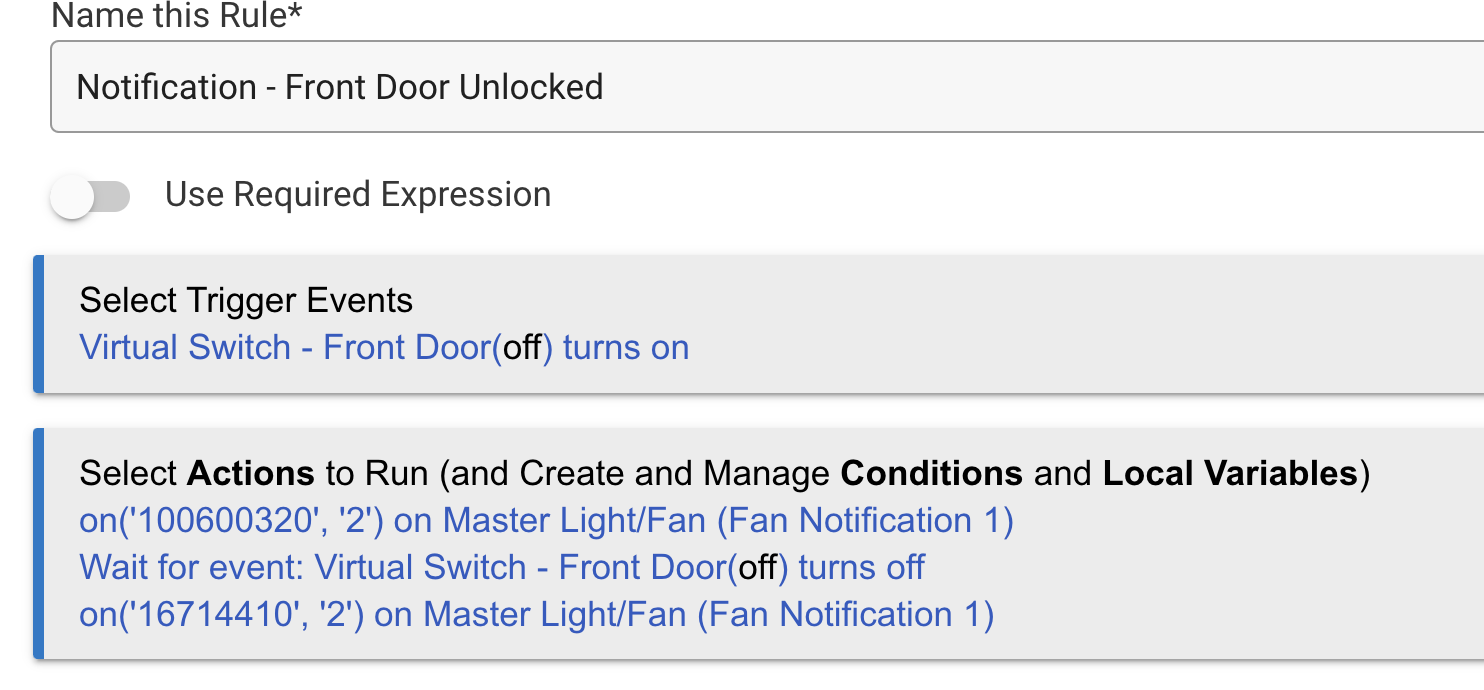
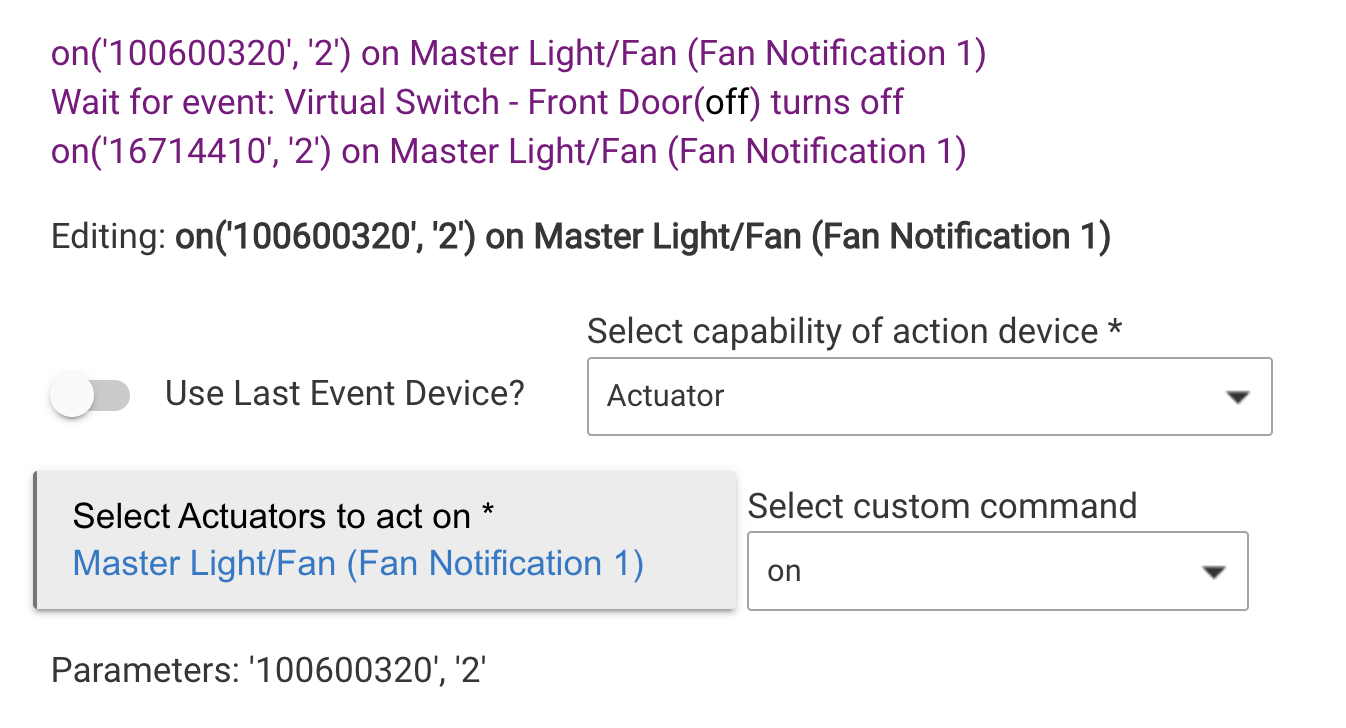
Maybe these photos will help you understand where I am.... I don't see anything listed as "setIndicator". I just updated Hubitat today, had been a while so first time on RM5.1 (was previously on RM4.0), and when I last tried to mess with the notifications on LED was quite a while back.
It appears you are sort of combining two different ways of doing this. The way you linked to above uses the custom command, "Start Notification" on the parent device, the main fan/light device itself. You appear to have created "child notification" devices using Inovelli's driver, which is fine, but that is an alternative to using the custom command. You can just do a regular "on" command for that, and you don't even need a Rule or any custom app to do that (it can work with any app that can turn on or off a plan switch), though a rule would certainly work if you want it to. You can just use the plain "Turn switches on/off" action under "Control Switches, Push Buttons."
If you do want to do things this way, say because you want a custom notification that you don't have a child device created for or don't want to mess with the child devices, then it looks like you're close--you just need to choose the parent device instead of any notification child device, and you'll need the startNotification() command instead of on() (which I can't blame you for choosing above since you won't see the command you need on the child devices, just the parent).
I didn't fully understand all of that, but changed the switch from the child to parent and changed the actions to start and stop notifications... works perfectly!