That is the one I use in its Z-Wave version. Supported well in Hubitat. If you are going to buy one, why not buy the z-wave version (2007). The only reason I can think of to have the wifi version is to participate in the power utility's peak reduction program.
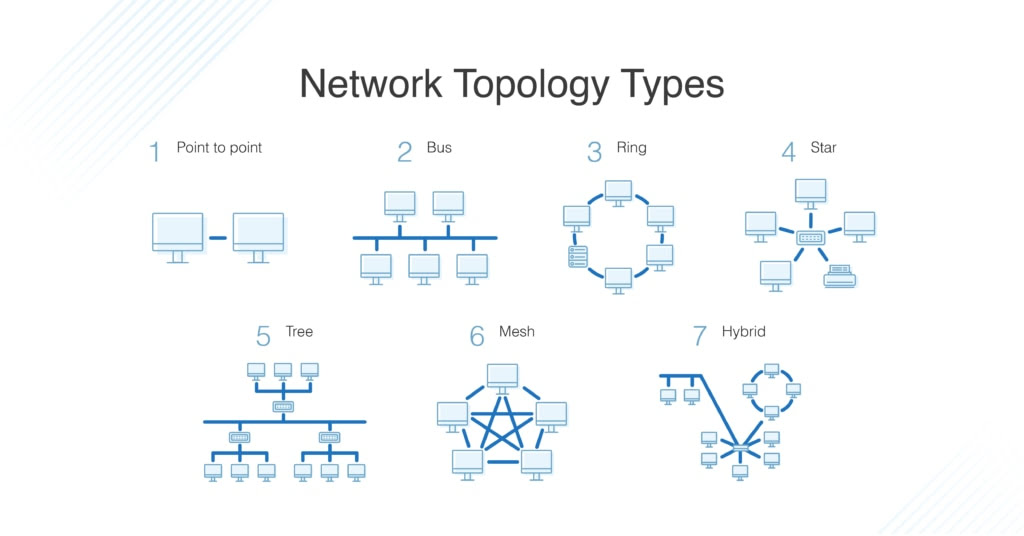
Look up network topology. Here is one website: https://virima.com/blog/mastering-types-of-network-topology-a-complete-guide
Z-Wave (with Long Range) is now a hybrid network with mesh (non-LR) and star topology (LR) combined.
Zigbee is a mesh.
Thread is a mesh.
HomeKit is a star.
Matter is mess best described as star topology within a fabric.
3 Likes
Ok, so if the device is paired to an Apple Home system already you would have to reset/remove that first, then pair to Hubitat. Then if you want it in Apple still you have to share it back to Apple through the other integration. By doing that you might lose some functionality along the way as well.
1 Like
Exactly!
1 Like
The HA version will allow you to bring the HomeKit device onto your network through the devices native manufacturer app then join it to HA. I may have not read it correctly but it read to me as if the HE version requires you to connect it Apple Home then remove it from Apple Home to join it to HE. It doesn't mention anything about other methods to bring it onto your network. Does HE require it to be brought on by Apple Home then removed and put into HE or can you use the manufacturer native app then bring it into HE?
I believe that is just needed to confirm the device is working properly and cut down on requests for support of HomeKit Controller with devices that aren’t even functioning properly with Apple Home.
Some HomeKit devices will require their manufacturer app or iOS to first get them on the IP network before they can join a HomeKit controller.

Changing from "Solved" to "Gee - I am learning so much more from this thread after I closed it"
3 Likes
Any idea why a Ecobee 4 will not show up as paired with the new Homekit Controller.
Before i tried to use this new built in app i had it linked with Homekit to HA. I removed it from HA, ensured that it isn't connected from the device itself and then have tried pairing it multiple times from Hubitat. It acts like it is paired, but I never see the device show up for it. Then eventually it the icon in the New Homekit Controller software turns to the one indicating it isn't available to pair. I can to back to the Ecobee 4 thermostat and remove it and try it again after a while, but it never completes.
HA's "HomeKit Device" and HE's "HomeKit Controller" integration behave the same. A HomeKit device must not be currently paired with any other HomeKit Controller before being paired with either HA or HE.
The confusion comes from the fact that when using an Aqara FP2 sensor, one must first use the Aqara mobile app on either iOS or Android. If one uses an Android device to perform the initial commissioning and configuration of an FP2 sensor, then the FP2 sensor can then be immediately joined to a HomeKit controller afterwards.
However, if an iOS device is used to perform the initial commissioning and configuration of an FP2 sensor, then the FP2 sensor will be automatically paired to that iOS device's Apple Home instance via HomeKit. Thus, in order to pair the FP2 sensor with either HE or HA, the FP2 sensor must first be removed from that instance of Apple Home, power cycled, and then it can be added to either HE ("HomeKit Controller") or HA ("HomeKit Device") 
Hope this further clarifies the behavior of the Aqara FP2 sensor. Ecobee thermostats do not automatically join an iOS user's Apple Home instance. Thus, they are simply configured using the Ecobee mobile phone app and then can be added to via HomeKit to either HE or HA. However, if a user has previously joined an Ecobee thermostat to their Apple Home, they will need to remove it from Apple Home to allow it to be paired with a different HomeKit Controller (e.g. HE or HA.)
6 Likes
Makes sense. Basically the same functions.
1 Like
I have a C8 Pro and when I go into the Add Built In App the Homekit Controller is not on the app list. Just the Homekit Integration. I am using platform version 2.4.1.177. based on the notes I believe I have to upgrade to the new version 2.4.2.119. is this correct? Just want to make sure as there have been reports of some matter issues with the newest version.
Yes, it is a new feature in 2.4.2.
1 Like
Thank you. I just wanted to make sure.
1 Like
Okay, so this is "Promising"? I use homebridge and attempted to bring in homebridge-deebotecovacs and it paired. however, nothing shows up after pairing. it also appears this app only shows up to 3 homekit devices only at any one time. Unfortunatly, I confirmed that the homebridge-deebotecovacs did pair in homebridge to hubitat, however, hubitat did not create a device after pairing. needs some work (hence "beta"), but either way BRAVO Hubitat team, love its potential. perhaps gopher.ny can offer some insite? considering the homebridge-deebotecovacs integration just brings over fans and switches, it should be doabl with this integration.
I don't have that vac, but... let me see if I can slap a basic driver together for it, anyway. The commands are well documented.
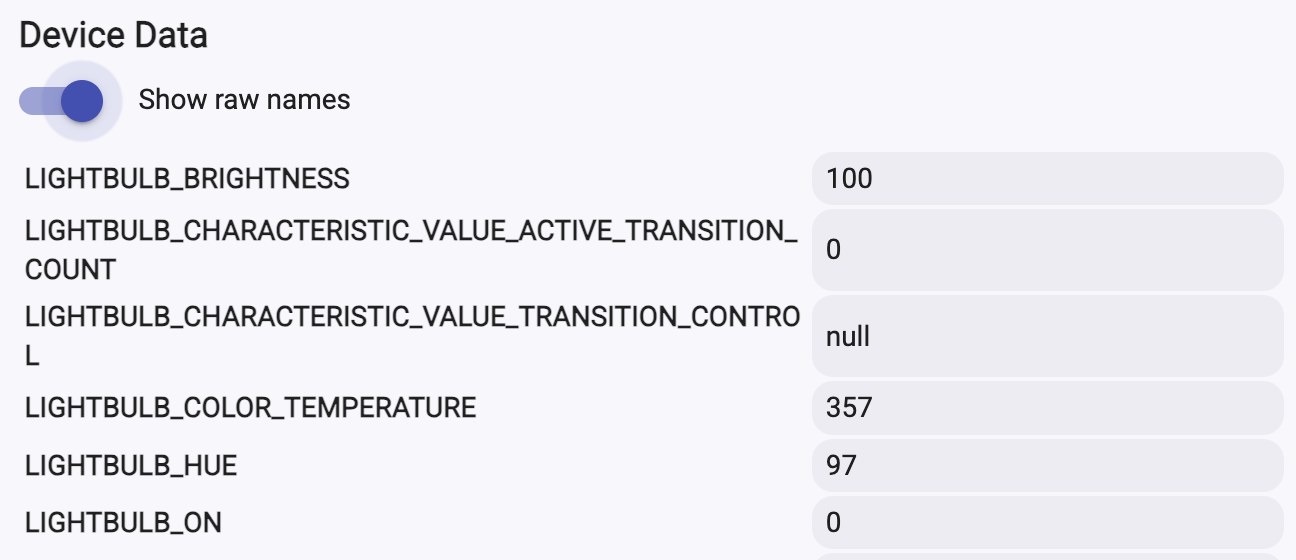
@rdstov , can you PM me the device data that is populated for the vac? Just copy/paste the whole thing, don't worry about the formatting. Here's the part I look for (the example is for a lightbulb).
1 Like
That’s the problem here, the device connected to the Hubitat HomeKit controller, but no “device” was created. This seems to be a consistent issue for any other device I have other than my Aqara FP2. The FP2 shows it paired and creates a device.
Once “connected” the Hubitat control shows the device as if it’s paired with another HomeKit controller.
I have no device info to send.
Can you PM me your hub id and some information on which device it is?
I couldn't reproduce the scenario thus far. Which isn't to say it's not happening, just that I can't reproduce it...
Is the deebot on its own child bridge in Homebridge? And is it also not paired to anything else? It would need to be a clean unpaired device. Not sure if bridges are supported.
@gopher.ny how familiar are you with Homebridge? It is probably exposing the deebot plugin as a "bridge", not a singular device. So not sure if you can pair a homekit bridge to Hubitat? Or only individual devices?
2 Likes
Haven't tested it with bridges, will try that.