Just got it set up via custom SMTP, and it's working great for notifications and full e-mail via the GUI!
What would be really helpful is extending this capability to custom apps and device drivers so we can send email directly (body and subject) from Groovy and not just through the GUI. I can see multiple uses where I would want to be able to send a few variables and their values via an e-mail rather than a sendEvent().
I’m very well aware of the notify function and already incorporate that in my code.
That wasn’t what I was asking for. I’m looking for the ability to send e-mail directly via the new device driver rather than relying on the notification app. These are not the same things.
i am NOT talking about the notification app.. you add a selection in your app or device driver to pick a notification driver (like an instance of this device) and then there is a devicenotification() method that sends direct to that device like you asked.. it has nothing to do with the notification app..
ie
Yes, the method you outlined does not require the notification app but we’re still talking about two different things. Using only a notification makes all the subjects the same. Being able to dynamically send the subject and message is different.
If the GUI didn’t already offer it rather than a single “test” notification button, I know the driver can already handle a dynamic subject line. Making that available in Groovy opens up additional options for status e-mails, notification classes (subjects), archiving the e-mail, etc.
Notes: if you had a list of multiple to address in the configure only one can be in the new replacment header so that would override the entire list.
other notes, order is important if you want to replace all headers (hence the rh-headername) you need to put them in this order:
rh-From, rh-T0, rh-Subject, rh-CC .
You dont need them all, but if any are there the must be in that order as that is the order they are processed.
Otherwise the will be left in as part of your actual message.
4.91 added option for the subject header to be rh-Subject: or just Subject: to be consistent with ritchierich code base so you have
have one notification send through both implementations.
v 4.92
the original header replacement above still works
but added an alternative message based on ritchierich pseudo xml at the start of the message
ie
{header: value, header: value}, this is the message
or
{header: value, header: value. Message: this is the message}
both work.
Legal header values for replacement are: Subject: From: To: CC: Message:
order is not important.
The existing drivers that did this (I linked to 2 up above) let you override the Subject: line (in the notification text, which your app could arrange). If you look up above, I've requested the same override be added to this an additional feature. Coming soon.
For newer users, should have instructions or a link to the help doc on how to create new devices with this driver on the initial post. I know how to do it so wouldn’t apply to me but there’s no instructions on how to actually create this driver anywhere on this post for anyone that doesn’t know how to create one.
On that topic, there probably should be an app created or a better way in the GUI to create devices that uses a Driver without an app. I feel like all of these drivers like this or the Weather ones, etc. are created all of the time but they are really hidden away under the Virtual Drivers list. I think you should look into a better way like for a new user to find these. Really something like this should be an Built-In App if you ask me, 6 months from now a brand new user will probably not know this exists.
Even established users could easily miss drivers like this that are added if they don’t see it posted in this Community site, there should be a better way to see a list of what is available with Drivers that have no built in app.
@bobbyD I believe an app to manage notification devices would be useful. Whether pushover, SMS, email, etc it could walk the user through the required inputs since these can be a bit confusing.
I got this working with Gmail but it was a painful adventure. I had to search for “app password” in the search box at the top of “Security and sign-in” section to access it. @bobbyD Thanks for making this available.
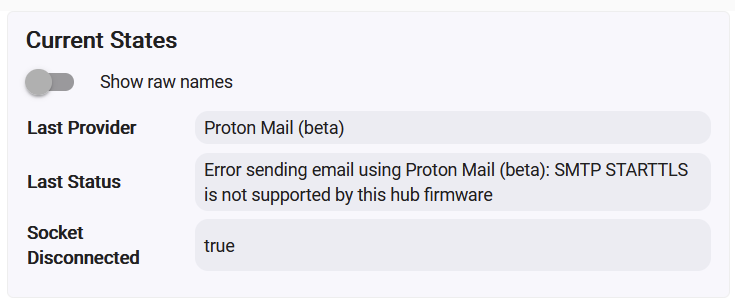
Would need to know what settings you tried. It looks like it is saying it supports STARTTLS, which is the default auth on the driver for a custom config.