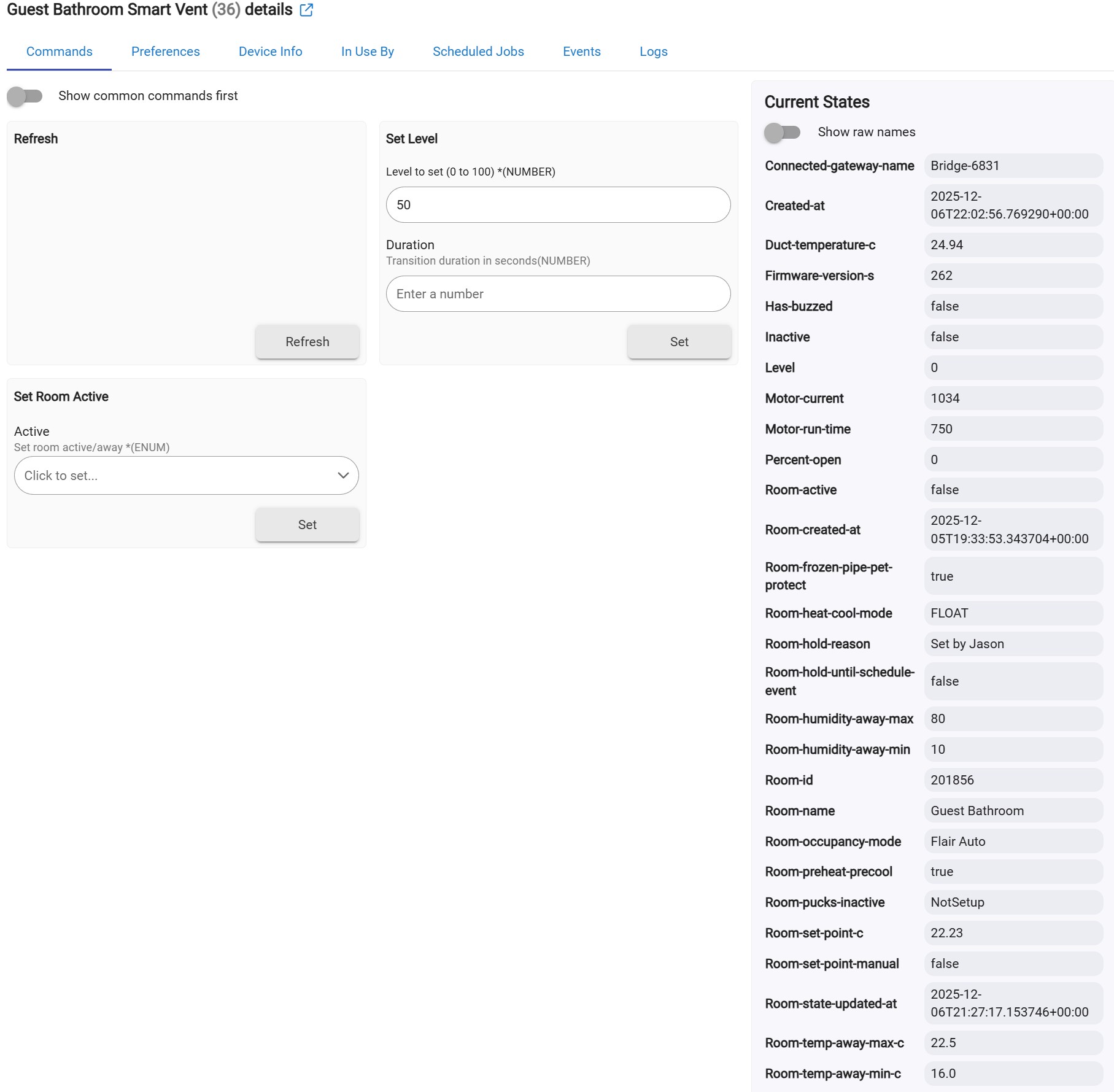
Got my API access and was able to discover my and 2 vents.
Is it possible to fix this parameter: Room-heat-cool-mode
As of now it only reads FLOAT
When I was using yracine's app, I was able to control the heel/cool/auto mode. This was particularly useful because I had it tied to my Z-wave thermostat, so when the HVAC thermostat would switch between heat and cool, the flair app was immediately updated to switch to heat or cool.
Any help would be appreciated.
Edit: so just to clarify, I had to use the above logic because Flair's own auto heal/cool sensing was terrible, it would detect the opposite of heat/cool because my HVAC circulates air in between calls for heating/cooling and this would totally confuse the Flair app.
So I've been trying the dynamic airflow balancing and it seems to be doing a reasonably good job (so far) of understanding that the HVAC is in heat mode even when it's just fan circulating the cooler air. Perhaps I won't need the code I used previously to manual link heat/cool from the HVAC thermostat to the Flair app anymore.
One other thing, I've tried having the vent granularity set to 25% as well as tried 10%, but either option only ends up in the vent position going directly between 0% to 100% to control the room temperature. Is something wrong?
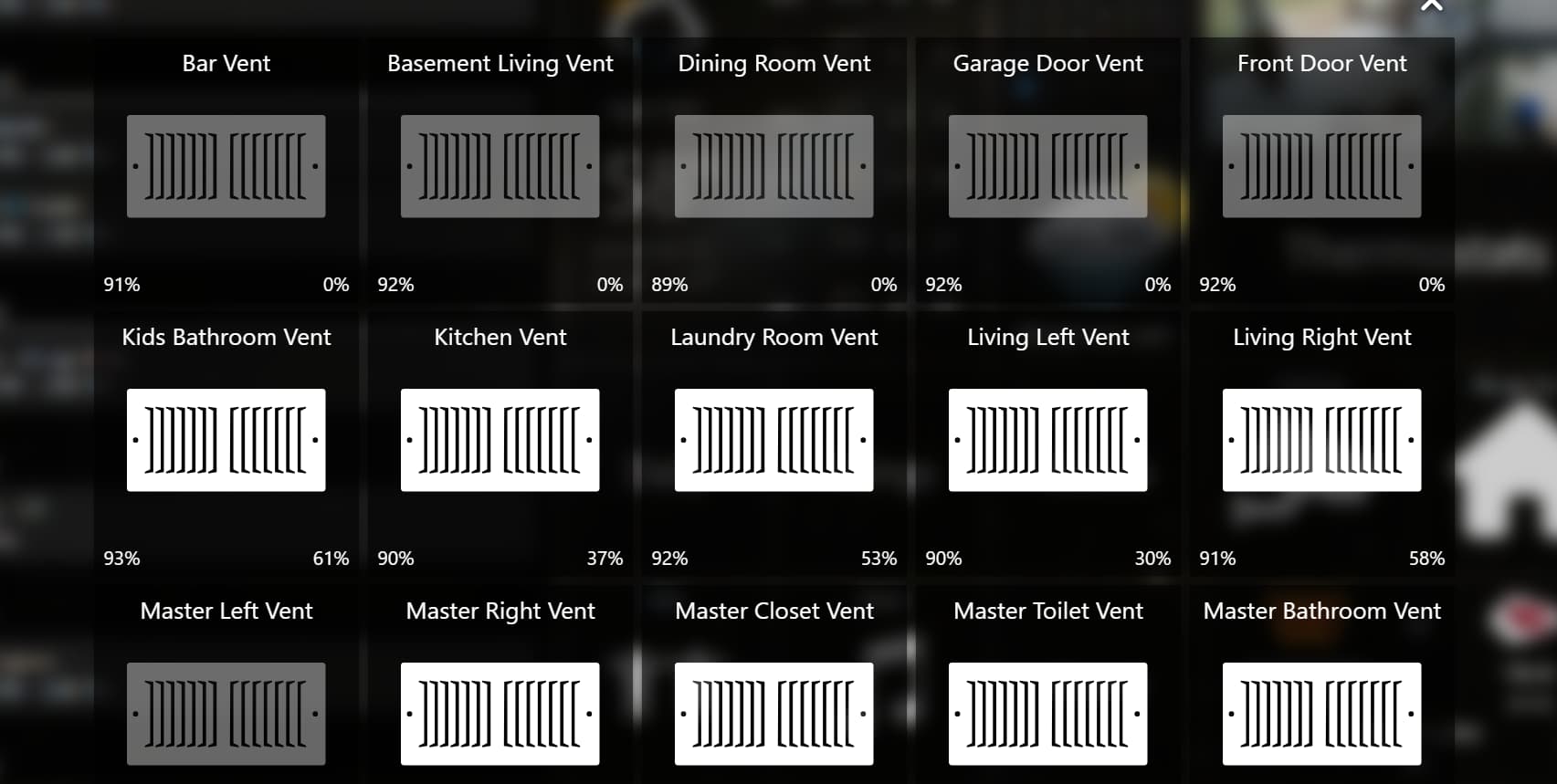
So, took some time, but I believe i'm fully transitioned from MyFlair - not using the dynamic balancing, only using the app to gain control of the vents and get sensor data from my pucks. I modified the vent driver to include switch and battery capabilities, then modified the linear voltage formula found in the puck driver to an algorithm/equation that more accurately maps Alkaline batteries. My thermostats and vents management is handled in Webcore which allows me more control as i have thermostats adjust based on occupancy, time of day, presence, is my fresh air make up on, fireplaces on, etc. I also did not like the 30% open vents rule (hard coded in original app, but can change in this one) as i added a mechanical bypass damper to keep HVAC safe from backpressure, etc. Learned to space out my webcore pistons/zones and timing a bit so not to overload the system, and thus far no errors. Adding the switch and battery capabilities allowed me to use in my Sharptools.io dashboards and with other battery monitoring apps. So far, running smoothly with 24 vents and 3 pucks. I have them setup in 12 zones, each with motion sensors and temp sensors controlling virtual thermostats. Equipment control using a 4 channel tasmotized sonoff relay to control calls (heat, cooling, fan, fresh air) and its backed by the original z wave thermostat in my hallway (good little redundancy). If the image loads, here you can see some of the vents in sharptools, when vent is off, its greyed out, when on, image is white. battery percent in lower left and vent open level in lower right. happy to help if i can.
Yes I’m using the Voltage attribute. For sure, it is different than the battery attribute that is common to so many other drivers. But my view was, hey, that’s not this dev’s problem to solve; it’s mine. And anyway, he added voltage at my request, which I was very appreciative of.
Besides, swapping battery for voltage takes one minute in Hubitat so nbd.
No worries, my post just above this one shows I too already solved, added Battery Capabilities and attribute (along with Switch) - then modified the current linear plot found in the app for the puck device (yes, the puck has these capabilities in the app, just not the vent) to fit closer to the battery usage/life of alkaline batteries. All is good, thanks for the help.
If I wanted to only control the vents via rule machine and not use the dynamic balancing is it possible to set levels other than 0 & 100? So far that's all I've been able to get working. Thanks for that much though!
Yes just use the setLevel command. I don’t recall how granular the setting can be, but certainly way more than all the way opened or all the way closed. Note that afaik you’d have to set the room state to be inactive in order to set vent levels manually.
I posted my rules (that include this logic) above in this thread.
Thanks. I've tried the rules and just using the button in the device page, but it doesn't do anything unless the level is set to 0 or 100. I don't get any errors either. From what I can see the room is set to inactive. Any ideas?
I’ve got the flair app set to manual control, but I just noticed that in the flair app it’s only allowing fully open or fully closed as well. What does that mean?
Ah well that would narrow it down — seems to be a Flair issue. If it were me, I would deinstall (or maybe just disable) the Hubitat Flair integration so it was just a clean simple Flair install and then, assuming I continued to see the all or nothing behavior, then I’d reach out to Flair customer service and ask for their help in troubleshooting the issue.
Taking this approach just helps you isolate the source of the problem. But, hey, there are always multiple paths to solve any problem and I certainly haven’t cornered the market on good ideas.
I'm still not able to get the 'vent granularity' thing to work. I've tried several value settings, 50%, 25%, 10%, 5%, but no matter what value I enter, the behavior remains the same -- When I check the actual vent events it only calls for a level of 0% or 100% to regulate the temperature. What gives?
If you are getting the same behavior from the Flair mobile app directly, then it suggests the problem has nothing to do with Hubitat, in which case I’d suggest you contact Flair support directly. Let us know what you learn.
So I'm not sure how best to configure my use case or if it is possible. I have 2 furnaces both with ecobee thermostat.
Upstairs is fairly straight forward. Multiple flair vents and ecobee sensors, now being controlled by this integration.
Downstairs is less clear. No flair vents except for 1 vent and puck in the basement theater room. Basement sensor not included in thermostat requests. I wanted to use the puck to set the desired room temp. (I.e. Just control opening and closing the vent)
Is this even possible with this application. Other alternative I thought of is to separate out downstairs as a separate flair house and then let flair control this vent.
I'm not sure I understand your question, but I don't see anything in what you said that wouldn't work. Is there something in particular you are concerned about?
you can see the individual devices, correct? basement puck and basement vent? in that case just a simple rule or webcore piston to use puck temp reading to set vent level. or is there more to this question that i'm missing?