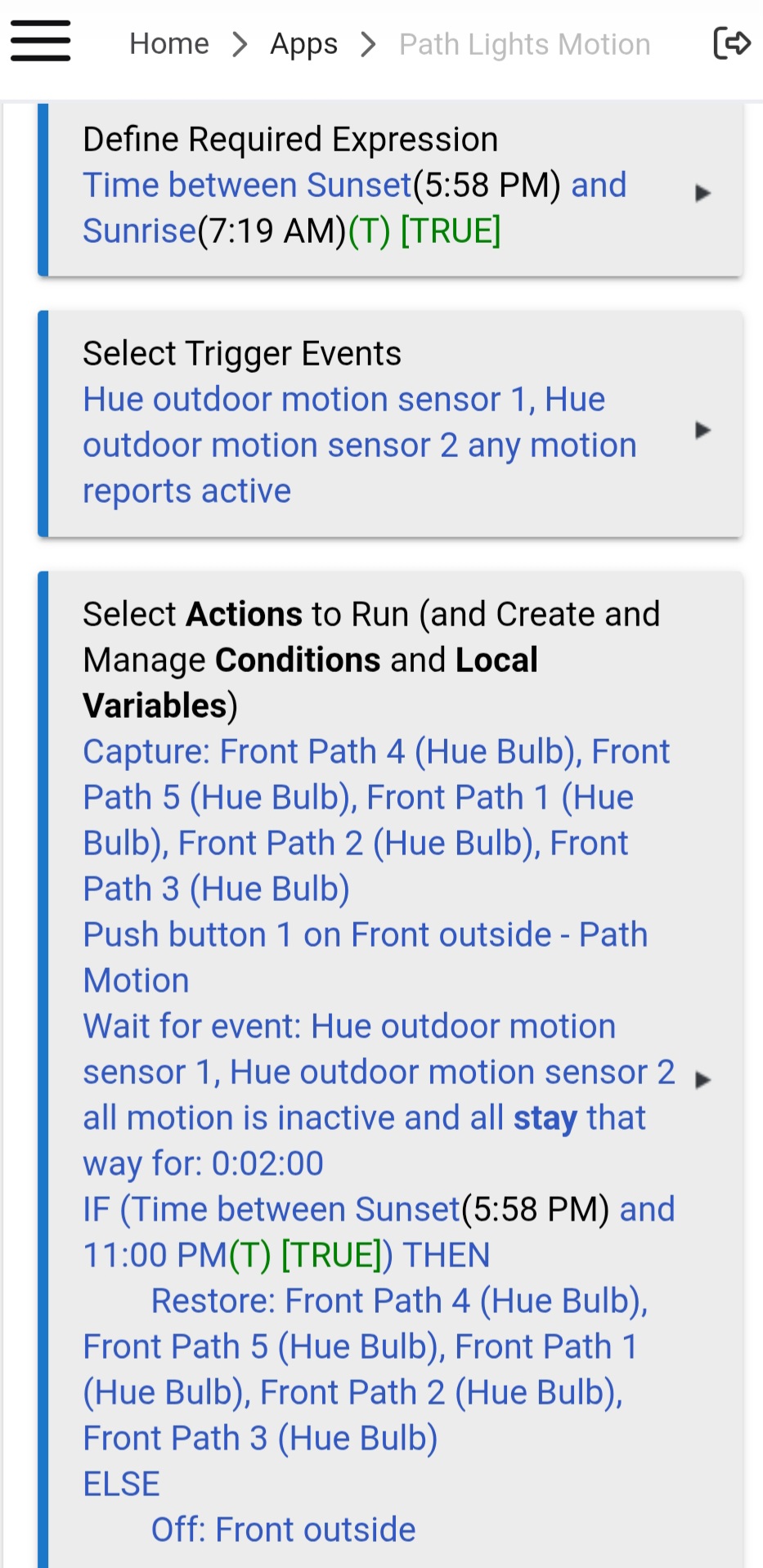
I have some Hue Calla path lights I would automate, but I'm stuck on how to proceed. The goal is to have them set to a seasonal color scene from sunset to 11pm, which I am already doing. I just bought a couple Hue outdoor motion sensors, and would like the triggering of any of these sensors to change all the path lights to a bright white scene for, say, 3 minutes after motion stops. I'm good so far. However, after the bright white scene ends, I want them to switch back to whatever scene was currently in use before the motion, or 'OFF' if it is after 11pm.
I'm thinking I will need to use a variable in some way, but I'm not sure how to assign a variable to a scene.
I poked around in the Hue app, but could not find anything for motion based automations using the Hue hub.
I'm using the CoCoHue app on a C8 pro, if it matters.
Can you post a screenshot of your Rule Machine? You'll need to join the owner's forum to post screenshots.
With the above said, this can also be contained to just the Hue app (if desired). Each motion sensor can have up to 10 time slots. For the sunset to 11pm, you want return to previous scene/state (I can't remember how the Hue app calls it). From 11pm to sunrise, you want turn the lights off. This stuff all happens in the accessory section of the Hue app. It's not in the automation section.
Adding to the above, (regular) Hue scenes don't really have a way to track whether they are "active" or not. So whatever method you choose, it's going to involve you knowing which scene it's "supposed" to be -- you won't be able to check and restore anything from a scene activatior device, for example.
Kind of what I thought. I was thinking of just having the new 'path motion' rule run my 'outside lights' rule at the end of a motion event, which would turn all the path lights back to the correct seasonal color (the outside light rule turns on the correct Hue scene depending on the date already, once per evening). This way just seemed a little clunky (having to re run that entire rule each time there was motion). I was hoping for a simpler approach, but I guess it will work for now.
You could have multiple path motion rules with different required expressions based on the dates. So, your Halloween motion rule could look something like the following:
Required Expression
Halloween seasonal dates that match the other rule
Trigger
Motion
Actions
Set Path lights to bright white scene
Wait for Event: Motion Inactive and stays for 3 minutes
If time is between sunset and 11pm, Set Halloween Seasonal Theme
Else turn off Path lights
The above would work during your Halloween seasonal theme. You would need additional rules to work around other seasonal themes and/or normal evening lighting. You could also have one massive Motion path rule using a bunch of Else-IFs.
Instead of trying to restore your scene, have a separate rule that is triggered by "any motion detector detects motion". Capture the state of all the bulbs before changing them to white. After your desired time period has passed, Restore each of the involved lights.
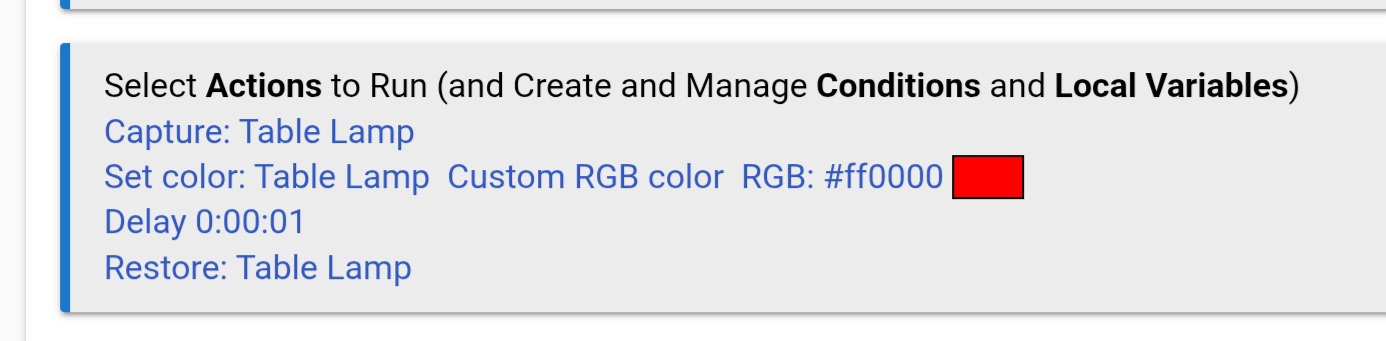
The following is a part of a rule I uses which is triggered when Blue Iris detects a person at my door.
I tried the capture/restore for each individual light, but it did not work. I'm guessing its because all of my scenes are stored in the Hue hub, and Hubitat just calls up these scenes, so there is no way for Hubitat to know the specific RGB values the lights are set to.
The screenshot in my previous post was a rule for a Hue RGBW-CT bulb, but I don't have a Hue Hub. To be honest I am not familiar with how the Hue Hub integrates with HE. So my assumptions are based on a conversation I had with CHATGPT.
I understand that each device on the Hue Hub should appear in the HE device table, and can be controlled from the device page.
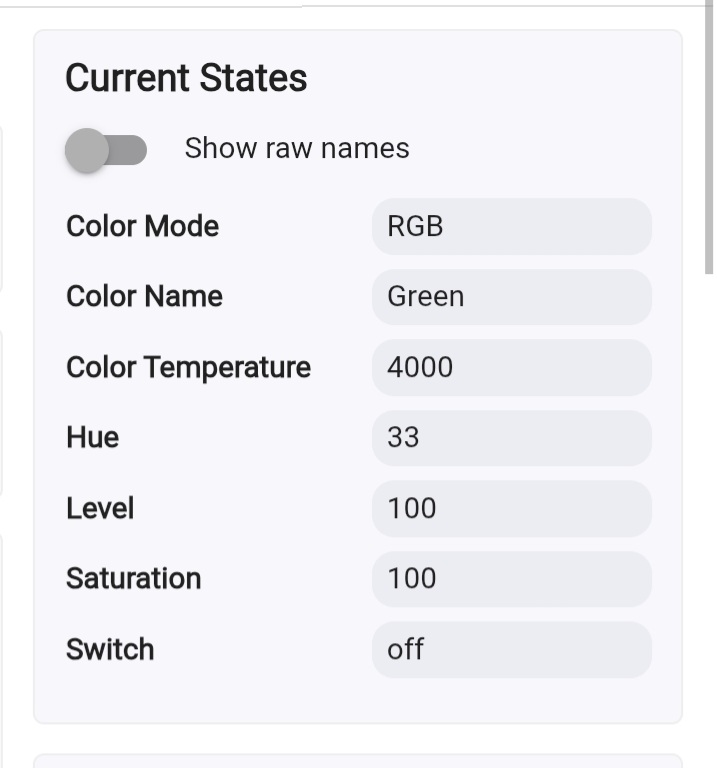
The critical question is If the current status of each device is also shown on the device page (color, level, etc). If that is true, then the capture and restore commands should theoretically work.
It must not pull the capture data from the Hue hub, as added each bulb into Hubitat through cocohue, as well as capturing each independent bulb before changing colors, and still no luck on the restore. It was a great thought though. I have never used this feature. I might play with it for some other rgb strips I have paired directly to Hubitat.
That is the big question that I don't know the answer to. Hopefully someone more experienced with the Hue Hub integration can comment.
This would be a perfect solution to your problem, because the rule to turn on the white lights would operate independently from your scene. It would simply turn on the white lights, and return them to their previous settings, whether a scene was active, or if the lights were off.
But generally, I would think that if the following is true.........
Each device on the Hue Hub shows up on the Hubitat devices page
Each device can be controlled from the Hubitat devices page
The status of each device is shown correctly on the Hubitat devices page
Then the commands should work. If the above three requirements are true, you might want to make a simple manually triggered rule for testing.
Capture current status of a single lamp
Turn the light red
Wait 5 seconds
Restore the previous status
Before running the rule, turn the bulb to a random color (other than red) and random level (including off) and verify the rule operates correctly. If it still fails, at least the logs will be easier to read.
It’s not that. The issue is the way Hue scenes come into Hubitat and the color coordinates. Basically, Hue comes into Hubitat via XY rather than RGB or HSL. This throws off the colors in Hubitat with individual bulbs and prevents the correct capture. There are lots of forum posts about this topic.
@bertabcd1234, is going to be your best bet since he is the author of both CoCoHue and the updated Built-in Hue app. The above is why he and I made suggestions to help. When using Hue scenes in Hubitat, the owner needs to track which scene is supposed to be active when. Since you are limiting scenes via date, my suggestion will work for your needs.
Yeah, a "Capture" or "Restore" from RM (or anything similar in other apps) on Hue Bridge lights whose color (or color temperature) were set by a Hue Bridge scene is not likely to work well, as Hue does not report color data on devices activated in this way in a manner that is easily compatible with Hubitat's native color model, the hue/saturation model (instead using CIE XY). This might work OK if it's a color temperature and you wait for the V1 poll to complete before capturing the data, but anything else is likely to be tricky. A "Restore" on a bunch of devices at the same time is also generally a bad idea, as the Hue API is (great but) picky about how many commands you can send at once, so you'll notice some "popcorning" as the integration meters commands to try to avoid errors.
My suggestion above to just directly activate whatever Hue scene you want active in a specific time or date range is still my best genera idea, though I didn't read into what you are looking to do specifically above. Sounds like @JB10 has the same idea. An approach like this is likely to work best for the reasons we noted.