Here is the other screenshot you requested.
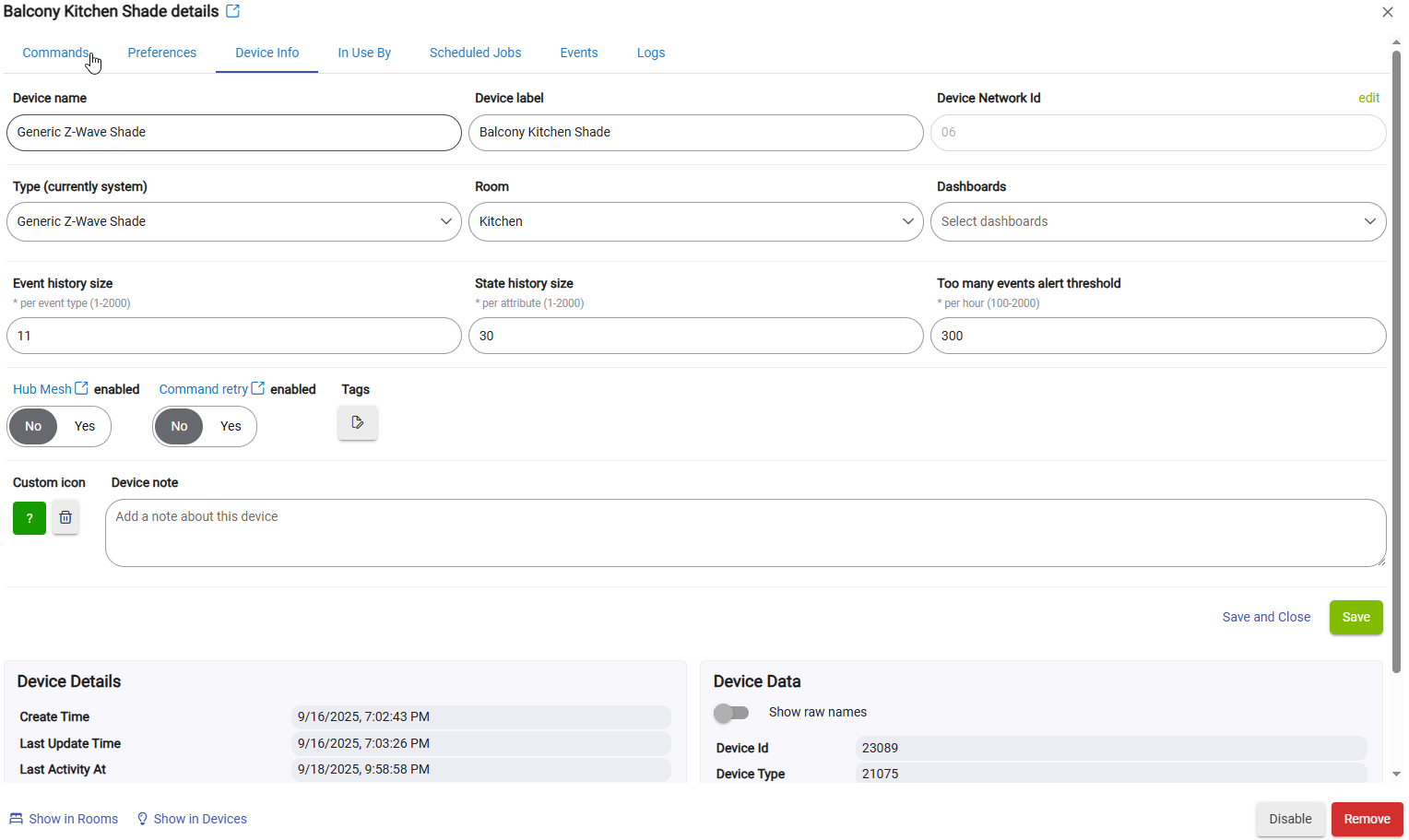
Hello. My shades are the same brand, Bali Layer Shades with Z-Wave. Purchased in 2018 from Blinds.com. My Hubitat is C-8 Pro.
The apps I'm testing are Rule Machine and Visual Rules Builder. As far as drivers, I don't know anything about drivers or how to download them. How do I install a driver?
Ok, I will work on controlling one shade first and give feedback later. I just tried the "set position". It's not working yet. I'm still testing it.
It sounds like your attempt to use setPostion didn't work well, so we need to determine if the issue is at the device-level or perhaps an issue with your z-wave mesh.
Are these shades your only z-wave devices?
Go to "Settings" (left nav), then "Z-Wave Details" -- post a screenshot of that entire Z-Wave Details page (it may require more than one screenshot to get the full page)...
We are primarily interested to see the info for each device in the table on that page -- that will help assess if there's an issue with your mesh.
Either way, that info will help shape next steps.
1 Like
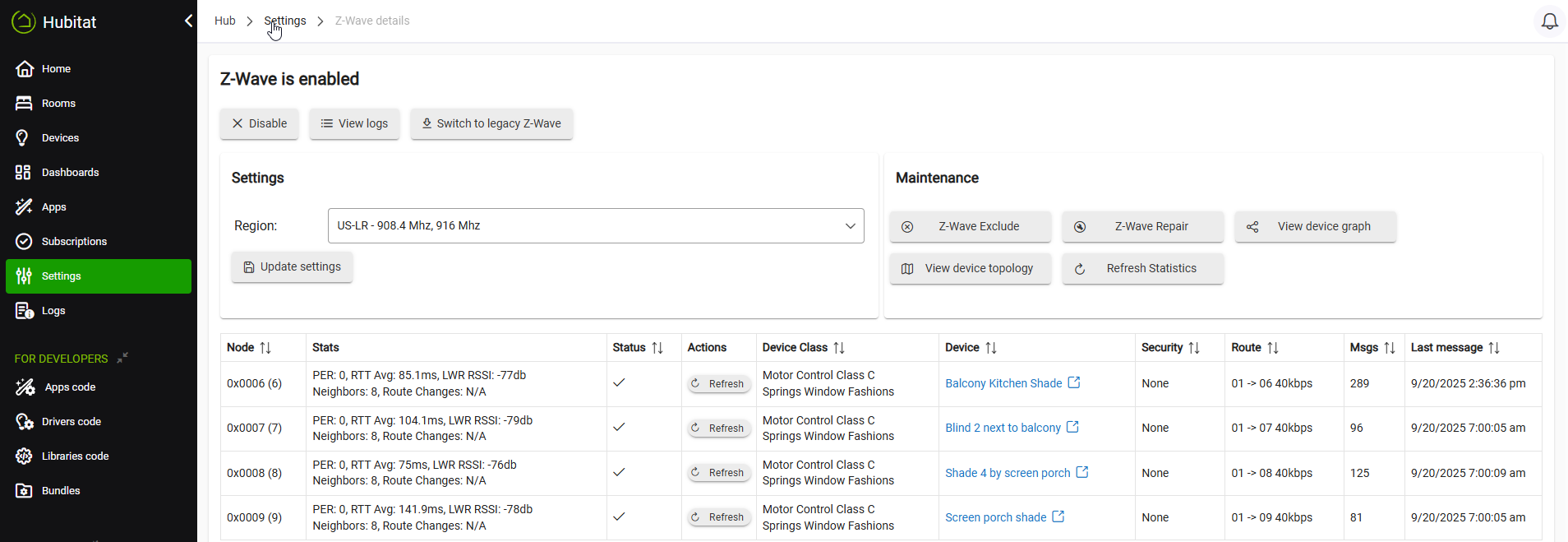
Well, they are LSS devices (listening sleeping slaves). For LSS devices to reliably receive commands from the hub, the zwave mesh needs at least 2-3 beaming repeaters.
Until you add such repeaters, you are unlikely to have reliable control of these blinds/shades.
2 Likes
Any mains-powered (non-battery) z-wave device will additionally act as a repeater for your z-wave mesh.
Although dedicated repeater devices exist (e.g. Zooz ZAC38 or Ring v2 range extenders), using z-wave smart plugs or wall switches are a common way to build out a robust mesh while also getting some practical utility from the device.
If unsure where to start, Zooz z-wave products are a solid choice -- they are well-supported in Hubitat with both native drivers and community drivers, and Zooz itself offers excellent support of its products. They have a wide catalog of devices, and are pretty reasonably priced.
Although they sell other brands here too, this is Zooz's offcial online store.
2 Likes
I think this is a red herring. If the shades have managed be paired. Some control from the device page should be available. As best I can tell that isn't the case. If open / close and set position don't work my bet is on the wrong driver. I agree that appropriate repeaters are necessary for reliability.
1 Like
I just noticed you're on z-wave JS -- I'd recommend going back to legacy (ZIP) z-wave instead by pressing this button.
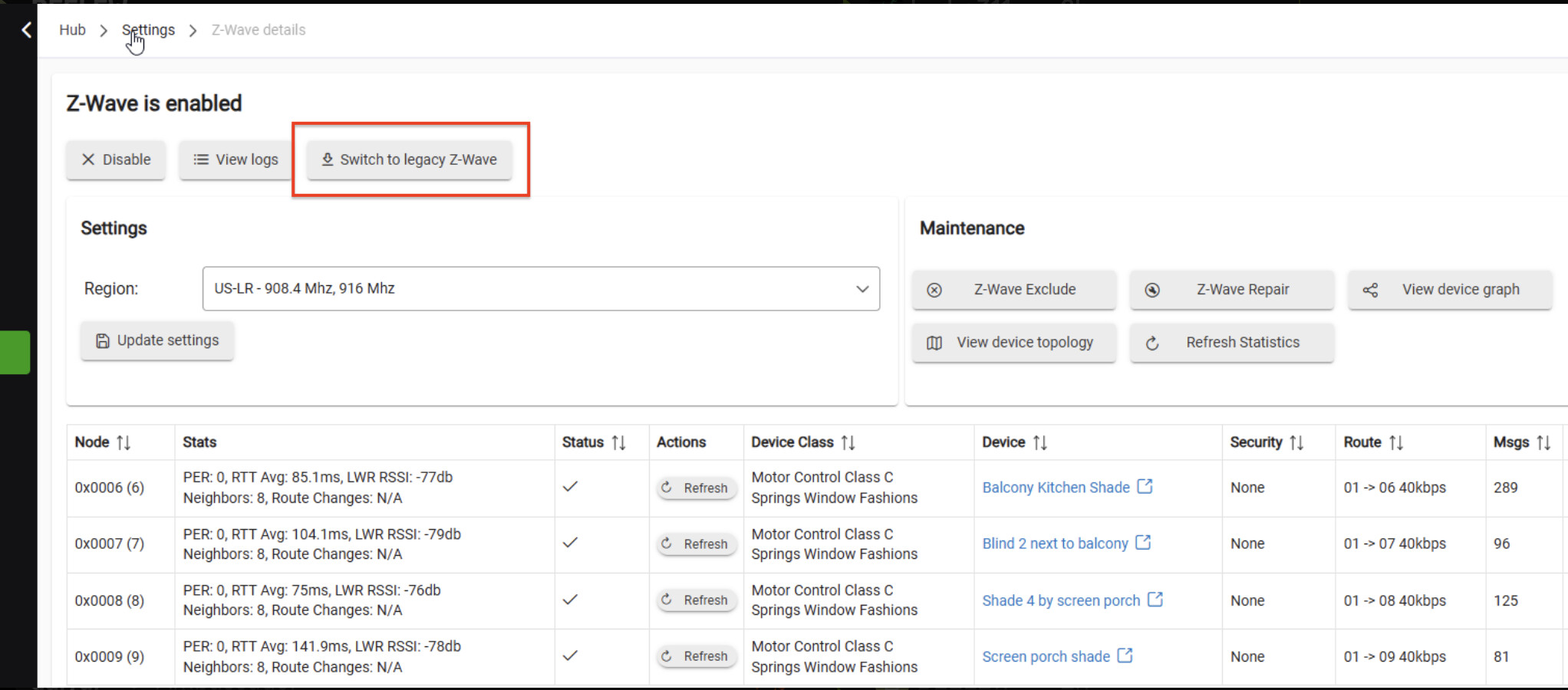
Your hub may do a reboot to complete that process (I just don't recall). Although this shouldn't be necessary per se, after the switch to legacy completes, I'd then do a full hub shutdown (from the Settings page), wait for the shutdown message to appear, then check for a red light on the hub. Then physically remove power from the hub for ~30 seconds -- this will clear re-cage the z-wave radio. Then re-apply power to the hub - it'll boot itself back up.
Then try actuating one of the shades from its Device page (Commands tab) by using either the Set Position or Open (or Close) command.
Even if this works, adding some repeaters will be an overall help to your z-wave mesh's health (near-term and long-term).
1 Like
What you’re saying would make sense ONLY if the shades were also sleeping during pairing. By they are not sleeping while being paired.
They sleep AFTER pairing, like any other LSS/FLiRS device.
That’s why there’s no issue with pairing. It’s an issue that occurs sporadically after pairing.
1 Like
Thank you to everyone who chimed in and tried to help me. In 2025, trying to pair my shades with a hub should not be this difficult. I have made the decision to return my hub for a refund. Hopefully, I can find a hub in the future that offers simplicity and reliability.
Thanks again.
Are you sure it's the hub and not the blinds? If a "Set Position" sometimes doesn't move all the way, my guess would be that something is off with the calibration or a sensor in the device. It's just one command from the hub, not like it's sending a "start" and "stop" or knows anything about the progress (until the device sends a report back, or in some cases, the hub has to request one) -- so inconsistent behavior seems less likely to be something from the hub if it receives the command in the first place. Adding repeaters could help if that was it.
In other words: a device problem will follow you to a new hub.  (And the best techniques to build a solid Z-Wave mesh are the same, too.) Aside from possible confusion with which Rule Machine rule was which above, you seem to have the hang of how to create the automation. Maybe some encouragement to stick with the hub if you've already sunk in the cost of custom Z-Wave blinds you can't return. But, of course, make whatever decision you think is best!
2 Likes
I wish you good luck in your search for a z-wave hub that will work in your environment.
However, as @bertabcd1234 points out, the same issue will resurface with any z-wave hub. Z-Wave requires the creation of a robust mesh with repeaters. That means you will need more than just four LSS devices. The mesh needs devices that:
- Do not sleep to conserve battery power
- Repeat the signals to/from the hub
I understand OP's frustration and will take a moment to vent. I've had nonsensical blinds and other issues on Hubitat since day one in 2020.
I have 3 iBlinds zwave motors in my master bedroom. They worked pretty well for a long while, many months, opening and closing every morning and night. One day after taking an update they no longer work, manually on the device page or with Rule Machine. I try everything I can think to get them working, stumbling onto swapping the iBlinds and zwave generic shade drivers. This gets them working again, I believe I posted here about this at the time.
Fast forward about a year later and another update breaks them again. I try swapping the drivers again but this time nothing works. I give up and leave my bedroom blinds stuck open for a month until another update fixes them again.
I'll share another example. I have Sengled zigbee color LED bulbs all over the house. They've been installed for about 4 years. I have two of them installed in fixtures next to the front entrance door, and they are programmed to turn green when the door is unlocked. Over the past 4 years there have been short periods of time where this rule doesn't work for a few days, with an update breaking and then fixing it. When it's broken, both bulbs will turn green for unlocked, but then when the door is locked, only one bulb will turn back to white and then OFF, leaving the other bulb stuck ON and green. I can go into the "stuck" bulbs device page and control it, but Rule Machine consistently fails at the same point.
This is not a zigbee network issue. This is some kind of breakdown in HE's logic and ability to send multiple commands in Rule Machine. Backed up zigbee network conditions wouldn't fail on the same exact command every single time, and an update wouldn't break and then fix this issue.
I love Hubitat and choose to continue using it. The good outweighs the bad. But there are definitely strange issues that support staff are too quick to label zigbee/zwave network problems instead of bugs on the HE platform. I am guessing HE developers are under funded and over worked. Small bugs that only present themselves in very specific situations are at the bottom of the list and considered acceptable.
1 Like

