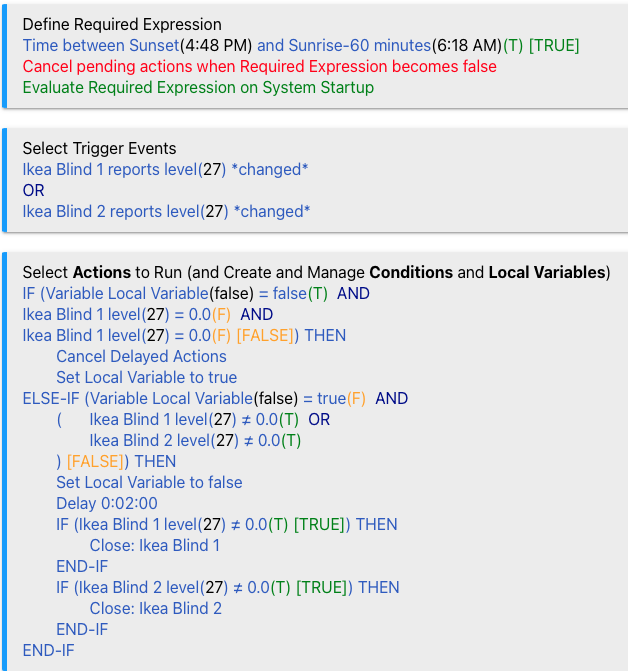
I am trying to consolidate multiple actions into 1 rule with multiple IFs.
So for the triggers I have condition 1 is true OR condition 2 is true etc.
Then in the actions I have:
IF condition 1 is true THEN
delay
action 1
END IF
IF condition 2 is true THEN
delay
action 2
END IF
etc.
This works but if both conditions 1 & 2 are true, the first IF runs. And then the second IF runs after the delay. So basically the delay drives how long before the second action fires etc.
I would rather have 1 rule for multiple devices than the same rule over and over for each device.
I guess I don't really understand how RM processes multiple IF loops.
I'm not sure I see a description of what you actually want to happen, but since what you posted is apparently not it, maybe you only want one set of actions inside an IF THEN... to run rather than all? If so, if you use an IF THEN ... ELSE-IF ... END-IF structure, then you can take advantage of the fact that only the first matching set of actions will run. For example:
IF (expression 1) THEN
  // do something
ELSE-IF (expression 2) THEN
  // do something else
ELSE-IF (expression 3) THEN
  // do something else
END-IF
You can use as many ELSE-IFs as you need, and you can add an ELSE to match any case that isn't covered by the above (or not; you'd only need this if you want something to run every time, this being what will happen if nothing else does).
With two entirely separate IF THEN ... END-IF blocks like you have, each expression will be evaluated when it is reached and execute if true.
That being said, it should be noted that trigger events refer to events, not conditions. While many trigger events to result in a state change that could be tested in an expression, the distinction can sometimes be important to know (though I'm not sure it matters in your case--but it's hard to tell when we're only dealing with imaginary events and no real devices).
Note that neither your nor my rule actions are testing for which trigger caused the rule to run--the actions just run because a trigger event happened, and then actions (and conditions/expressions within them) are evaluated when they are reached, with the actions running (or not) based on how you have those set up. If you want different things to happen based on different trigger events, it's likely that a different rule for each trigger event would be a better approach. Or if you want to run the same command on possibly different devices, depending on which device is the trigger device, that may be possible without conditionals (as long as that device is the trigger device).
But again, this is hard to tell with hypotheticals. If you need more help, sharing a real-world example of what you want to do may be more helpful. Good luck!
Sorry for not being clearer. I am not looking for ELSE-IF. What I am after is for all blinds to be monitored and if any of them are open to close it. The rule is working but somehow blind 1 will close after 5 minutes (per the delay), but then blind 2 will not close at the same time as blind 1. It will only close 5 minutes later.
Here is a simplified example with only 2 blinds.
TRIGGER
blind 1 !=0
OR
blind 2 != 0

ACTION
IF blind 1 !=0 THEN
   delay 5 minutes
   close blind 1
END IF
IF blind 2 !=0
   delay 5 minutes
   close blind 2
END IF
From looking at the logs I think part of the problem is the trigger is firing too often. Blind !=0 means it will fire on any value 1-100. While the blind is opening the hub is getting multiple inputs on different values. I.e. blind = 7, blind = 11, blind = 15 etc. These all trigger the rule in quick succession. So maybe that is what is driving the delays?
Rule actions are essentially ordered scripts. Any time a trigger event fires, your rule actions will start running (from the top, though some particular lines may be skipped, e.g., if they are inside a conditional action and the expression on it is false). A "delay" or "wait" will essentially pause execution at that point until the time, event, etc. that is specified happens (but, notably, won't stop the rule from starting over with another trigger; waits are cancelled in this case, but delays are not unless you take specific actions, and it can lead to re-entrant/simultaneous execution, which is often undesirable, if you don't--though I think that's a separate issue from your question).
Thinking of rules like this will probably help. You may want to just split these out into different rules given that yours seems prone to re-entrant execution and is trying to deal with a bunch of devices at the same time. You could just split these separate sets of actions into triggerless rules that you then run from inside this rule's actions, keeping each with its own timers and eliminating the need to manage a bunch of triggers across different rules, assuming that is the concern.
Sorry, if I am not completely understanding what you want to do. But the solution seems very simple. Keep your trigger as is and under actions simply state delay 5 minutes and then close both blind 1 and blind 2.
If one of these blinds is already closed, sending another close command to it, is fine, the blind will report already closed and do nothing.
i would use a variable, and set it to 0 at the start of the rule. then for each blind, assign it a value (could use binary, so blind1 = 1, blind2 = 2, blind3 = 4, blind4 = 8, etc). for each IF statement, add to the variable based on the blind. then after you've check each blind, do a single 5 min delay. lastly, do an IF/ELSE-IF for each possible value, and have it close those blinds
to get around the multiple triggers, you can use a boolean to track when the rule is running to prevent multiple runs
IF boolean = FALSE
set boolean to TRUE
variable = 0
IF blind 1 != 0 THEN
variable += 1
ENDIF
IF blind 2 != 0 THEN
variable += 2
ENDIF
(repeat for each blind)
delay 5 minutes
IF variable = 1 THEN
close blind 1
ENDIF
IF variable = 2 THEN
close blind 2
ENDIF
IF variable = 3 THEN
close blind 1
close blind 2
ENDIF
(repeat for each combination)
set boolean to FALSE
ENDIF (boolean check)
this of course can be a lengthy rule, but can work.
As Stephan stated though, there shouldn't be a concern about sending an additional close to the blinds as it shouldn't cause another trigger since the blind is already closed
I think this summarizes my problem really well and was a big part of what I did not understand when I started this thread.
Looking at the log, I have triggers firing all over the place.
After way too much trial and error, this is what ended up working. The triggers still fire a lot of times but it gets ignored while the first round of actions runs.
So basically trigger(s) fire. -> Set boolean to false -> Delay -> Close blind(s) -> Blinds report level as 0 -> Set boolean back to true. Ready for next round.