I'm having trouble getting Mode Manager to work properly. For some reason, it's returning FROM away TO away. I'm using two motion sensors with a rule that turns a virtual switch on and off.

To clarify: The virtual switch is on or off when you're present?
The virtual switch is on when present (motion detected) and off when not present (motion not detected). Here are screenshots of the rules that run the switch.


That setup looks right to me, unless there's something I'm missing (entirely possible...).
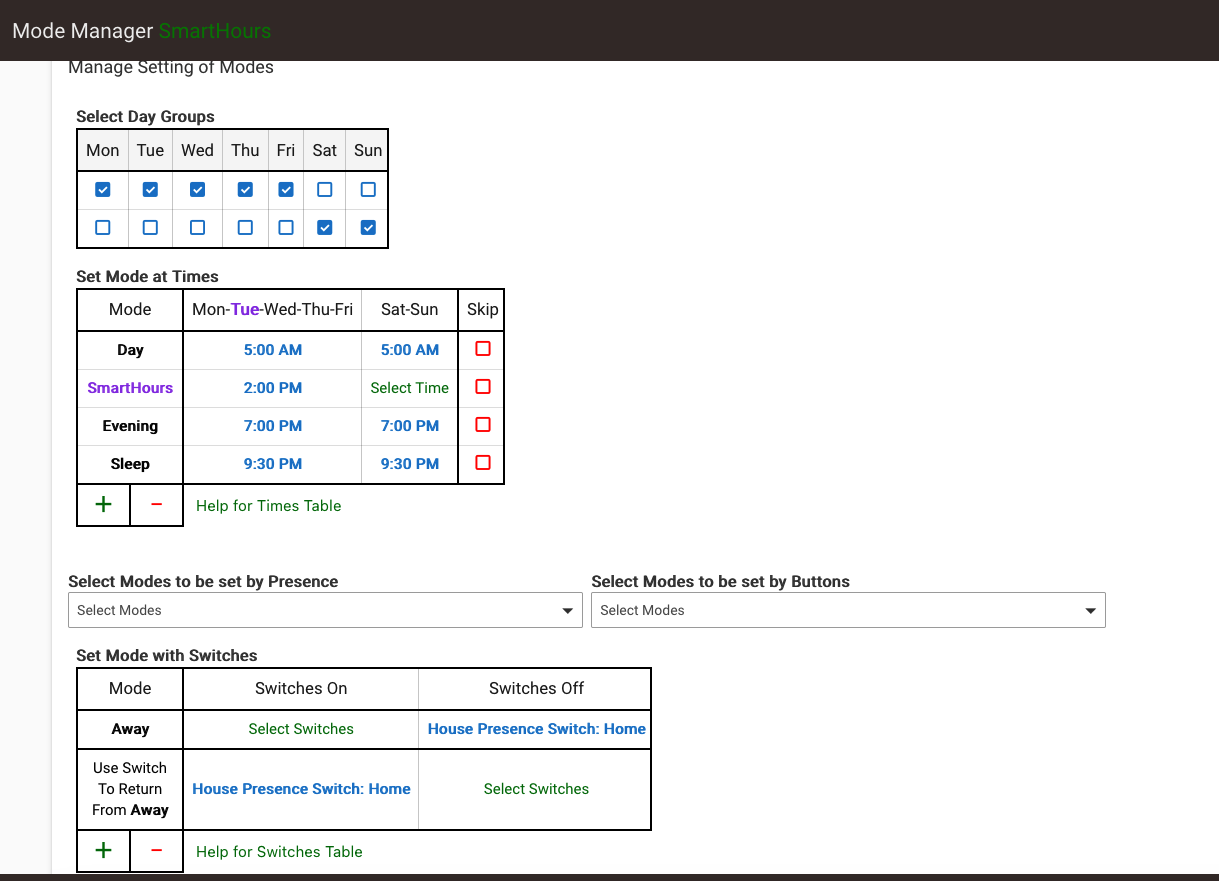
One thing you might try: just hit "Done" in Mode Manager to re-initialize schedules, subscriptions, etc., particularly if you've made any changes (maybe you had the switch selections sort of reversed before?). Or you could try re-creating the app. If not, I believe logging should show you things like "shadow modes" that may be helpful to figure out your Return from Away problem, but it would require having logging enabled for longer or digging back farther, whichever the reason is they may not be in your capture above.
At your suggestion, I started over by removing that instance of Mode Manager and creating a new one. I just noticed that this Away line is in the new instance and it wasn't in the old one. Maybe deleting it caused the issue? Should "skip" be checked on the schedule?

You probably do want Away mode with "Skip" selected in that table; otherwise, your other configured time-based modes will continue to change (based on their times) when you are in Away mode, which is generally contrary to the point of Away mode. But either way, that shouldn't cause your particular problem.
This topic was automatically closed 365 days after the last reply. New replies are no longer allowed.