Can't tell. But:
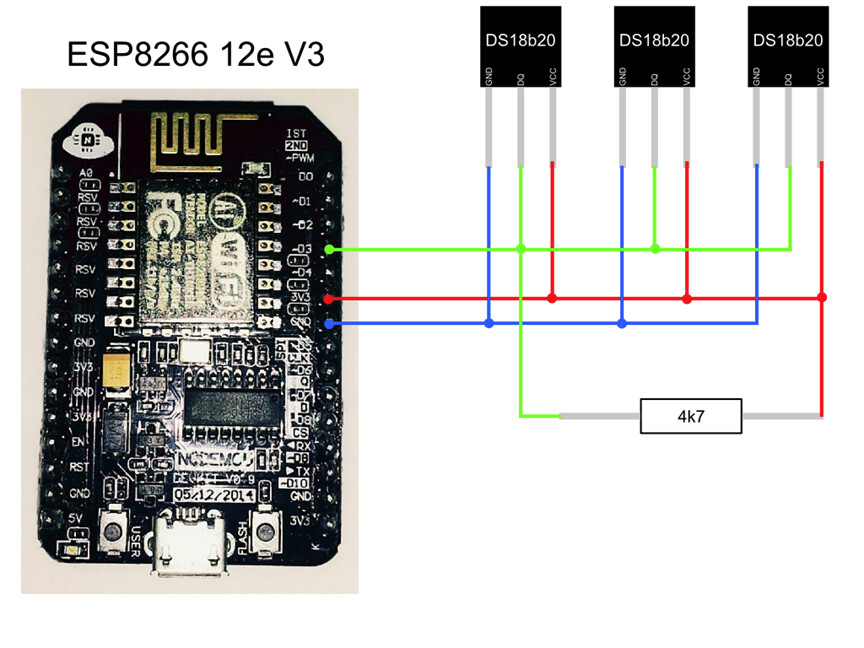
3v gnd = sensor gnd
3v pwr = sensor pwr
D1 = sensor data
Resistor between sensor data and sensor power.
Can't tell. But:
3v gnd = sensor gnd
3v pwr = sensor pwr
D1 = sensor data
Resistor between sensor data and sensor power.
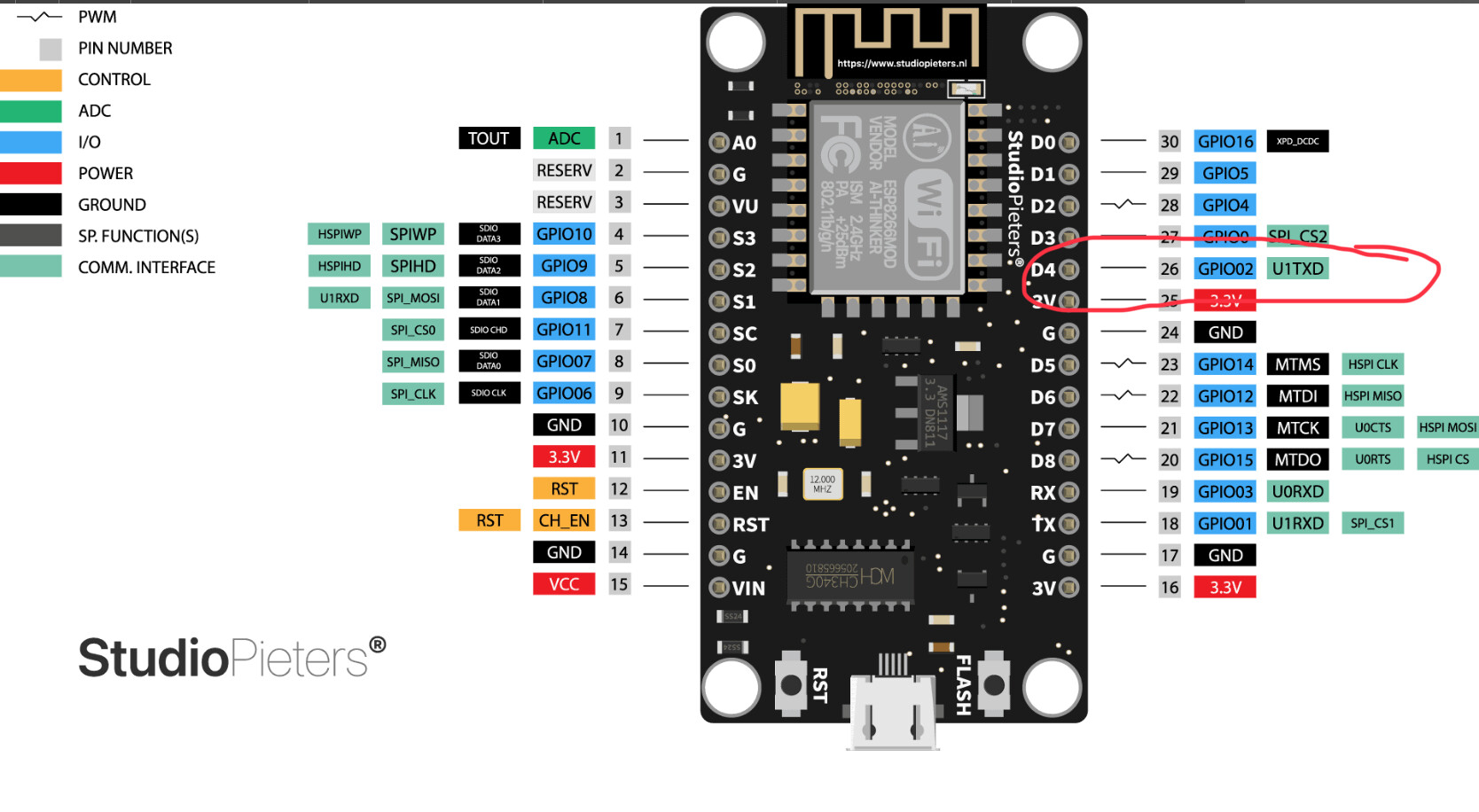
Hmm. There's numerous 3V3 pins and numerous GND pins. Are they all interchangeable? Wonder what would happen if I switched to using hte 3V3 and GND closer to the D1 and D2 pins....
Shouldn't make any difference...it's been a while. I wonder if I used V in and gnd instead of 3v and 3v gnd. That'd be 5v.
One troubleshooting step you might want to consider... Using the Arduino IDE, you should be able to load up an example DS18B20 sketch. Load that sketch on to your ESP8266 NodeMCU board, and see if it can read the temperature sensors. This way you'll know for sure if your wiring is correct or not. Once you get everything sorted out and working with a simple example sketch, load the Konnected firmware back on to the board and try again.
Tried that too but it still doesn't work. I am stumped 
Ah, ok. I'll have to look into this. Thanks.
I believe both sensors connect to D3 in parallel with the resistor between sensor signal (D3) and power (3V3). I went by this diagram and it worked.
Select DS18b20 on D3 when you configure the pin. Does not matter what you label it, just underneath, as there is only on label entry. When you finish the config, the driver will create all the devices that it finds, with long, gibberish names. I couldn't figure that part out either, until djh_wolf explained it.
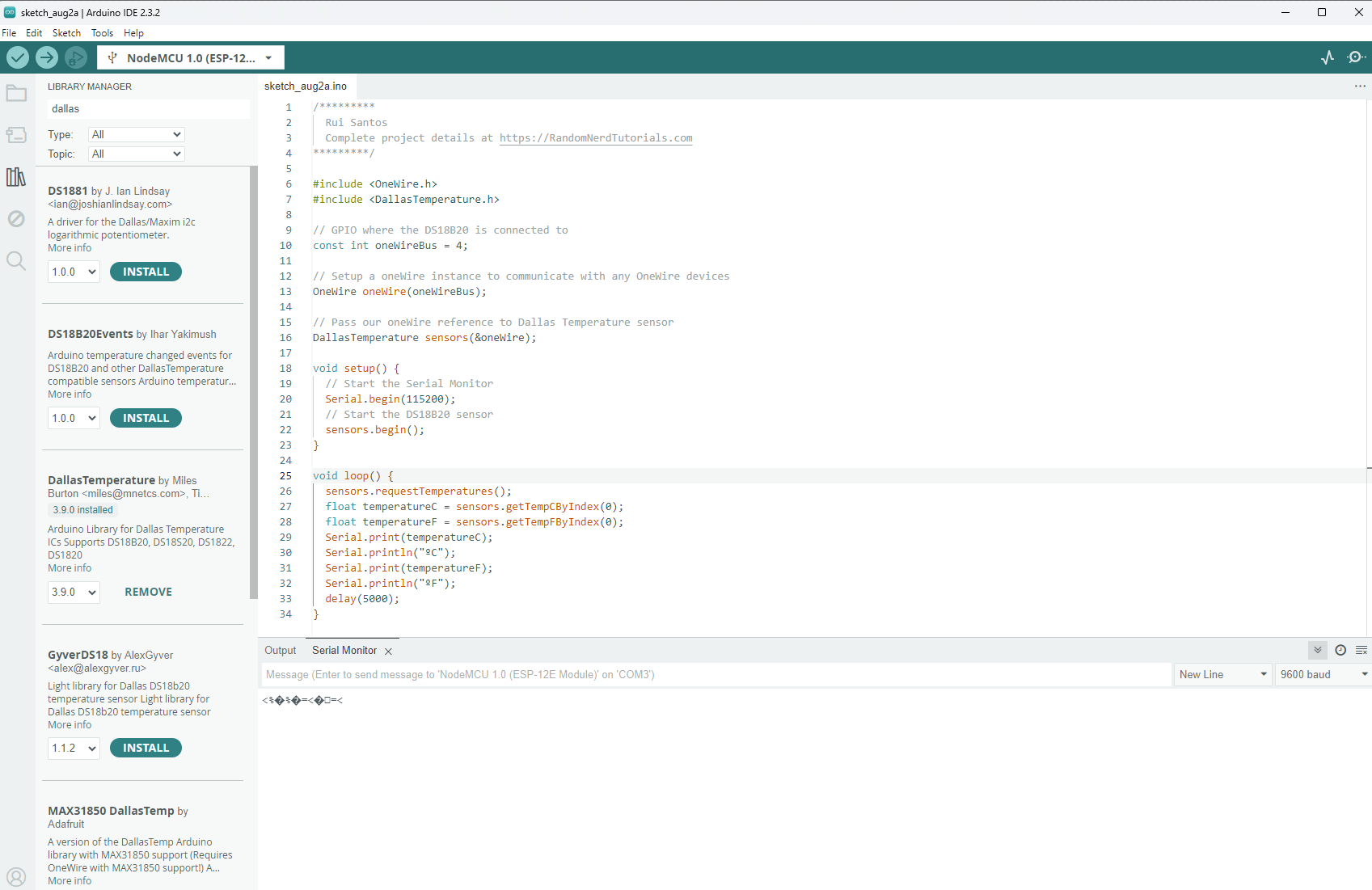
So I am getting wierd gibberish in the serial monitor. Any idea what that might suggest is wrong? Changing the baud rate doesn't seem to help...
Set the baud rate in the Serial Monitor window (bottom right in your photo) to 115200 to match the baud rate in the sketch you’re using. Then restart the microcontroller to see if it then displays data correctly.
Also, please be sure to set the GPIO PIN number correctly. The numbers on the board may not match the actual ESP8266’s GPIO numbers.
For example, you may need to change the “4” in your sketch to a “2”. Or, try using “D4” as the PIN number, which may be mapped behind the scenes to “2”.
bad sensor?
Money. Got it working. Thanks!!
Hi,
I've altered to 1 minute in the DHT code but the polling still only occurs every 3 minutes. Your alteration was on line 47 but mine was further down the code. Have I missed something here? Could you advise, see below code. ... Appreciated....Stu
/**
http://www.apache.org/licenses/LICENSE-2.0
*/
metadata {
definition (name: "Konnected Temperature & Humidity Sensor (DHT)", namespace: "konnected-io", author: "konnected.io", mnmn: "SmartThings", vid: "generic-humidity") {
capability "Temperature Measurement"
capability "Relative Humidity Measurement"
}
preferences {
input name: "pollInterval", type: "number", title: "Polling Interval (minutes)",
defaultValue: defaultPollInterval(),
description: "Frequency of sensor updates"
}
}
def updated() {
parent.updateSettingsOnDevice()
}
// Update state sent from parent app
def updateStates(states) {
def temperature = new BigDecimal(states.temp)
if (location.getTemperatureScale() == 'F') {
temperature = temperature * 9 / 5 + 32
}
sendEvent(name: "temperature", value: temperature.setScale(1, BigDecimal.ROUND_HALF_UP), unit: location.getTemperatureScale())
def humidity
if (states.humi) {
humidity = new BigDecimal(states.humi)
sendEvent(name: "humidity", value: humidity.setScale(0, BigDecimal.ROUND_HALF_UP), unit: '%')
}
log.info "Temperature: $temperature, Humidity: $humidity"
}
def pollInterval() {
return pollInterval.isNumber() ? pollInterval : defaultPollInterval()
}
def defaultPollInterval() {
return 1 // minutes
}
That's the line I changed. Did you do it in the loaded copy under Drivers Code...
This topic was automatically closed 365 days after the last reply. New replies are no longer allowed.
Download the Hubitat app