Hi there - I'm trying to troubleshoot some strange behavior I've been having with my Zigbee devices, and looking for some help or advice. I have a small zigbee network consisting of a Sinope 1300ZB, two Nyce motion sensors, and an IKEA Trådfri repeater. They are all wishin 20 feet of each other, and about 30 feet from my Hubitat C7.
One of the motion sensors and the thermostat seem to randomly stop responding (it no longer shows any activity), but the other motion sensor has continued to work solidly and consistently. I can't figure out why I'm having issues (or, honestly, what issue I'm actually having).
It seems sometimes when a request to say, change the temperature on the thermostat is sent, the thermostat doesn't respond (guessing here)]. I can see the request being sent continuously (~every 30 seconds or so?), and then eventually, both the thermostat and the one motion sensor fully stop responding and they both seem to no longer be part of the zigbee network. Meanwhile the other motion sensor (which is less than 10 feet away) continues to work fine. This doesn't happen all the time, but about once a month. Both devices will right themselves after a few hours or even up to a day or two later.
Does anyone have any thoughts on how to trouble shoot?
Hav you tried re-pairing the flaky devices? If you don't unpair them first HE will allow you to re-pair them without having to bother any of your automations.
Pairing the devices is only the 1st step in the process. You MUST make sure that the devices have been correctly identified and are using suitable device drivers.
The Sinope thermostat should be using the Sinope TH1300ZB Thermostat driver.
The NYCE motion sensors should be using the NYCE Motion Sensor Series driver.
Also, remember that Zigbee is a mesh network. The more devices you add to the network, the stronger the mesh becomes. A small network consisting of just a few devices is not very robust.
Placement of the Hubitat hub is critical. Since it operates on the same 2.4 gHz band as 2.4 GHz WiFi, you want to keep the hub a few feet away from your router. The hub uses a small antenna inside the case. Thus, if it is mounted in a bad spot, your reception might be poor.
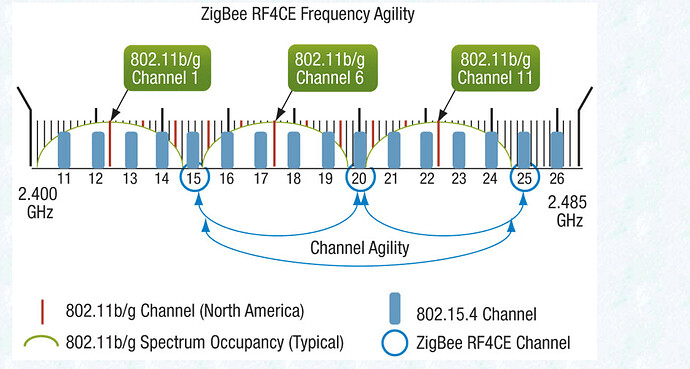
Which channels are used by your WiFi router (and nearby neighbors) and by your Zigbee radio. Typically WiFi will use channels 1 and 6 which do not overlap. Zigbee channel 20 resides in the small gap between WiFi channels 6 and 11.
You also need to be aware that metal such a electric wiring, water pipes, and HVAC ductwork can affect signal transmission. In a bathroom, you might also have one or more mirror that reflect signals.
The best way to resolve connection issues is through adding more devices that can repeat signals. They do not have to be expensive. I use a number of cheap eWeLink Zigbee outlet plugs that work well. Just be sure you get Zigbee plugs and not the WiFi plugs that look similar.
Thanks - I've got the drivers correct, and, most of the time, everything works. It's just this occasional zigbee crash. I will try some additional zigbee repeaters to see if that helps. Thanks so much.
It looks like the devices you have that are repeaters, are too weak to repeat for anything. The outlets @rwclements228 linked to have been recommended by others here as being very good repeaters. Make sure to put at least one solid repeater within 10 feet of the hub.
This page shows only what devices are within a single hop of the hub (and in the route table entry section, a cache of recent 'first hop via' routes for devices that may be elsewhere in the mesh).
So the only devices you'll always see here are repeaters within range of the hub (they'll be in the Neighbor Table section) and end devices (non-repeaters) that are connecting directly to the hub (in the Child Data section).
If you have other end devices in your mesh not shown here, they are most likely child devices of the neighbor repeaters. If other repeaters aren't showing up in this table, they would be more than one hop away from the hub, connecting via one of the repeaters in the neighbor table.
Agreed. If you are using the plug outlets for higher power (15 amp) devices and want power monitoring, then the Sengled plugs are great.
However, if your primary use is as a repeater, then the eWeLink plugs are terrific. They are only 10 amps; they do not do power monitoring; but they are great repeaters and they are inexpensive.
The number one place to look is to see if your 2.4 GHz WiFi is using the same frequency range as ZigBee. The channel numbers for WiFi and ZigBee are not the same:
Channel 20 is generally a good channel for ZigBee as long as you use channels 1, 6, or 11 for your 2.4 GHz WiFi.
Also, if you are running any Philips Hue devices, these also use the ZigBee channels...and you want to make sure that Hue and Hubitat are not using the same ZigBee channel. I originally had an issue with Hubitat ZigBee and Hue not being reliable...so I change the Hue channel to 15 (from the default 20) and things have been fine ever since.
Finally, I use these Innr ZigBee repeaters (work for both ZigBee and Hue):
Thanks @ksgnow2010 - very useful information. I have a couple of APs in my house - and one is set to channel 1, and the other to channel 6. My Hubitat Zigbee is set to channel 20.
And thanks @rwclements228 and @rlithgow1 for the repeater recommendations - are there any zigbee outlet receptacles (where I can literally replace the physical outlet) that people recommend as good repeaters?
Edit: I have had a really good experience with the previous gen GE Zigbee in-wall switches/dimmers, but don’t trust their current generation stuff. For that reason I would go with Sinope if I needed this.