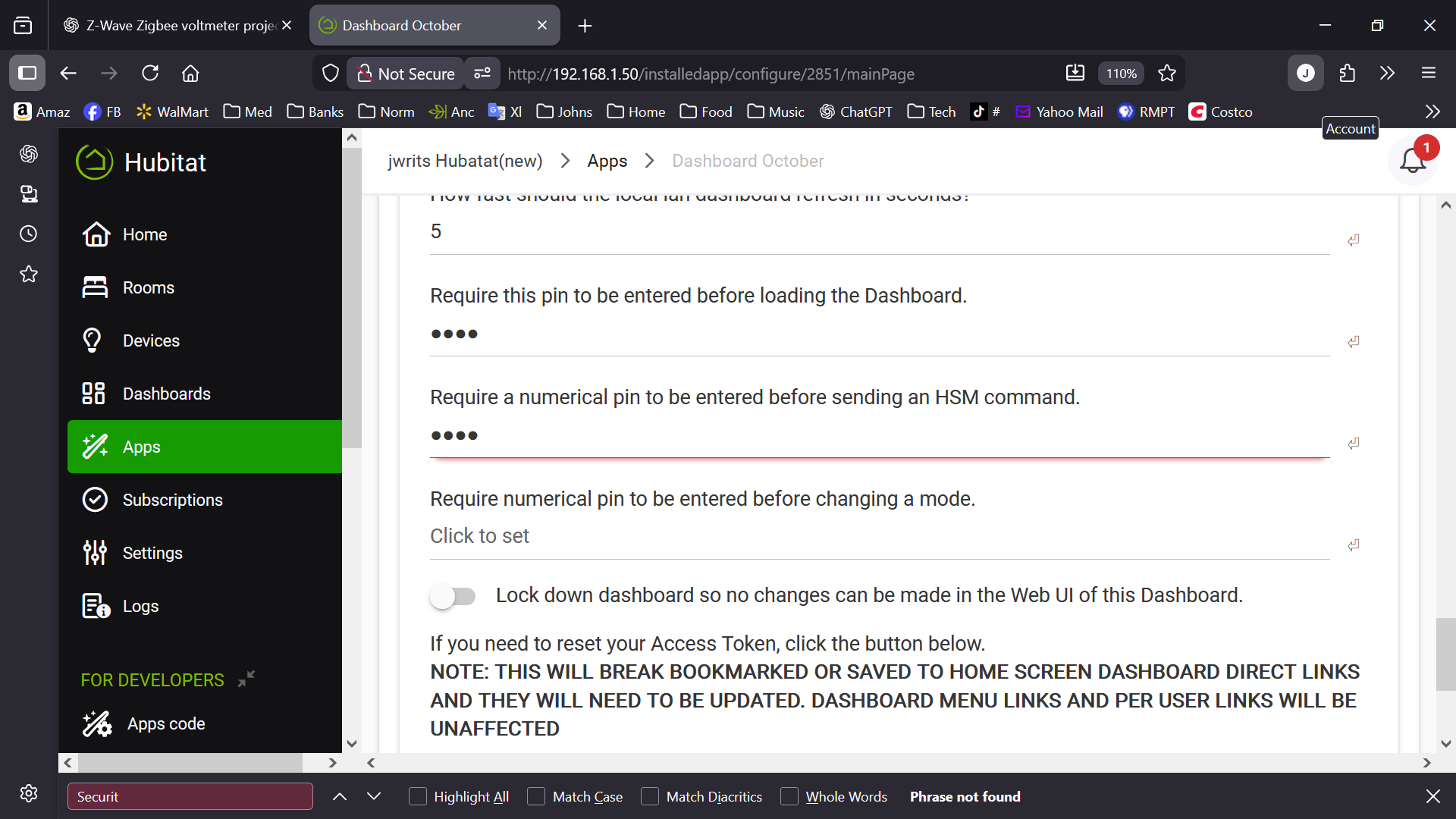
I am completely locked out of all Hubitat Dashboards, including brand-new ones. A PIN is being forced on me by the system, even though no PIN was ever set.**
Here is exactly what is happening:
The dashboard shows a PIN prompt: “Enter PIN to load dashboard.”
In the child dashboard app, the only option that appears is “Require this PIN before loading the dashboard.”
If I turn that OFF and hit Done, it immediately turns itself back ON when I reopen the settings.
The parent “Hubitat Dashboard” app shows no PIN set at all, no security enabled.
I created a brand-new dashboard, and it is also instantly locked behind the same phantom PIN.
Forced overwrite (set a PIN → save → remove → save) does not clear the behavior.
Clearing browser cache, cookies, local vs cloud URLs, and hard refresh do not help.
Cloning dashboards also clones the stuck PIN behavior.
Other apps/devices work normally — only Dashboards are affected.
This appears to be corruption inside the Hubitat Dashboard parent app instance, likely a stuck security flag or PIN attribute that cannot be cleared from the UI.
Could a Hubitat staff member please reset the security/PIN attributes for the Dashboard parent app on the backend?
Thank you in advance — this has completely locked me out of all dashboards.
@jwrit45, can you check if there are any PINs appearing in the dashboard app?
Go to Apps - Hubitat dashboards - Dashboard name - Advanced section (may be collapsed initially). There are PINs for dashboard and HSM there.
If there are any PINs, please delete them, then update the app. Let me know if the PIN is/was there.
In Apps > Hubitat dashboards > Dashboard October ( my failing dashboard ) when I select advanced, I do have a four dot pin. I delete them but they fill in right back after I select " Done " and go right back to advanced again. BTW: I have tried making a new dash
Just an additional data point:
I created a brand-new dashboard by copying only the layout attributes from my “Dashboard October.” and it forced the setup to the Eazy Dashboard and guess what?
The new dashboard (“Eazy Dashboard”) works perfectly — no PIN fields, no lockouts, and no errors. ( But for reasons, I really would like to have my normal " Dashboard October " available ).
Not sure what that means from a technical viewpoint, but sure seems to mean something.
Update / escalation:
I’ve now confirmed the forced PIN is triggered inside the Apps → Classic Dashboard editor itself, immediately after selecting a device to add — before any tile is created or the dashboard UI renders. This now occurs on multiple Classic dashboards (including ones that previously worked) and with simple devices (e.g., Zigbee outlet), not device-specific. EZ Dashboards remain fully functional. This strongly suggests a corrupted or incompatible internal database / index used by the Classic Dashboard editor, rather than a dashboard layout, device, or driver issue. At this point Classic dashboards are effectively read-only on my hub.
You seem to have pinpointed your issue. But I'll post just for reference for anyone who may be searching this issue as mine lead me here. I was having a similar issue with dashboards and a pin being added. Mine turned out to be Chrome's password manager autofilling the field. It only happens if I click on add devices immediately after opening the app. A field flashes with my email in it, quickly disappears and them my pin field is populated. I'm pretty sure it's my saved hub login credentials. I can replicate this consistently. If I wait a few seconds before clicking on add device, it does not happen. I should add this occurs using remote access. I have not tested it locally.
Thanks again for the help on this — much appreciated.
One follow-up question after reviewing the recent 2.4.3.176 release notes:
The notes mention “Likely fixed the issue of autocomplete silently filling PIN fields for EZ dashboards.”
In my case, the forced / un-clearable PIN behavior appeared only on classic dashboards, while EZ dashboards were unaffected and continued to work normally. After restoring the repaired database, classic dashboards are now working again as expected.
Is it possible that the underlying fix applies to classic dashboards as well, but was described as EZ dashboard–related in the release notes?
I’m mostly asking for clarity so others running classic dashboards who encounter similar PIN issues know whether this release addresses it for them too.
Thanks again — and thanks again for the quick turnaround on the database repair. - jwrit