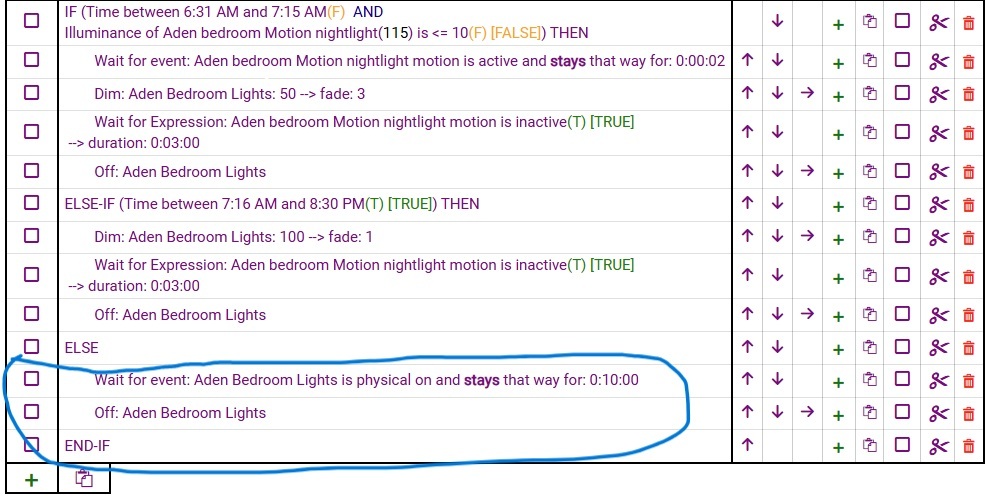
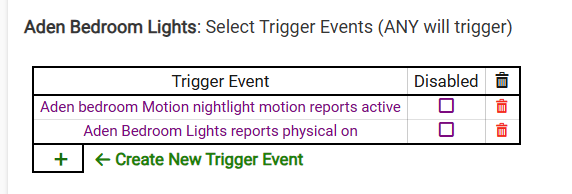
This is my first post. I'm looking for help with a rule I setup for my kids bedroom. I've included a screenshot that shows the full rule. The trigger for the rule is motion sensor is active or light switch is reports physical on . The kids bedtime is 8:30pm so motion sensors turn off after that time and if the light switch is manually switched on, I want it to stay on for 10min only and then shut off. I tested and the rule is not working and the light doesn't turn off. I've been using Hubitat for 1 year have continuing issues with figuring out how to have the light switch off if it is manually turned on. Advice with this issue may help resolve this similar issue with all my rules. Thank you in advance.
This is just a spam filter. To post media, you just need to join the owner's group (Hub owners - Hubitat).
In a quick look at your rule, once you get access, please post your full rule. One thing I do see right away is that:
will not work with your intended goals. This Wait is waiting for a physical on event to occur and then a timer will start for 10 minutes. It is not looking for previous physical events and this action has no idea how the light got turned on previously. Basically, I would not recommend using the same event as both a trigger and a Wait in the actions unless you have a distinct way of the event happening twice (once to trigger and a second time to clear out the wait).
One thing you could do is change the Wait. If you changed it to Wait for Event - Certain Time of 8:40pm that basically gets you to the same spot (10 minutes after 8:30pm). If everything else in the rule is working correctly except this part.
Hi JB10. Thank you for the advice and now I'm able to post screen shot of the issue.
Regarding your advice to change rule to 8:40. I learned a lot from that your response. Reason that won't work for me is because I don't know exactly when the kids will manually switch on their lights and it could happen at anytime during the night but I want the lights to stay only only for 10min and then shut off. How would you setup that rule?
The easiest way for this to happen is use Wait for Events - Elapsed Time of 10 minutes. The hard part would be determining whether this is trigger via motion or a physical event. What are your triggers for this rule? Are there any Required Expressions? Do you use Modes at all?
The other thing that might be helpful is breaking this rule into two. One rule is controlled via the motion sensor and the other via physical event.
Hi JB10. I posted screenshots of the triggers. There are 2. The motion sensor and the physical light switch. The reason I say physical light switch is because there were two options for configuring the trigger event. Switch and physical switch. I went with physical switch. Do you know the difference between the two?
I do not use mode or required expressions. My rules work except for the part, if the light switches are physically turned on. The way I've been working around it is by setting an additional else-if statement with the trigger times included like the ones above it so the full 24 hours schedule is accounted for in the rule. But if I use the ELSE (to account for triggers outside the specified time) then the rule doesn't work. What am I missing in order to fix that. I'm going to test if changing it from physical switch to just switch will fix this issue. How can I make it work without breaking the rule into two?
Another way to say “Physical on”, would be manually turned on, as in not turned on by the hub, or an integration. It also relies on the switch reporting properly that it was turned on manually (physical on). Try changing it to switch on and change the trigger as well and see if it works.
Also, Not sure why you have a wait for motion active for 2 seconds earlier in the rule. I have never heard of a motion sensor that reset in under 10 seconds.
I have several older Leviton Zwave wall switches and dimmers. These older versions do not send updates to the hub when they are manually switched.
Test this theory by looking at the switch status on the device page, while you operate it manually.
I get around this problem by using a completely different rule which periodically polls these older switches, which causes them to update the hub with their current state.
What I would is create a new rule, just for this. It is important thought that, as others have stated, you confirm that your switch supports sending physical on events.
Remove the else condition from the rule
Creat a new rule with the following:
Trigger: Aden Bedroom light is physical on and stays that way for 0:10:00
Action: Off: Aden Bedroom Lights
If that doesn’t work, please post a screenshot of the logs.