I think this only applies to the periodic status request which is called once a minute for each device. It shouldn't cause a problem, although it would be nice to know what causes it.
I have this issue with a couple of my LIFX bulbs.
I think this only applies to the periodic status request which is called once a minute for each device. It shouldn't cause a problem, although it would be nice to know what causes it.
I have this issue with a couple of my LIFX bulbs.
Hi all, I am new to HE and I am testing the waters here to see how I go with transitioning my stuff from ST across.
I uploaded the LIFX app code as well as the other bits and pieces as per the instructions then set up a new Hue motion sensor with a couple of downlights but I am having some issues with it. Sometimes one of the lights won't either get turned off or on but sometimes it works as expected. There was one occasion where the lights didn't get turned on at all as I walked past them.
Troubleshooting performed:
dev:1732021-02-15 19:57:45.083 warnError occured with UDP message: SocketTimeoutException: Receive timed out
dev:1932021-02-15 19:57:13.056 infoHallway Lights switch was turned off
app:1992021-02-15 19:57:12.927 infoTurn Off Hallway Lights when Hallway Motion Sensor Inactive Turn Off
dev:1662021-02-15 19:57:04.069 warnError occured with UDP message: SocketTimeoutException: Receive timed out
dev:1642021-02-15 19:56:40.086 warnError occured with UDP message: SocketTimeoutException: Receive timed out
dev:1742021-02-15 19:56:12.842 infoHallway Motion Sensor is inactive
dev:1742021-02-15 19:56:03.743 infoHallway Motion Sensor illuminance is 22 Lux
dev:1932021-02-15 19:55:59.034 infoHallway Lights switch was turned on
app:1982021-02-15 19:55:58.871 infoTurn On Hallway 1, Hallway 2 when Hallway Motion Sensor Active Turn On
dev:1742021-02-15 19:55:58.754 infoHallway Motion Sensor is active
Any suggestions please?
Thanks in advance.
I'm not sure if it is me, but I got back into working on Hubitat again and tried to tackle this but I think the setwaveform has disappeared. I can't seem to find it anymore. Was it changed?
As has been mentioned in earlier messages the SocketTimeoutException is from the periodic polling of the lights rather than any changes to the state of the lights. The polling is only necessary if something else is updating the lights e.g. the LIFX app on your phone/tablet.
I am starting to wonder if sometimes the polling can interfere with a state change if they both occur at the same time.
If you're willing to experiment a bit, you could edit the driver source code for your bulbs, and comment out the the line in the initialize() method that says runEvery1Minute poll . You'll then need to use the initialize command on each bulb that uses that driver.
The drivers used to request an acknowledgement for each state change command, but I disabled that as it slowed things down a bit too much, I may have to re-enable that, or at least make it configurable for each bulb.
It's showing for me, at least for LIFX Color bulbs.
Thanks heaps Rob - I've applied the workaround as suggested and I am assuming this is the correct line:
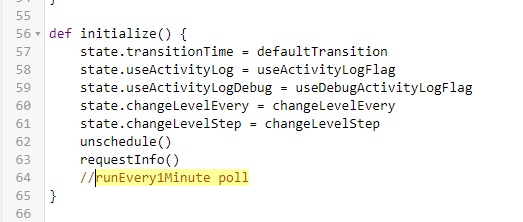
I'll keep an eye on it for now and I'll let you know how it goes.
Another thing which might be worth mentioning is that I noticed that some lighting automation which I run with my LIFX stuff through ST have failed a little more often since I started testing them out with HE? Perhaps your theory makes sense as I have the LIFX app on my phone, Google Home, ST hub etc all polling the same devices? Note I ensured that there is no automation running on ST which conflicts with my 2 test rules I set up on HE.
It's not there for LIFX White Mono though, I'll add it.
Hi @rob - I wanted to check in and see if you had some luck with the popcorning solution?
I've not had much of a chance to play with a solution, but I do have some ideas.
The next step is getting the LIFX drivers into Hubitat Package Manager. Once that's done it will be more straightforward to release beta versions.
I think I left it off of White Mono, since there aren't any colors or color temps to oscillate between. Guess it could be a brightness waveform, though...
That's what I was thinking.
Hi Rob, the issue still persists and I've done further troubleshooting:
I am getting these logs as well which appear to be for my hub (10.1.1.196) ?
dev:12021-02-19 11:08:10.733 warnNo route to host (Host unreachable)
dev:12021-02-19 11:08:07.661 warnNo route to host (Host unreachable)
dev:12021-02-19 11:08:04.589 warnNo route to host (Host unreachable)
dev:12021-02-19 11:08:01.518 warnNo route to host (Host unreachable)
Any suggestions?
Cheers.
That's a bit puzzling, and it's not a very helpful error message given that it doesn't say what the host is that it's attempting to reach! Can you confirm that the device is actually a LIFX one? If you click on the warn bit in the log it should take you to the device in question.
It's taken me to one of my Sonos speakers so I won't worry about it now as I am looking to get my lights working first.
I've done further troubleshooting today:
The lights appear to successfully turn on now but one of the two will fail to turn off and I am using very simple rules. One is 'If motion is detected then turn on light group Theatre' and the other is 'if no motion is detected then turn lights off after 1 min' .
I am super keen to get my LIFX working but I seem to be exhausting my troubleshooting options - I haven't even started testing my other lot of lights which are also wifi - These are Brilliant Smart which use the Tuya backend. I heard about the Tasmota stuff so I might give that a shot a some point.
It sucks that here in Australia we don't get much option for Zigbee and Zwave lighting as almost everything available at the shops is wifi. There is only Hue which is a fortune.
Anyway, any more suggestions please?
All I can think of is that there's some sort of Wifi issue. Do the lights reliably turn on and off from the device page? Any issue when used from the LIFX mobile app?
That's part of the problem with UDP, transmission isn't guaranteed. I'll see if I can reinstate the code that require the lights to acknowledge a command, and resends if it fails, this time I'll make it a setting in LIFX Master so that it doesn't impact those who don't have the problems you're having.
Can't promise when I'll get around to it though.
By the way, I haven't previously announced this, but I've added Hubitat Package Manager support (thanks @undervillain for the initial pull request) , which seems to be working nicely.
Thanks for the swift reply mate, I appreciate that.
I'll try and test them a few times out of the device page as you suggested - I've never had any issues controlling them from the LIFT app at all. I also use Google home and the ST app which have had their occasional 'moments' so I'll see if I can replicate the issue through those two as well.
As far as wifi hardware, I use a Dlink Taipan Triple Band which services my indoor stuff and I have an outdoor TP Link AP which services the outdoor ones so I am pretty well covered for wifi signal...total of around 50-60 clients from memory....I might go around with the Wifi Analyser app on my phone to see if there is any channels overlapping each other however I don't have drop-outs very often... my modem is set to reboot itself every Sunday night which helps a bit.
That's okay, take your time but please give us the heads up once you have made the change to the code.
I'll check out the package manager option too.
Thanks again.
Have a good day.
I have made some wifi changes and the issue hasn't occurred for a couple of days now so you were correct about this - Thanks a lot for your efforts, Rob, you are a star.
Cheers.
Out of interest, what wifi changes did you make? It may help somebody else.
Sure, not a problem.
1- I have three 2.4g networks, one on my modem, another on an outdoor AP, and another on the ST hub so I manually 'load balanced' the clients across them.
2- I used a wifi analyser app and realised that some channels were overlapping so I changed my modem to channel 11 and my AP to channel 1. I couldn't find a setting on the ST app to change the channel on the ST hub which appears to be sitting on channel 6 so I left it as is anyway. I also changed the 'Channel Width' from my modem from 'Auto' to 20mhz as the ST hub appears to be using 40 mhz.
3- Moved my HE hub to another room, placed the ST one a bit further away from my modem ( the AP is outdoors anyway so I didn't worry about it)
HE hasn't failed to turn my lights off once since so I am pretty happy about it - I'll now start transitioning my stuff from ST to HE as I become more familiar with the HE interface.
Hope this helps.
What do you mean by "network"?