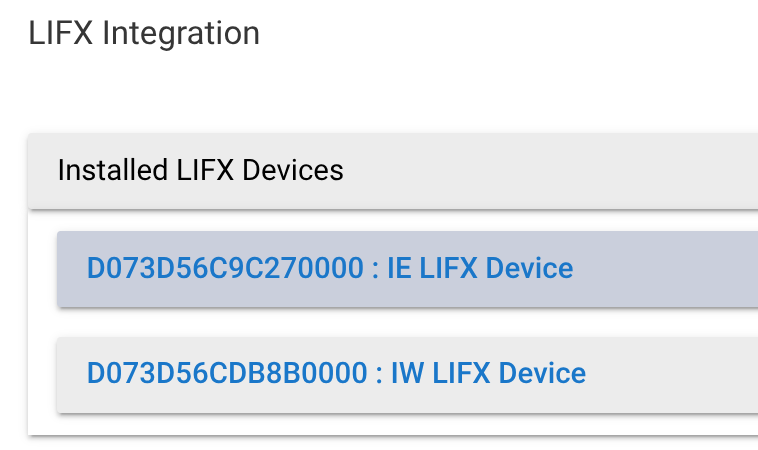
I've always been a little confused by this. These are WIFI based...where in Hubitat can I see the IP...
How do I relate the bulb in Hubitat to the IP I see in my router. Even the HEX numbers don't even seem to line up. I'm sure I'm just missing something...thx!
It's all done with mDNS for HE to find the bulbs, the HEX numbers are the MAC address of the bulbs, that's what matters -
The actually IPs can change, and the HE driver finds them at discovery or on boot (with mDNS). Either do an reverse ARP to find the IP associated with a MAC, or check your routers DHCP table - But the MAC address is the bit that matters.
Agree with @GuyMan. You don't need the IP addresses. You do have to make sure your network is configured to broadcast mDNS (and I've learned the hard way that Unifi networks have several config options that prevent Hubitat from discovering the bulbs). But most networks are find out-of-the-box in discovering the bulbs on your network.
As they say, you should use a 2.4ghz only network. Many folks--myself included--use an "IOT" network, a sister of your main wifi that doesn't have 5 ghz.
While LIFX bulbs can be a pain to setup initially (and their customer service is absolutely atrocious), once they're in, I find them to be rock solid.
I like the bulbs...but when upgrading to a Dream 7 router...none would join back w/out configuring the same network and pw that was used before. I have 20 of these.
To start w/ that means waiting 15 minutes for them to give up joining a Amazon Home network...WHAT A PAIN...15 minutes TIMES 20...that's really slow and painful.
And I use assigned IP's for every device so I know exactly what's on my network. Sure, you can do this all in the router, but they ALL use IP's. It just sucks that there is NO WAY to correlate to the router IP after the fact. I've never had a problem like this with any past router upgrade...and not doing anything special...just defaults. BTW - It doesn't match up with the MAC...but the name resolution partially does. Why that's different when it SO CLOSE to the MAC I have no idea.
I have two over my kitchen island in pendants. They are perfect. It's been a couple of years, I used the LIFX phone app to initially enable them. Reserved an IP address in my router as I do with anything that is wifi that is going to be integrated into Hibitat. Enable the built-in LIFX app in Hubitat. It should find your bulbs assuming they are on the same network. The good news is that they have never dropped off. They have successfully migrated from a C7 -> C8 -> C8 Pro with no attention. Other than initial onboarding I've not needed to use the LIFX app. I tried several vendors bulbs and the LIFX provided the most even light for my application of all that I have tried.
The IP address is not used. What shows up in the app is the device serial number with a following four zeros.
Other than the 15 minute wait to config them …they are great…replaced all my Sengled in every can light and lamp.
The problem wasn’t with the Hubitat hub at all… The app actually relearn them instantly as soon as soon as each connected to the router.
It’s the router that was the problem somehow in combination with the bulbs. The bulbs did not recognize it as the same router. All I had to do is reconfigure them and put it in the exact same wireless network and passwords and they connected just like that..
I will say, even though I’m having some issues… I wouldn’t trade that dream seven router for
anything I’ve ever used before
and yes ...every router is different. I'm sure I've had a couple dozen over the years and have never had this happen.
Again though...I love the Dream 7...I mean come on...if nothing else...and I have not even gotten to that yet...and I should for this problem actually...but it has packet capture!
I never even worked with a Cisco router that had that in the almost 30 years I did that.
Like you, my experience in discovering LIFX bulbs has been terrible (UDM network here). But on this issue, why not suffer the 15 minutes in parallel? That's what I did. Power up (or factory reset) all the bulbs you want to add at the same time. Then there's no 15 x 20. Just 15. Still not great, but 1/15th as bad!
Oh, I know I could’ve done that. I’ve could’ve bought five sockets when I went to Home Depot because I built just an extension cord with a light switch on it and a switch because spinning them around in a lamp is ridiculous.
I like the product… It’s just they shouldn’t have the default as a specific unit to connect to… i.e. HomeKit.,,that’s what causes the problem.