Having trouble recovering from this one, advice requested.
I have a few of the Leviton DZ15S Z-Wave Plus switches, all running the latest Leviton firmware. They have been reliable since performing upgrades to the latest firmware several months ago, and all show direct Z-Wave connections to the C-8 hub. The device driver I'm using is the built-in 'Generic Z-Wave Smart Switch'. My Z-Wave mesh has been extremely reliable (30+ devices), even more so after upgrading to a C-8 hub earlier this year.
A few days ago, one of the Leviton DZ15S switches became unresponsive to Z-Wave commands, and stopped providing Z-Wave status updates. The switch functions as expected manually, switching the load on and off.
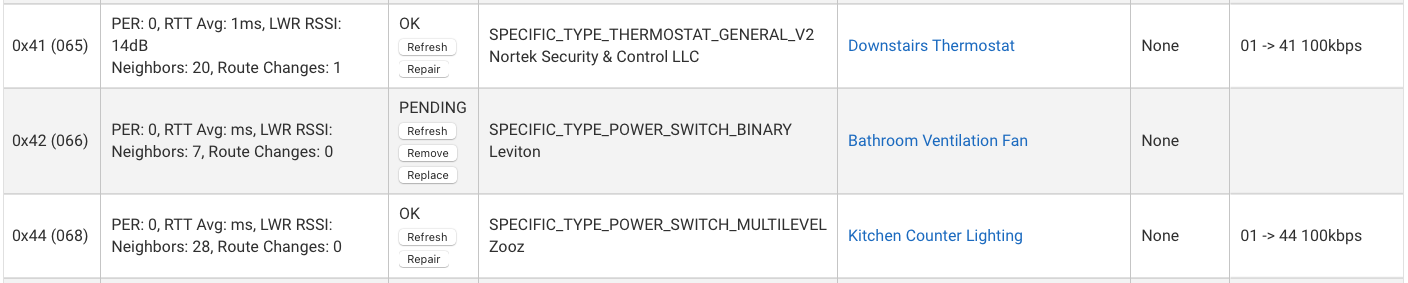
So I navigated to the Z-Wave Details page, where the device (0x42) indicated nothing abnormal. I then used Refresh a couple of times, then Repair, which indicated failure. After a couple of more Refresh attempts, the switch changed state to "PENDING" as shown in the following screenshot:
So I attempted the following to remedy the situation:
Removed power from the Leviton DZ15S. After resetting the breaker, still no change in the switch Z-Wave response.
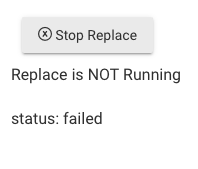
Factory reset the Leviton DZ15S, then attempted a "Replace". Replace indicated it was running, I then put the DZ15S in Include mode, but the C-8 Replace process did not detect the device, and then indicated:
Shutdown the C-8, removed power, waited a few minutes, then restored power. After booting up, the Z-Wave network is fine, but the PENDING device still unresponsive on Z-Wave.
I have a pesky Leviton DZ6HD that occasionally just decides to disappear from Z-Wave. It has somehow factory reset itself, and is no longer associated with Hubitat. I had to force-remove the device from Hubitat, remove the ghost device with a Zwave stick (cause I have a C5, you might be able to remove it on the C8 without extra tools) and then re-include the device to Hubitat again.
Thanks, the eventual solution was to fire up the Windows PC with a UZB Z-Wave stick, then using the SL Z-Wave Controller software remove the ghost device, then add it back the C-8 as a new device.
I couldn't get the C-8 to ever FAIL the device, and REMOVE didn't work either. It was stuck on PENDING, and REPLACE always failed.
So after a bunch or reconfiguring dependent rules and such, back to normal now.
If it ever happens again, reset the device and include to a new node FIRST.
Then you can use Settings > Swap Apps to move all your apps over to the new device.
Yes that would have been more straightforward; what I did was create a new Virtual Switch and re-mapped all the apps to that device, then after re-including the Leviton DZ15S, re-mapped again to the real Switch device.
Holy crap, I didn't even know this app was literally baked in to Hubitat. Sometimes I wish I was the type of person that just read the instructions..
FWIW, what I've done in the past is:
1 - re-include the device again.
2 - Write down the new ZWave node ID.
3 - Fail and remove the ghost device (original node ID) in PC Controller
4 - Force delete new device in Hubitat (do not exclude)
5 - Transpose the new node ID to the original device on Hubitat device page.
This also works without changing any rules, but the Swap Apps might be even more straightforward.
Yeah if it’s the exact same device swapping the DNI manually might even be safer than swap apps. There is this random rate glitch where some of the Device data goes missing when you use swap apps.
Swap apps will work if you upgrade a device or even if you go from zwave to zigbee.