I am very new to home elevation. Just took C7 out of its box, set up and registered. I am trying to connect Kwikset 620 to the hub. I read every single topic about connecting 620 to hub here before I opened this topic and I tried everthing that was said here but nothing worked.
When i try "add device" through "Z-Wave devices" because 620 is not in the list, it is not included. I bought 50' ethernet cable to get the hub next to the lock but it did not work. When I try SmartStart, it is on SmartStart list and it says "included" but it is still not on Devices. People talk about "driver" and "custom driver". I dont know where this driver is, how to download custom driver, how to install custom one.
Adding a device means to put the hub into Include and then put the device into Include. The hub is easy, youjust click the button, but the device is manufacturer specific. The documentation that came with the device, or the same, found online, will detail the taps and presses needed. I always suggest starting with an Exclude though... you want to see the "Unknown device excluded" message. This tells you the hub and device can communicate. It will help you decide to use the 50' ethernet cable, for example.
Maybe you're doing those steps but because you mention being new and you don't mention using Exclude to confirm connectivity, I'm guessing you might be missing a step.
Yes, thank you very much. I have never heard or read about "first exclude" step. Now, both GoControl garage door controller and 620 door lock are on Devices section. However, I still cant control the door lock (lock and unlock). I dont know whatelse to do. Also, I installed Lock Code Manager to assign codes but when I try to add new user, I enter the name and the code and then there is a dropdown list possibly list of the devices, when I clik on it nothing happens. It seems like the devices list is empty.
LockCode Manager (LCM) is a "wrapper" for Locks. By that I mean, you need a working Lock first, THEN LCM can add to your automation.
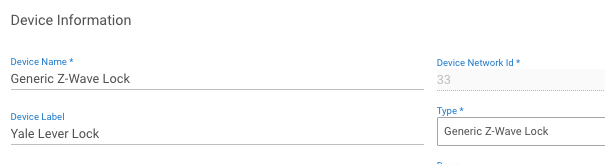
Look in Devices for your Lock and on that Device Details page, you will find a TYPE option in the bottom half of the page. That is where you can select a different driver if needed.
I have only Yale locks but you can see from my screencap that I'm using a generic zwave driver. It's a dropdown list and you can change it. During the Include process, the Hub will try and find the best match driver, but if it can't find one, it picks the "Device" driver, which doesn't do much.
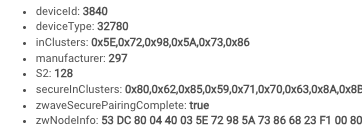
Scrolling down a bit more, look for:
and especially:
zwaveSecurePairingComplete: true
Finally, if the driver and secure pairing are correct, click the buttons at the top to lock and unlock your device.