I am using the built in Kasa integration. When I send a command to the Kasa device from Webcore, the command gets processed by Kasa, but them immediately reverts. I am not giving it a command to change level to 55, I send command for 70. Really racking my brain on how to solve this one? Here is a screen shot of the device log of the Kasa device. Anyone have any suggestions? ("Occupied Side Solarium 2" is a Webcore Piston and "Kasa Dimmer Side Solarium" is the Kasa Hubitat device name)

And here is what the logs show - it looks like it is the "setsysinfo" that is reverting the level to 55, but I cannot figure out why?

It looks like the piston is trying to set the level to 70 but the device then responds that the level is 55. I think the setSysinfo is a reponse from the device.
I would turn on some debug logging, get new logs with more info hopefully, and also post your piston.


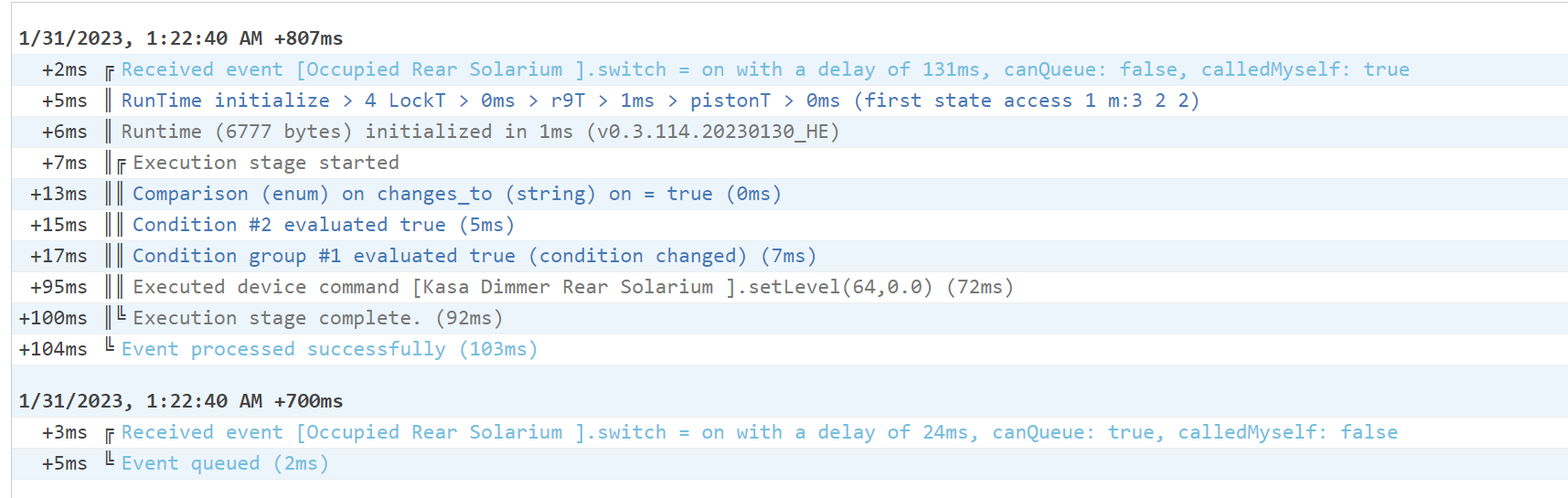
Debug logs is what we needed, you can see the device is responding with an error. Then the driver follows up by asking the device for a full report which it replies back with the same level it was at before.
If you just use the setLevel command on the device page does it work from there?
@djgutheinz do you know what might be going on here?
I can duplicate it for the dimming switch but not bulbs. It is in the duration field. Two items:
- duration must be an integer. not "0.0". This is a platform rule for setLevel.
- current work-around is to set the transition time to 1 or greater. It can not be blank.
I will work this week on a permanent fix.
2 Likes
Kasa Dimming Switch Error
- Version: 2.3.4-1 (both built-in and community)
- Error: a duration of 0 in the set level command is does not change the level.
- Cause: The Kasa Device itself does not accept a 0 duration value in the setDimmerTransition command.
- Work-around: you can enter a 0.01 (seconds) in the duration field. This will be nearly instantaneous.
- Fix estimation: 1 week.
- Test alternate setBrightness command from device and see if it is instantaneous.
- If positive, when duration is null or <= 0, use the alternate set_brightness command.
- If not positive, use current command and set a zero value to 0.01 prior to executing command.
- Test alternate setBrightness command from device and see if it is instantaneous.
Update: The new command did not work as hoped. I will modify the code to convert a zero duration to 0.01 (10 msec), which visually seems instantaneous to me. This is essentially - do not enter zero for instant. Enter 0.01.
1 Like
Perfect - thanks for your help with this.
This topic was automatically closed 1095 days after the last reply. New replies are no longer allowed.

