It was in the logs, which I look at every morning, lol.
I thought it was interesting.
I'm not sure if I've ever seen a low battery warning before.
Seems to be intrinsic to the sensor.
Sensor is in Fridge.
It went to 1%, sent out a couple of warnings, and is now back to 19%.
Maybe it woke up or something.

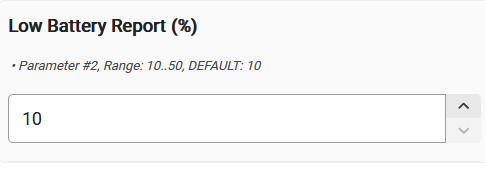
I'm at the office, so can't check for certain, but I'm pretty sure the Low Batt Warning % is a device-level parameter you can set (if using Jeff's driver, you can do it right there).
It's a lithium battery, so it's gonna get really squirrelly up & down now that you're at the lower end.
You can either start chasing it, or simply wait until Device Activity Check confirms its death -- I prefer the latter.
2 Likes
True. But I guess the question would still be how to access the "warn" log programmatically. I'm not pursuing anything aggressively at the moment. When they fail, I'll notice at some point. Nothing is mission critical, except the fridge temp, of course. 
I just thought it was interesting.
The sensor just keeps on running in the fridge section.
In the freezer, it had a 1.5 month life.
Here's a funny, unrelated story:
While driving to the movies with someone, got a warning email from the Ecowitt app.
My fridge temp was high!
The last log on temp change I got from the ZSE44 was a day before I think, so I didn't trust it totally.
Almost turned around, but realized while sitting in my theater seat, that I had moved that sensor from the fridge to the garage, and didn't rename or delete the Ecowitt notification! Duh.
1 Like
Hopefully Jeff may be able to help answer the Warn log stuff, but you can always use the Notifications app to get a notification for whatever battery level you want... I have that set up for my battery stuff just so that I have a head's-up that something is at the lower end.
But I still don't do anything until DAC confirms it's finally toast.
Well, one exception -- I do rotate the batts in my door lock ever Fall no matter what they say they are. But none of my other battery devices are mission critical, so they can all fly-to-failure.
1 Like
"Fly-To-Failure". I like it.
1 Like
I don't think there is any point in doing this on Hubitat, as this report from the device is just based on battery level, and you can already see that data. So, if you created some automation based on that (less than or equal to your desired level), the outcome would be the same -- and you'd be able to see even more information, specifically, the actual level. Not that these matter much with lithium coin cells, but that's all it's doing anyway (i.e., there is nothing "intrinsic" to the device and anything it might know about the battery, just this parameter and the level it reports anyway).
On the Z-Wave side, there isn't anything special about this either -- just just sends a battery report with a special value when this happens (0xFF) rather than the actual level (a quick look at this driver shows it reports that as 1%, not uncommon; set the threshold too high and it seems like you'd actually lose precision instead, again, not that it actually matters much with these).
This kind of thing is generally only useful on less featured controllers or if you're using it as part of an Association group to do something with other devices when such a report is received from the device without involvement from your hub/controller (I'm not sure this device actually supports that, but some do -- again, generally not something useful with a full-featured hub-type controller).
1 Like

