I migrated from a C7 to a C8 Pro using a cloud backup. The C8 firmware is 2.3.7.146.
I had some hiccups with Philips Hue motion sensors, but got those sorted. I'm having more problems with an Iris v3 (IL07_1) motion sensor. Oddly, I have two of these--neither of which worked after the migration--but one quickly and successfully re-paired with the hub and then started working. However, I can't get the other one to pair.
Things I've tried:
-Placed the Iris directly on top of the HE while trying to pair.
-Removed the device from the hub.
-Factory reset the Iris (hold down button while replacing battery, then when LED shows red, push button 5 times until a solid lilac shows [for about a second] then blinks lilac). I've done this numerous times.
-Tried a fresh battery.
-Reset the Zigbee radio.
-Shut down the hub, unplugged for 10 minutes, then restarted.
-Tried pairing in the "pair while trying to avoid Zigbee 3.0 repeaters" mode.
-Tried pairing in the "pair while exchanging keys in clear" mode.
The Iris worked fine with the C7. Is there something I'm missing? Thanks.
As an experiment, I shut down the C8 Pro and booted up the C7. When I tried pairing the Iris, the C7 immediately saw it and paired.
EDIT:
After re-pairing the Iris to the C7, I shut down the C7, rebooted the C8 Pro, and restored a backup from before I had removed the Iris. I tried pairing once again, and the C8 Pro finally saw the Iris, saying it had discovered and paired a previously paired device. It's finally working.
Both Irises stopped working. I think it's time to say they're incompatible with the C8 Pro. It looks like others had reached this conclusion with the C8:
The Iris motion sensor I was having problems with has been rock steady now for months. My problems were happening at the same time as my Hue motion sensors were dropping all the time also. But eventually that all seems to have been sorted out. I haven't had any problems now for ages.
But this is the kind of thing that made me decide to wait awhile until the dust settles before pulling the trigger on a C8 Pro.
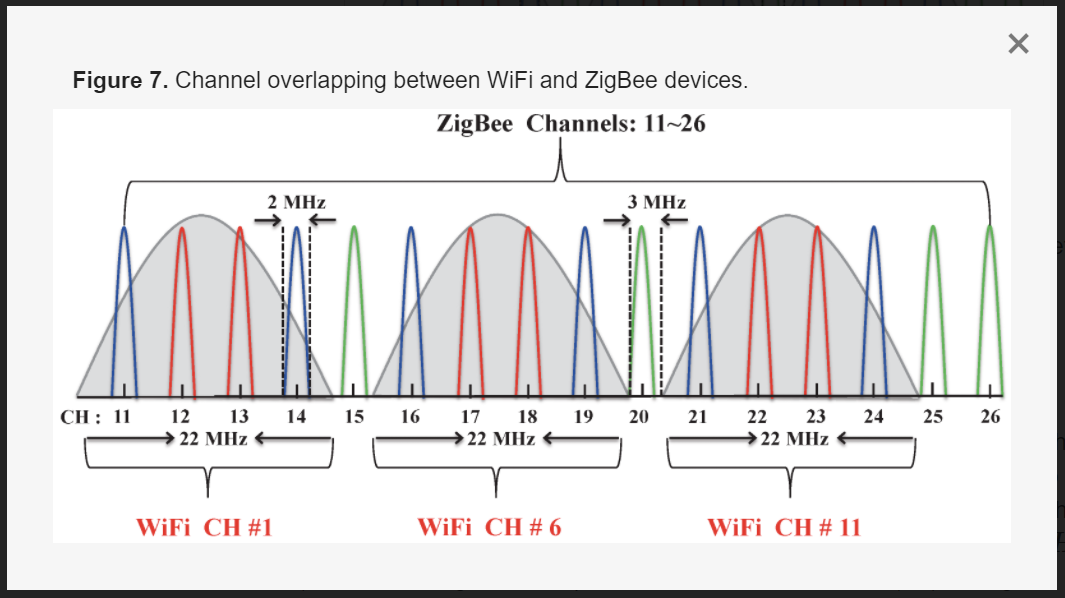
What Zigbee channel was your C7 using? What Zigbee channel is the C8 Pro using? I personally like Zigbee channels 20 and 25, as most devices seem to work well with both of those channels, and neither interferes with 2.4GHz WiFi channels, as long as your WiFi uses channels, 1, 6, and/or 11 with a 20MHz channel width.
What Zigbee channel was your C7 using? What Zigbee channel is the C8 Pro using?
The C7 was on channel 20, as is the C8 Pro.
I'm starting to see problems with other Zigbee devices--several of my Linptech mmwave sensors aren't responding. I've tried varying the Zigbee radio power on the C8 Pro from 4 to 20, but it's not helping.
I'm pondering setting up a mesh with all of my Zigbee devices on the C7, but that's frustratingly kludgy after paying for an "upgrade."
Is the C7 powered down and unplugged? If not, its Zigbee radio may still be interfering with the C8 Pro's Zigbee radio.
Are these the mmWave sensors that are known to be somewhat "chatty"? What happens if you unplug those devices for an hour or two? Does everything else calm down?
Assuming you don't have a Hue bridge or other zigbee bridge on it, I'd definitely try ch 25.
For me, my maddening C8 zigbee issues were hugely helped my moving to 25, using radio power 4, and ensuring all of my main-powered ZB devices were ZB3.0. Again, that's just my own experience, but I'd give ch25 a shot to begin.
What 2.4GHz WiFi channels are you using in your house? What is the channel width setting for 2.4GHz WiFi? Sometimes Routers/Access Points will automatically change channels to the detriment of a Zigbee network. Again, making sure to only use 2.4Hz WiFi channels 1, 6, or 11 with a 20MHz channel width is the best way to avoid Zigbee interference on Zigbee channels 15, 20, and 25.
Ideally you want these farther away from your Zigbee channel - any reason you can't move the ones on 11 to 6?
The Linptech mmWave sensors you have aren't in the "chatty" groups, so unlikely to cause problems from that end. However, they do repeat, and I found on my C8 that they were bumping off some Aqara contact sensors, so I moved the Linptechs to my C7 and everyone has been happier in that setup.
I have three Iris v3 motion sensors on my C8-Pro (and more v2's), had them on my C8 before. So they can work on the C8/C8-Pro.
However...After I first got my C8 when it was released, I had to move a number of Iris motion v2/V3 sensors from my C8 to my C7. It wasn't that the device isn't compatible w/the C8 (as noted I have several in use on the C8/C-Pro) but something about how some of them were working w/the C8 just wasn't stable. After trying repeatedly to make them work I had to move on and put them back on my C7. No issues there.
Others have used v2 and v3 sensors w/out issues on their C8s from the get-go. I tried three different C8s when I was working through my Zigbee problems, similar on all three, so it appears to be an environmental issue to me. In the end I did find that I achieved stability w/Zigbee on my C8 when all of my Zigbee devices were connecting via repeaters, no direct connections.
The Unifi devices are set to nightly channel optimization, but I could turn that off and set channels manually. However, it's puzzling to have to blame my wifi when everything worked fine on the C7.
This is a disappointing workaround when a touted advantage of the C8 is external antennas that allow for more direct connections.
I'm waiting for my Zigbee channel change to 25 to kick in--it's been a couple of hours; no devices have connected yet. If this doesn't pan out, I'll do what you did and move Zigbee devices to the C7 in a hub mesh--might as well go with what I know works.
That is not a recommended approach to managing interference between Zigbee and 2.4GHz WiFi. I also use multiple UniFi APs. I have then forced to use channels 1, 6, and 11 with VHT20. I have zero Zigbee issues for my Hubitat channel 20 mesh and my Philips Hue channel 25 mesh. On my C8 Pro, I use power level of 8.
I believe that would be a good idea, to ensure things are not changing unexpectedly.
As @ogiewon indicates, not the best approach for use w/a hub, and IIRC not generally recommended in the Unifi community. C8 Zigbee 3.0 radio may be a bit more sensitive than C7, so providing some space should be a good thing.
I'd wait until tomorrow before doing anything else...
I only moved ones that weren't behaving well on the C8...I have >90 Zigbee devices on the C8/C8-Pro, including pretty much all types.
To make sure I understand how this works...If Zigbee devices are split between two hubs, they're two separate meshes, right? Meaning they can't act as repeaters for each other?
Well, 18 hours after changing the channel to 25, the Zigbee map was showing 10 of 19 devices. However, only one worked--a Philips Hue motion sensor, and that was intermittently unresponsive.
I ended up manually re-pairing each of the 19 devices. It's been a mixed bag. The Linptech presence sensors seem to be working. Two Aqara FP1 presence sensors paired fine but don't respond to motion. Several Philips Hue motion sensors work some of the time, but then stop reporting motion (stuck on either active or inactive)--although interestingly they seem to continue to report changes in illumination and temperature. Restoring full functionality requires re-pairing them again. One of the Iris v3 motion sensors reported motion for a time, then stopped. However, it does continue to report temperature
I'll give this more time for the Zigbee mesh to settle down, but this isn't promising.
My 2.4 GHz wifi is on channels 1 and 5 with a 20 Mhz width; my Zigbee channel is 25; and I'm in a rural area, 1000 feet from the closest neighbor. I'm not sure the interference explanation is the entire issue, particularly with the partial function I'm seeing--devices no longer reporting motion, but still reporting other things.