0, 15, 30 and 45 minutes of every hour I know I can use a periodic CRON setting for the trigger but in the rule I'd like to test for 0, 15, 30 and 45 and do something different for each at those specific minutes. I don't see a way to test for periodic in an IF statement so am I going to need to make 4 rules with separate triggers for each? I just need to know what the minute of the hour is can that be done?
You could use a variable as a counter each time the rule was triggered...
True but I want to set 4 variables specific to it being 0, 15, 30 or 45. So on a reboot depending on the time of day I would not know where to begin without a crazy number of if statements for every 15 minute period of the day. At least as far as I know that's what I'd have to do. Too bad we can't parse a string in RM so I could take something like 17:30:00 and parse the 2nd value that is delimited by the colon, at least for this case.
I think you could do it with one variable. Just increment it by 1 (or 15 if you want it to make more sense) every time the rule triggers. Then you could have four IF statements based on the value of the variable and the last IF statement would reset it to zero.
I want say X1 to be for the zero hour, X2 for 15 min after, X3 for 30 and X4 for 45. They would be updated accordingly. So if I boot the hub at 12 min past the hour I'd want X2 (15 min) set next. How would I know to set the incremental variable to set X2 after that reboot? I know the variable would probably carry over on a reboot but if the reboot straddles the 0,15,30,45 time then it would be off and I'd be setting the wrong variable.
Maybe I just need it to be a running last 4 and I'd have to do the calculation in my head as to what was what? As given my last example the X2 would be off every time after a reboot that straddled 15 as it would be from the prior hour and not the most current. Might just be the nature of the beast here.
That's not really a condition, but could check some resultant state. As one possibility, set a local (or hub) number variable to "current minute," which is an option in the "Set Variable" action. Then, you could test the value of that variable in an condition, e.g., as part if an IF expression.
But...
If you want to do something different in each case, why not just:
Then, you won't have to mess with conditionals at all, and each rule will be simpler and smaller. That is almost always a better approach.
2 Likes
Ya that's where I'm heading.
webCoRE has a built-in $minute system variable. Is there something similar in Rule Machine? Or can you parse the time and make your own minute variable?
That's what Robert recommended above. There's an option to set a variable to the current minute.
Where is the option to set a variable to the current minute?
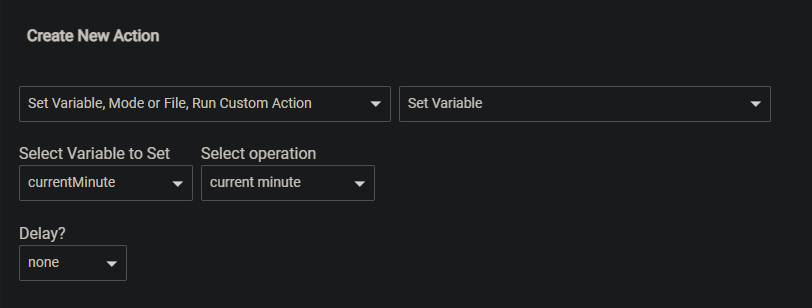

Thanks!
1 Like
This topic was automatically closed 365 days after the last reply. New replies are no longer allowed.

