Hello, all. I have four ecobee units and am not really happy with how it handles auto mode. What I'd LIKE to do is to create an auto mode that incorporates OAT into the mix to determine when it should just "flip" from heat and cool based on a single setpoint. Obviously some delay is needed, ranging, etc. But the family finds the significant gap between setpoints unacceptable. It seems like the situation only arises when I'm out of town (of course, that's one of the laws of thermodynamics, right?) When I'm home, I 'm just aware that the weather is changing tonight, so I flip it before I go to bed. It's a hassle. Has anyone already solved for something like this?
What sensor do you use to get outdoor air temperature?
The issue with using outdoor temperatures reported by ecobee is that it depends on the specific weatherstation used by their weather service, which is often inappropriate for places with micro-climates.
1 Like
I have a zooz sensor that.
According to what I remember the minimum setpoint difference for heating and cooling is 2 degrees. You have to go through the thermostat menus to change it, I think the default is 5 degrees.
I'm not really after a narrower band, exactly. What I'm wanting to do is get a single setpoint and have logic control the mode. That way my wife, kids, guests, or me when I get even more feeble minded just walk up to it and go "I'm cold, I'm going to raise the temp by 2 degrees" and it acts accordingly. Right now, they walk up and go what are these two numbers, WTF? I get that it's an easy explanation, but it seems unnecessary. And I know that as many times as I explained the Harmony remote control, that never got me any where but "IT DOESN'T WORK!! and an argument."
I use my own app to control my thermostats.
I wrote my own auto mode check method that uses cooling setpoint, heating setpoint, temp, and current mode. I don't see any need for outside temp. I use outside temp in my thermostat driver to determine the length of the cycles, but not for auto changing modes.
This could be done with Rule Machine or Webcore:
String getAutoMode(coolPoint, heatPoint, temp, mode) {
	logDebug("getAutoMode() called")

	def coolDemand = temp > coolPoint
	def heatDemand = temp < heatPoint
	def newMode = mode

	if (!(coolDemand && heatDemand)) {

		if (coolDemand && mode == "heat") {
			logDebug("Thermostat Mode changed to cool")
			setThermostatMode("cool")
			newMode = "cool"
		}
		if (heatDemand && mode == "cool") {
			logDebug("Thermostat Mode changed to heat")
			setThermostatMode("heat")
			newMode = "heat"
		}
	} else {logDebug("Difference not in range for auto mode change")}

	return newMode
}
Yeah, OAT really doesn't matter if the logic is being done by a machine on the fly, as opposed to a guy who's about to go to sleep for the night trying to predict that his family will complain about being cold in the morning! Good point.
I ended up with two rules. Basically if coolsetpoint< temp + 2 then mode = cool, and the opposite rule for setting heat mode. The only purpose here is when the weather changes markedly, the mode flips. Thank you all for helping simplify things, I was overthinking as usual.
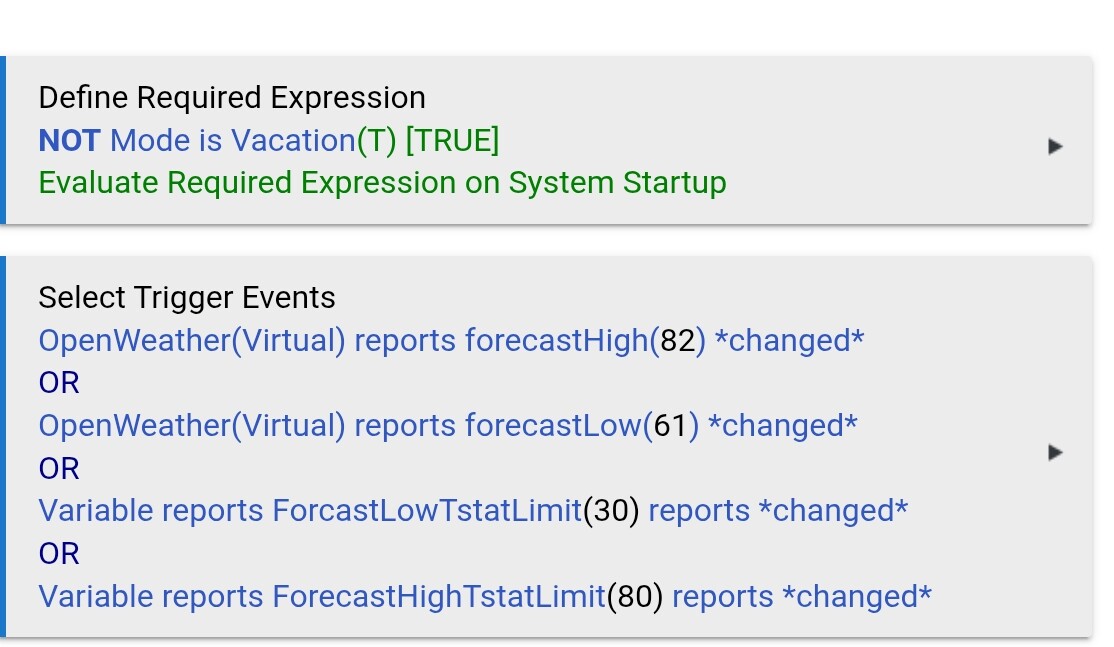
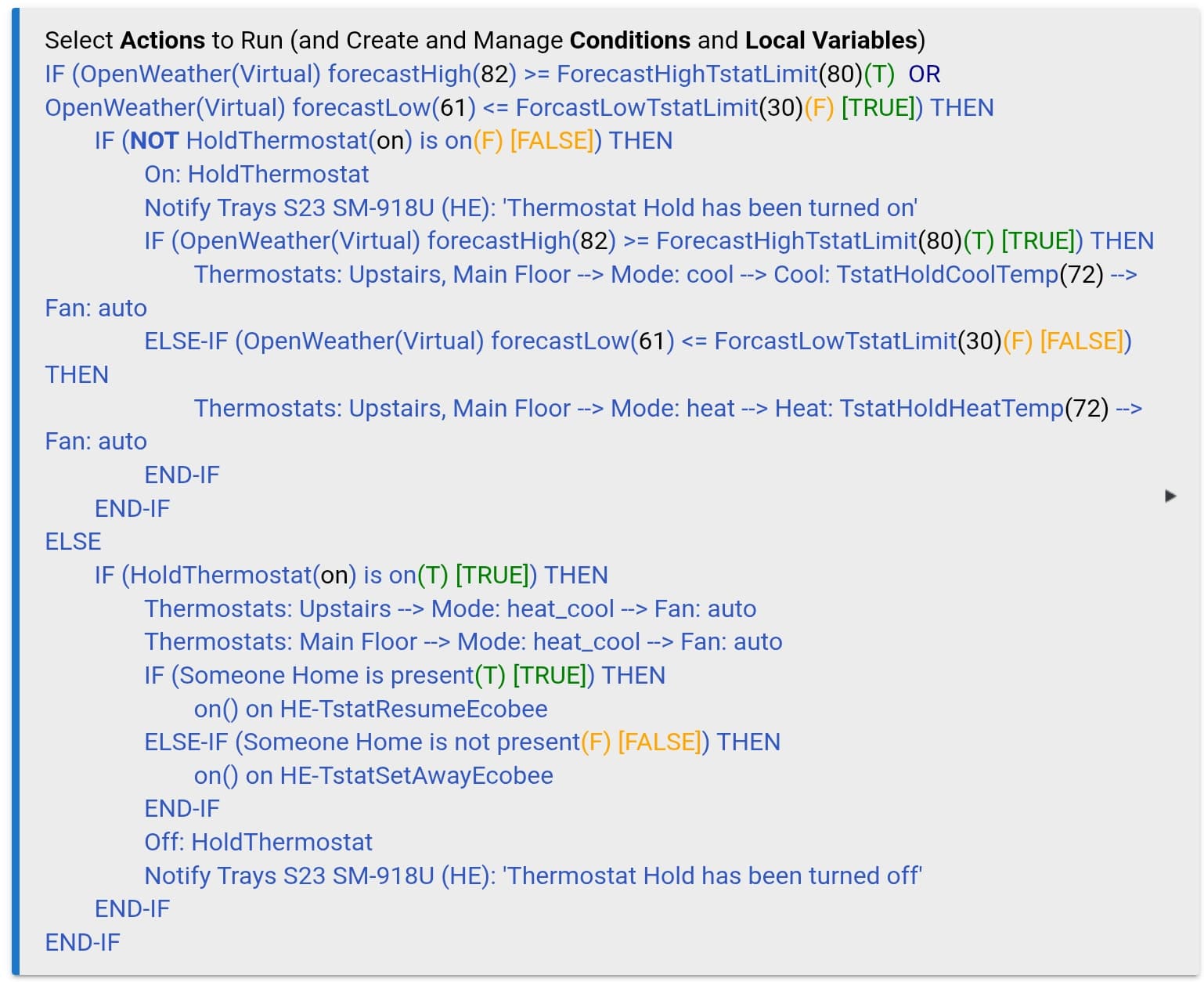
I use the predicted highs and lows to set heat/cool/auto.
I also use hub variable to store my minimum and maximum thresholds as well as my heat and cool setpoints. I set COOL when the predicted high is over my hub variable, HEAT when the predicted low is below a certain value, and AUTO in my Goldilocks zone (neither high is above or low is below). In Auto mode, the ecobee's comfort settings take over. I also use a 2 degree difference between heat and cool in auto mode.
I also have the same rule handle the away mode (which is configure in ecobee's comfort settings). This way, it doesn't put the thermostat into away mode if the temperatures are expected to be higher or lower than my thresholds, preventing delayed recovery times.
My triggers are on updates of the forecast low or high (I have my update interval very slow - on purpose - 6 hours), or change in my global variables (the last one so that I can change it on the fly if I want)
I use the forecast for a few reasons. One: it prevents a lot of fluctuation if the outside air temperature is teetering about my thresholds. Two: even though not as accurate, if I am close enough to my threshold outside air temperature, then it doesn't really hurt to start it early/late.
On a dashboard or the Ecobee thermostat? I never use the thermostat UI, but I just looked at mine and it just shows a temp and a + and - to raise or lower temp. Seems pretty straight forward. Maybe the newer ones are differnt.
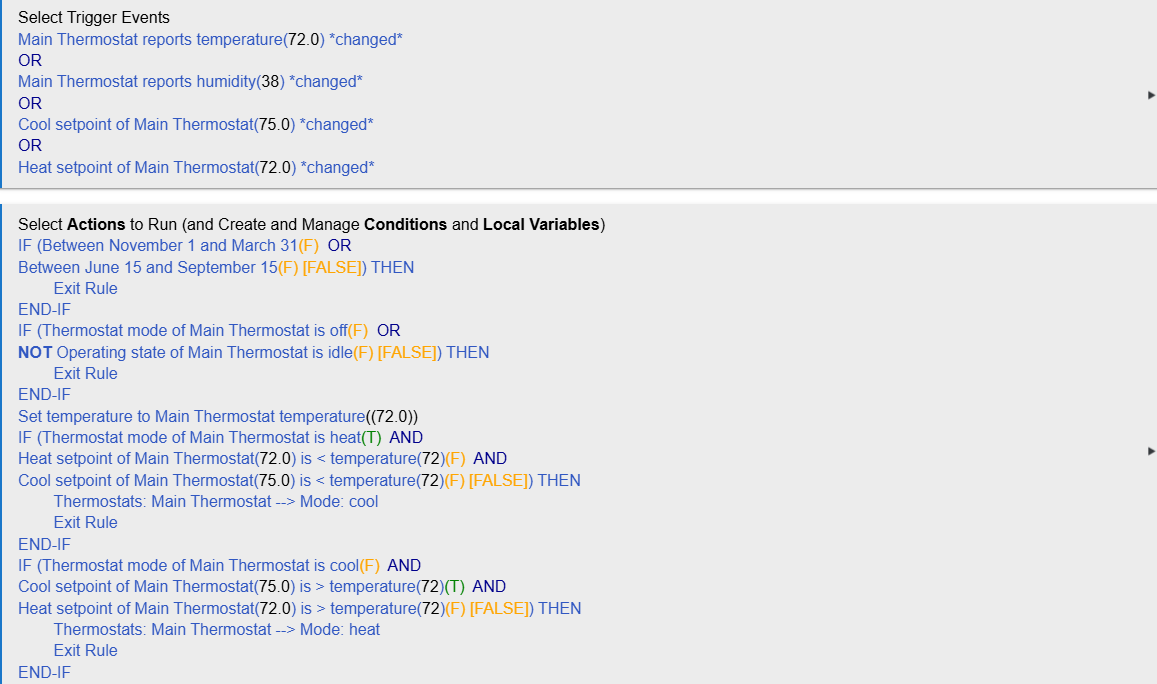
Thank you, everyone. I think that with all of the feedback here, I got a workable, simple solution. I'll overcomplicate it later :).
4 Likes

