Hi,
I’m a new user coming from a basic setup on smart things. I am using a c8 v. 2.3.8.119.
I am trying to figure out the order and path direction related to several hue bulbs, switches, and bridge, and its integration w HomeKit. I took the warning of previous posts to not connect individual hue bulbs directly to hubitat and instead connected the hue bridge (initially w the built in hubitat hue app, but then changed to cocohue.)
Here is where I wonder if I erred in the order I did things or if I should have stopped at 2.
I had already connected my hue bridge to home kit. All was good.
I then connected my hue bridge w cocohue and selected all my lights, motion sensors, and button devices. Made some minor room adjustments. All seemed good w how things connected.
I then used HomeKit integration to add hubitat to HomeKit via the QR code. Matched items w room, etc.
Not surprisingly I now have duplicate lights in HomeKit - the original hue>homekit and now the hue>hubitat>homekit. Both work so at least my mistake works haha! I’ve done and undone this several times, but I think I am missing something fundamental… should I have not connected the lights in cocohue? Should I not connected the hue>hubitat back to HomeKit? Should I unlink the direct hue>homekit? Should I ignore hubitat and just use hue>homekit?
Nothing seems wrong with this unless in step 3 you added the same Hue bulbs that you already added to HomeKit from Hue to HomeKit again, this time from Hubitat. I don't see enough information above to say for sure whether this is what you did, though I have a suspicion from the following paragraph that maybe you did.
There's no wrong or right way to do that, though it really only makes sense to do it once since you don't need the same device in HomeKit twice. Some people prefer to due Hue directly to HomeKit since that works perfectly well and there's one less system in between that way; others prefer to manage as much as they can using Hubitat, including external integrations. Whichever way you choose is up to you, as any can work well; FWIW, my preference is the former.
Do you use Adaptive Lighting in Homekit? If so, you'll want to connect Hue directly to HomeKit (though not via Matter). If you do not use Adaptive Lighting, then you could go either way. I'm actually the opposite of @bertabcd1234 and go Hue into Hubitat into HomeKit. However, I only send my Hue groups into HomeKit as this eliminates the popcorn effect that sometimes occurs when connected directly. Since the bulbs are connected to the Hue Bridge, I can always use the Hue app or Hue switches connected to the bridge to get them off if something happens to Hubitat.
This is my personal preference. All of my Hue hub and Lutron Caseta hub devices are connected to Apple HomeKit directly. I also have these same devices brought into Hubitat using the Hubitat built-in integrations for each system.
Additionally, I have some Hubitat-only devices connected to Apple Home using Hubitat's HomeKit integration. When doing so, I only select devices that are not already included in Apple Home using the Hue and Lutron integrations.
Yes, I then added the hue>hubitat lights/buttons/motion detectors back into HomeKit, thus the two version of the same lights in HomeKit. I think my rationale was that there had to be a function benefit to gain by using hubitat and if I wanted that available I had to bring hue>hubitat forward to HomeKit.
There certainly is for me; automations in the native Hue app and the Apple Home app are limited to devices you have in those systems as well as being fairly simple in general. Hubitat is compatible with many more devices, has far more powerful automation capabilities available, and is thus a better match for my lighting automation needs (among other home automation tasks I have it doing, though this is how I started down this rabbit hole in the first place).
You don't need to, as you can integrate Hue directly with Apple Home (I guess that part you know...), and the Hue Bridge and its devices will function perfectly fine with both systems at the same time.
If you weren't using CoCoHue, one caveat you may notice is that the native Hue Bridge Integration for Hubitat is polling-only, so you could have to wait a minute or more (depending on your settings) for Hubitat to see changes made outside the hub, including via Apple Home. CoCoHue allows use of the new "v2" Hue API for real-time device status updates, eliminating that concern -- though that is one reason some people may have done HomeKit via Hubitat for Hue, despite native support, in the past.
So as I understand it based on the responses (thank you all by the way!) here are the options for a hue, hubitat, HomeKit environment, associated rationale, and advantages/limitations: (please correct any issues you may see)
Connect hue bulbs/bridge/accessories directly to hubitat = don’t do this.
Connect hue bulbs/bridge/accessories to HomeKit. Advantages: utilizes solid HomeKit interface, single system means less failure points, can utilize adaptive lighting. Issues - does not integrate w hubitat so that limits system wide rules and behavior to only Hue. Limited to the automations within Hue.
Connect hue bulbs/bridge/accessories to hubita via built in app or cocohue. Advantages: integrated with hubitat and available for system wide use in rules/behavior. Issues - some hue functions not available, less streamlined interface, not integrated w HomeKit.
Connect hue bulbs/bridge/accessories to hubitat via built in app or cocohue. Connect hue bulbs/bridge/accessories to HomeKit. Connect only groups to HomeKit from the hue>hubitat integration. Advantages: takes advantage of hue interface, takes advantage of hubitat features, can utilizes adaptive lighting. Issues - hubitat rules are limited to group rules, hubitat rules won’t apply to individual bulbs or accessories, will need to manage rules in two systems.
Connect hue bulbs/bridge/accessories to hubitat via built in app or cocohue. Connect hue bulbs/bridge/accessories to HomeKit. Connect hue>hubitat to HomeKit. Result is duplicate (2 versions) bulbs in HomeKit. Advantages: could utilize all hubitat rules options, able to use HomeKit interface. Issues - duplicate versions of the same bulb, rules are limited by what version the bulb is, twice as many items, a second system could be a failure point for half.
Connect hue bulbs/bridge/accessories to hubitat via built in app or cocohue. Connect hue>hubitat to HomeKit. Advantages: hubitat integration and rules can be used, use HomeKit interface. Issues - have created redundancy and added a failure point w two systems.
Connect hue bulbs/bridge/accessories to hubitat via built in app or cocohue. Connect hue bulbs/bridge/accessories to HomeKit. Is this even possible? Advantages- can utilize hubitat rules, can utilize hue interface. Issues - changes in hubitat aren’t reflected in HomeKit?
I think this is where I’ve gotten confused. I think I (maybe) didn’t understand that the integration happens at this point - and doesn’t need to be then sent to HomeKit for it to be integrated. I don’t need to bring anything from the Hue>hubitat combo into HomeKit. Merely connecting hue to hubitat is making hue subject to the benefits of hubitat? Then separately having the hue>homekit combo just adds some HomeKit functionality. Is this an accurate understanding?
It sounds like you have a good understanding of all the tradeoffs, but I don't think there's any reason to think of these all as separate things; you can connect your Hue Bridge to both Hubitat and HomeKit (no matter how you do it -- directly or via Hubitat, or even via some other means) at the same time, all while also maintaining control via the Hue app. So literally any different combination of these options is possible. So that means the answer to the question embedded in this option:
is "yes," and it also sounds like what I do (and also what @ogiewon does).
Continuing with this point (your #7):
No, changes made in Hubitat will be reflected immediately in Hue and HomeKit. I did mention an issue where, if you use the polling-only options (or the built-in integration where this is the only option), Hubitat may be slow to see changes made outside of Hubitat, but even that is rarely a big deal unless you rely on bulb/group states for automations (e.g., as a "trigger" or "condition"). The original Hue API was polling-only, so this might also affect other systems you integrate Hue with, but Hue itself and HomeKit (which has apparently always used some proprietary integration not subject to this limitation, and now can do either that or Matter) are not affected.
I'd strongly recommend against any option that gives you duplicate devices in HomeKit. What advantage does that give you? Your answer might be different from mine, but to me, the answer is "nothing" -- and it also adds a bunch of confusion, so it's even more of a negative than a neutral.
I think this confirms that the issue is my initial misunderstanding that in order for hue>hubitat to be able to reflect changes within HomeKit I had to link it back to HomeKit via connecting hue>hubitat to HomeKit. This initial understanding appears to be incorrect. The correct path is that the app itself is creating that link and I should only connect back to HomeKit things that aren’t already accounted for in HomeKit (when possible). Is that correct?
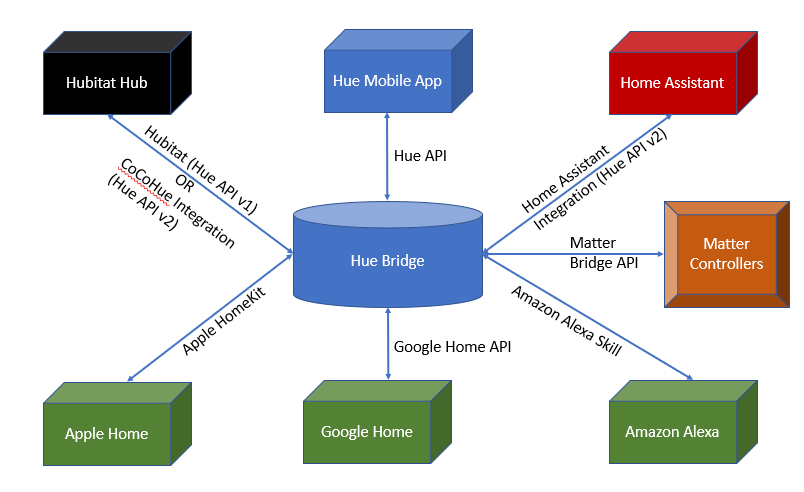
It is really the physical Hue Bridge that is keeping the various systems it is connected to up to date (not the Hue mobile phone app).
Perhaps a picture will help explain the Philips Hue Bridge current architecture. This drawing does not show all of the current possible integrations the Hue bridge has with other systems, but it should help with the basic design.
Other systems like Node-RED, SmartThings, etc... can also be integrated with a Hue bridge.
If you look at the image above, eventually, if Matter really takes hold, then the current integrations that Philips Hue and other have to maintain for Hubitat, Apple Home, Google Home, Amazon Alexa, Home Assistant, SmartThings, Node-RED, etc... could all be replaced via the Matter home automation standard. This is the promise of Matter, but we're not quite there yet. The Matter standard is continuing to mature, and more and more home automation controllers and devices are beginning to support Matter. For now, though, the existing integrations are very feature complete and very reliable.
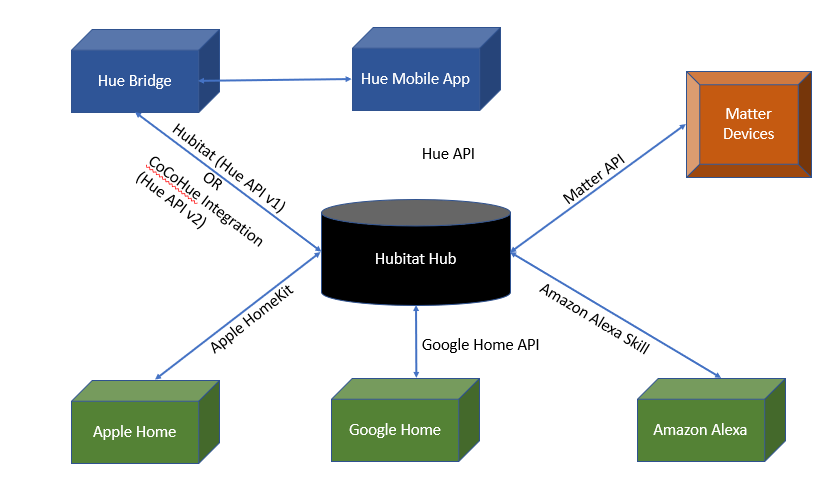
An alternative architecture that some prefer is as shown below, where Hubitat is in the center of the design.
The advantage of this alternative design, which is my personal preference, is that it avoids possible confusions that might arise by device duplication in Apple Home, etc.
@aaiyar you inspired me to draw out my personal architecture. I prefer as many direct connections, using native integrations, wherever possible. This allows for portions of my home automation system to go down, yet allow much of the system to still function at some level. All automations run on the Hubitat Hub, to make sure I don't lose my mind trying to figure out what system is responsible for what happens.
So in this first image you would not be using the homekit integration app from within hubitat for any hue functions, correct? I am assuming you can still set rules/behavior within hubitat that impact hue, thus benefiting from hubitat vs a hue>home kit setup.
What are the functional differences between these two options? (Ignoring future development of matter aside) The diagrams were very helpful, thank you!
And this is because nothing hue related gets into HomeKit unless it is coming from hubitat.
The overall functionality is very similar. However, if one wants to make use of Apple Home's Adaptive Lighting feature, then one must use the native Philips Hue HomeKit integration (i.e. first option.)
If you use the second option... if your Hubitat hub was to go down for any reason, then your Philips Hue devices would not be available in the Apple Home app on your phone. The second options adds another device in the path of communications, and additional devices add additional failure points.
The bottom left of your image with the relationships between hue, hubitat, and homekit is exactly what I did but wasn’t selective about what connected back to HomeKit - thus the duplicates in HomeKit just as you warned.
I really appreciate everyone’s assistance in helping sort this out! I think my initial big hang up was a belief in the role the HomeKit integration had to have to make any hubitat features work. I wanted the hue>homekit specific features and the hubitat benefits…thus the redundancy loop I was in.