I am having almost daily problems with my Hubitat C7 shutting down and needing rebooting and not knowing what else to do, in desperation, I have ordered a C8 PRO.
Whilst waiting for delivery, I see that after a shutdown yesterday, the logs showed a lot of debugging activity related to the Hue Hub.
I only have 6 devices on Hue so I am now wondering if the Hue Hub is more likely to be the problem.
It is very old and I would appreciate opinions on replacing it with a later version or is there any other device that could, with advantage, take its place
I mentioned to you in another thread recently that debug log entries are expected to be lengthy and voluminous, whether or not anything is “wrong.” So it may or may not mean anything at all that you see “a lot” of debug log entries from your hue bridge.
If your hub is shutting itself down that sounds like it could perhaps be an issue related to overheating or a faulty power supply.
What exactly do you mean when you say the hub shuts down?
On this last occasion, after switching debugging back on on the Hue hub, there were a lot of "startup" entries for the Hue hub, which seemed more meeningful (to me!)
I am made aware that an action has not taken place, e,g. kitchen lights would not switch off last night. When I come to look at it on my Mac, no device will open still less be capable of switching.
I can get logs to show up, but for anything else to function, I have to reboot the Hubitat hub, usually in the "Advanced" format. Then everything works fine until the next time.
There is no overheating and I have tried 2 different locations with greater separation between the two hubs. Can't vouch for power supply but will see if I have another of same spec.
Thanks for your interest
As I said in the other thread, the purpose of debug logging entries is generally for a developer to debug (aka troubleshoot) specific driver or app code that is not behaving as expected.
Since that’s not what you’re doing, I suggest you turn debug logging off for any device or app that you’ve currently turned on. Keeping information log entries on, in general, would be sufficient to see if a device or app is actually throwing errors that might be related to hub instability.
That’s not a “shutdown” in the literal sense, for a computer like Hubitat. Shutdown = turns off.
With that in mind, disregard what I said re: overheating and power supply.
If I can interject... For anyone else, i.e. me, I feel it could be useful to stop and cover a few points... Without wanting to sound condescending, while at the same time doing exactly that:
- @marktheknife has referenced another topic... it would be handy to have a link so that we can understand more about the context of the conversation
- @david.storer - moderators like @marktheknife (?) and others will sometimes talk about the importance of certain norms that are encouraged / dictated, including issues resulting from posting issues across multiple topics. There are good reasons for this, such as my question above about the background to this issue that is not clear when I look at this topic in isolation...
- I feel it would be useful to understand more about the setup of the Hue Bridge and integration with the Hubitat Hub, which could be related to my first point above...
Simply put... understanding more about what is happening would help... For others... If not moving the conversation back to a topic where these details are already covered.
I am sorry if I caused confusion.
The previous topic was:
After following this and with my limited knowledge, I couldn't see a way to get to the bottom of the hub becoming unresponsive (not "Shutting down" as @marktheknife has reminded me) and I couldn't see a way forward, but eventually decided to buy a C8 PRO in the hope that this would solve all my problems.
Then I remembered that the Hue hub was probably purchased before my first Hubitat (C5 or earlier?) and I wondered if Hue technology had also progressed.
That was my new question, i.e. having committed to buying a new Hubitat hub should I really consider updating the Hue hub or anything that would take its place?
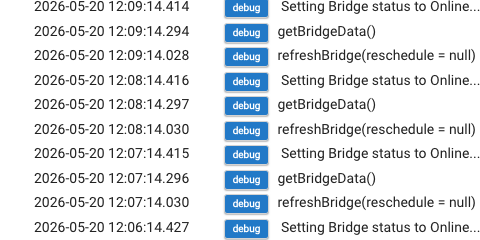
As @marktheknife has suggested, the logs may be meaningless, but here is an example of what prompted me to think that the Hue hub may have a problem:
They’re not meaningless, they mean something to the developer that wrote the code.
But they’re probably unrelated to your hub’s performance issues unless you have more reason to suspect that hue is involved independent of these debug log entries.
I thought it might be relevant that when there is a failure (i.e. nothing working), the logs show entries for "Get Bridge Data" followed by "Setting Bridge Status to Online" repeated many many times over.
Another, perhaps more mundane, thing was noticed recently.
On retiring each night our Alexa pattern is: "Living Room Lights Off", (These are all Hue hub connected), followed by "Kitchen Lights Off" (Zigbee switch controlled).
What has happened 2-3 times recently is that the living room lights switch off, but the kitchen lights do not and in fact nothing will now function until I reboot the Hubitat hub.
I have mentioned that I am awaiting delivery of a C8 PRO so, hopefully, that will eliminate any problem associated with the Hubitat hub. We will see.
I just want to make the point here that If it meant that I could spend rather less time/ worry on this problem, I think I would be prepared to also invest further in replacing the Hue hub, but before doing so my original purpose was to seek opinions on if a currant Hue hub is a wise choice or are there other options.
I have a feeling (probably unjustified) that the Hue range is not well regarded, but that may be down to price.