So I decided to update my Hue Bridge to the new Pro model. Most of my Hue bulbs are going to be in downlighters so I would've potentially got close to the limit on my existing one. Existing setup:
I'm using the built in Hubitat Hue Bridge app
My Hue bulbs and switches are connected directly to the Hue Bridge
Hue Bridge is linked with Homekit to Apple Home
I'm assuming I power up the new Bridge Pro, register it and migrate the bulbs and switches from the old Bridge before powering it down. I'm wondering what I need to do in the Hubitat Hue Bridge app once that's done:
Will I need to give the new Bridge Pro the IP that the old Bridge was using or can I just alter it in the app.
Will I have to start again bringing in Hue Groups, Scenes, Switches into Hubitat via the app or will they be found.
As above, will I have to go through all my Room Lighting and Rule Machine apps replacing devices with the 'new' ones
Any recommended settings in the Hubitat Hue Bridge app?
I understand that the Bridge Pro uses matter and no longer supports Homekit. Am I right to assume that as I've got HomePods and Apple TV 4K's in use that I can again add the new Bridge Pro to Apple Home without needing to enable matter on my C8.
Apologies for so many questions...I just want to make the changeover as straightforward as possible.
I just did this a couple of weeks ago. The Hue migration software is very good and will provide guidance on migrating to the new hub. I probably didn’t need to give the new Hue bridge the same IP address, but I did (after the transfer), because why take chances. On the Hubitat side, I don’t remember having to do anything besides reauthorizing the new bridge. It was all very painless.
The only pain point in the migration was having to redo everything in Apple Home due to Matter being the only protocol the new Hue bridge supports for connecting to Home. Also, I couldn’t get it to connect after dozens of attempts. I discovered that unplugging all but one of my Apple TVs fixed my issue and the Hue bridge then connected immediately to Apple Home via matter. After everything was setup, I plugged the ATVs back in and everything has continued working perfectly.
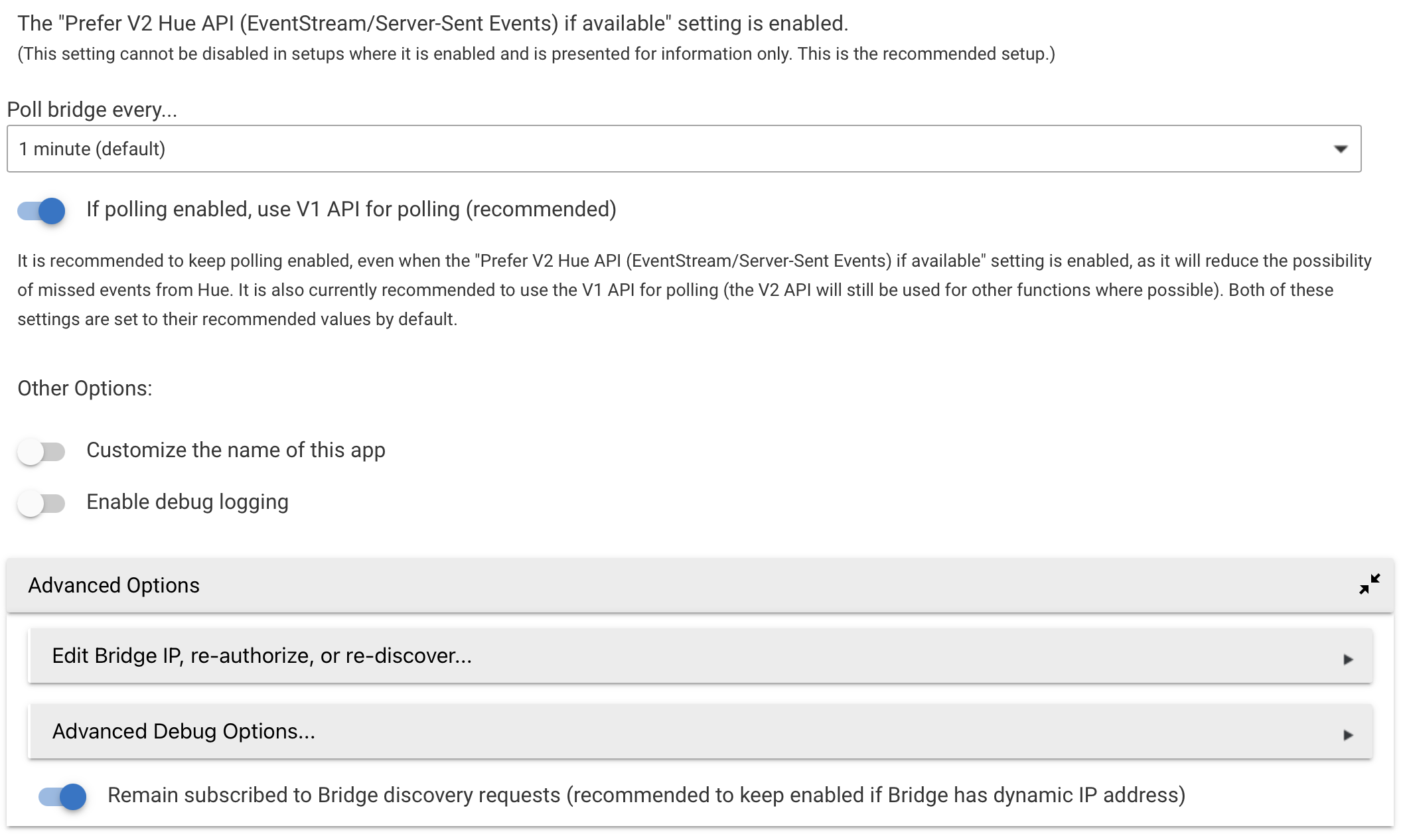
1.) Go into the Hubitat Built-in app for Hue
2.) Select Advance options at the bottom
3.) Re-authorize the Bridge (either via static IP or automatic discovery)
Edit Bridge IP, re-authorize, or re-discover: You may need this option if you previously configured your Bridge with a static IP and changed the IP address, configured the integration with automatic discovery and wish to change to a manually specified IP or vice versa, removed the Hubitat authenticiation from your Bridge settings, or migrated your Hue Bridge configuration to newer hardware (e.g., Bridge V2 to Bridge Pro).
The nice thing about this migration is that Hue keeps all the same "IDs" as before, so there is no need to update anything on Hubitat outside of authorizing the the new bridge. Other connections like Apple/Google Home will require resetting everything back up.
1 - Are the previous polling options correct for the new hub - Poll every minute and the 'use V1 API for polling'?
2 - Similarly, do I need to have the 'Remain subscribed to Bridge discovery requests' switched on, as I have a DHCP reservation for the hub?
I've got both of them active even with a DHCP reservation for the hub and have seen no issues or performance problems. I think the first one is just a safety measure to make sure Hubitat gets updated if something happens to the eventstream. As for the second, with some prior Hubitat updates, it is no longer necessary to have a reservation for the hub.
I am about to perform a Hue Pro update. I currently have 2 hue bridges connected, so will have to consolidate those first to the single Hue, luckily I understand that this feature is now available.
My question to those that have already performed a move, did you see any issues with non-Hue lights? i.e. did they migrate well over to the Hue Pro? I have a mixture of IKEA and Gledopto lights connected, not a single HUE bulb.
Hey Kulfsson
I believe all non Hue bulbs switches and so on that is not native hue, you will have to add again to the pro bridge, Im sure I read it somewhere that it will not migrate over to the new bridge and will have to be reconnected, luckily I only have 1 lightsolutions zigbee dimmer dimmable Ill have to reconnect
I also read that somewhere, but was hoping not to have to do it, or that perhaps it is a simple matter of "rediscovering" (reconnecting) the bulb and not having to reset the bulb and add again. Rediscovering is tedious, but it is less of a hassle than the reset.
I am curious if someone has already migrated with non-Hue bulbs and can share their experience.
I received a new Hue Bridge Pro for Christmas. All of our guests have left, so today was the day I decided to tackle the upgrade.
My Hue Bridge v2 was connected to:
Hubitat using built-in integration
Apple Home using Hue Bridge HomeKit
Home Assistant using built-in integration
Following advice in this and a few other threads, everything went very smoothly.
Here is the process I followed.
Added the new Hue Bridge Pro to the Hue App on my iPhone. It immediately updated its firmware, and then asked if I wanted to migrate my old bridge to the new one.
I let it perform the migration, which took about 20 minutes.
I then performed the hardware factory reset on the old Hue Bridge v2.
I verified that I could control my Hue lights from the Hue App on my phone.
Next, I reconfigured my UniFi router to assign the the old bridge’s reserved TCP/IP address to the new Bridge Pro. I unplugged the old Hue bridge and power cycled the new Bridge Pro to pick up the DHCP reservation.
I then opened the Hubitat Hue Bridge integration and went into the Advanced settings and allowed it to reauthenticate. Hubitat was then able to control the lights.
I restarted Home Assistant, which automagically fixed the connectivity to the new Bridge Pro. All lights verified to be working correctly.
Finally, I followed the Hue App’s instructions to remove the old Hue Bridge v2 from Apple Home and then add the new Hue Bridge Pro via Matter. Took some time to get all of the lights back into their respective rooms. Verified that Apple Home could control of the lights.
Total time was about 1 hour. Pretty smooth process, all things considered.
One more update... I just realized that the new Hue Bridge Pro is not supported by my Logitech Harmony Hub. I think it is because the new Pro bridge requires https instead of http, and no one at Logitech is supporting the Harmony platform any longer to make the necessary changes.
So, I am looking into running Emulated Hue on Home Assistant, to allow my Hue Bridge Pro bulbs to be exposed to my Harmony Hub. I have seen others post online that they were successful with this workaround. I'll report back once I figure it out.
I just finished configuring "Emulated Hue" on my HA Yellow. I exposed only the Hue and HE devices that I wanted available to my Logitech Harmony Hub. I think used the Harmony app on my phone to 'discover' my Emulated Hue Bridge. And that was it. Very simple to do and then I mapped the lights/fans to the proper "Home Control" buttons on our physical Harmony remote controls.
The hardest part was getting the YAML syntax just right on the HA side. Once I was able to expose one single light, the rest were trivial.
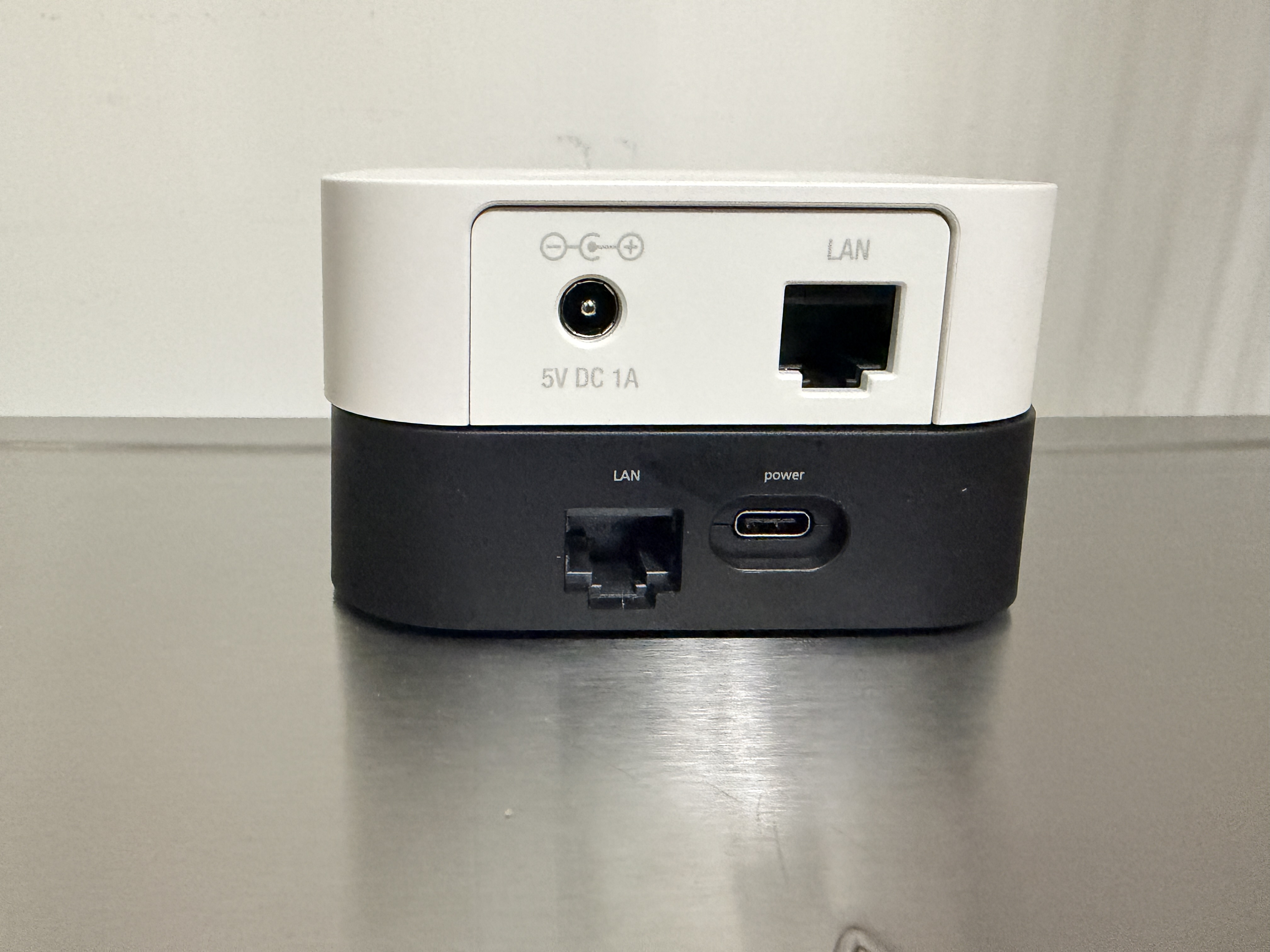
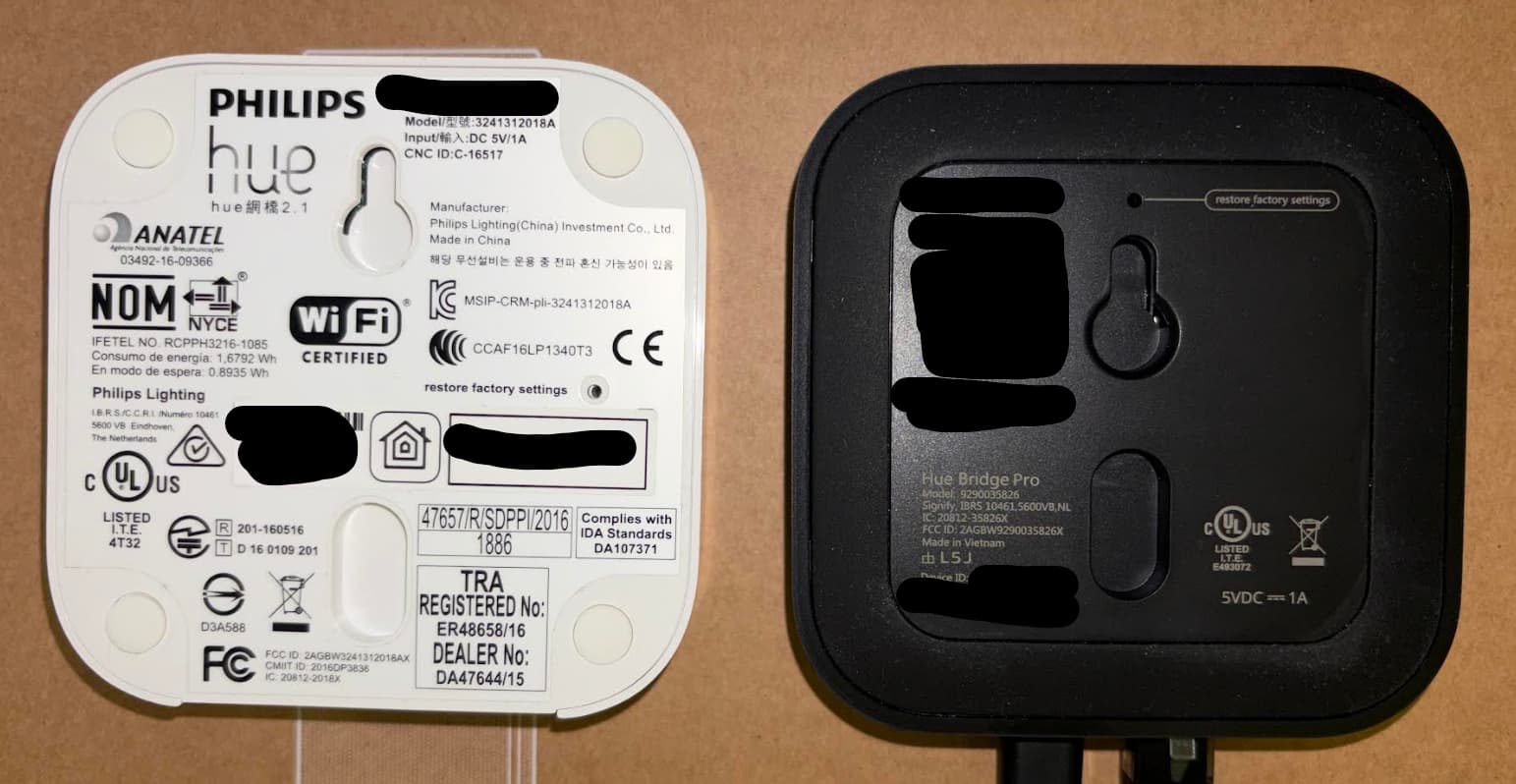
I have a favour to ask, can someone post a pic of the back of the Bridge Pro please.
A comparison shot of the non vs Pro would be fantastic if possible.