Hubitat SONOFF ORB SNZB-01M Driver

Here is my take on the SNZB-01M driver set-up on Hubitat.

Hubitat SONOFF ORB SNZB-01M Driver

Custom Hubitat integration project for the SONOFF ORB 4-in-1 Zigbee Smart Scene Button (SNZB-01M).

Features

  • Supports 4 logical buttons (endpoints 1-4)
  • Events: pushed, doubleTapped, held
  • Triple-tap surfaced via lastAction text for Rule Machine matching
  • Battery reporting (% and voltage-to-percent fallback)

Project Layout

  • drivers/SonoffOrbSNZB01M.groovy - Hubitat custom driver
  • apps/SonoffOrbButtonMapper.groovy - Hubitat helper app for gesture-to-switch mapping
  • packageManifest.json - Hubitat Package Manager (HPM) package metadata
  • docs/rule-machine-blueprint.md - 16-gesture Rule Machine template
  • scripts/set-manifest-locations.sh - helper to inject GitHub raw URLs into manifest
Link:
ggiblin/sonoff-snzb-01m-zigbee-switch: Custom Hubitat integration project for the SONOFF ORB 4-in-1 Zigbee Smart Scene Button (SNZB-01M)

Hey, Gerard,

Thank you for creating this driver!

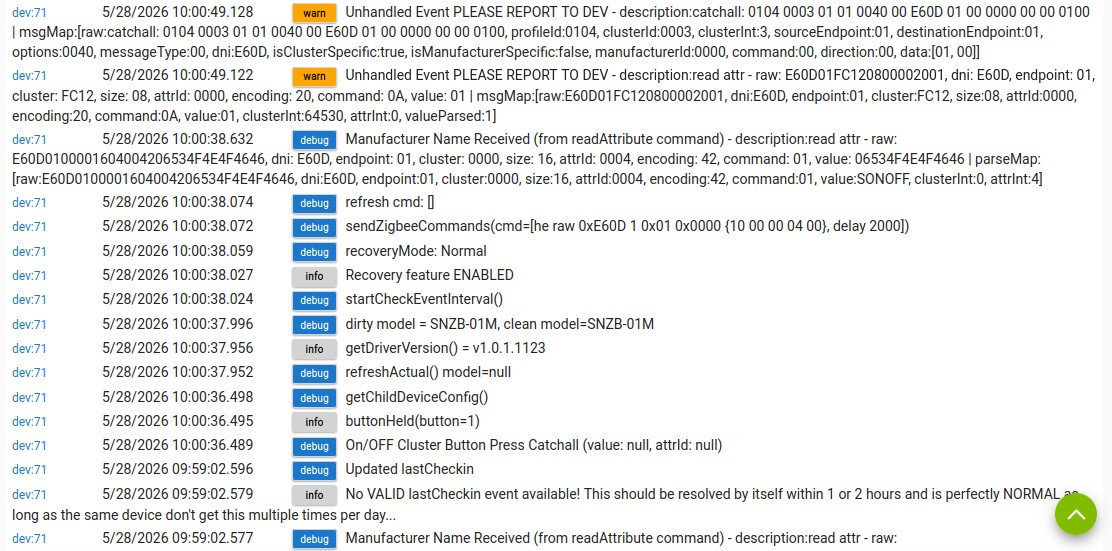
I tried it with a new Orb 4-in-1 and get these errors:

dev:645/26/2026 14:26:47.691

warn

Unhandled Event PLEASE REPORT TO DEV - description:catchall: 0104 0003 01 01 0040 00 1802 01 00 0000 00 00 0100 | msgMap:[raw:catchall: 0104 0003 01 01 0040 00 1802 01 00 0000 00 00 0100, profileId:0104, clusterId:0003, clusterInt:3, sourceEndpoint:01, destinationEndpoint:01, options:0040, messageType:00, dni:1802, isClusterSpecific:true, isManufacturerSpecific:false, manufacturerId:0000, command:00, direction:00, data:[01, 00]]

dev:645/26/2026 14:26:47.675

warn

Unhandled Event PLEASE REPORT TO DEV - description:read attr - raw: 180201FC120800002001, dni: 1802, endpoint: 01, cluster: FC12, size: 08, attrId: 0000, encoding: 20, command: 0A, value: 01 | msgMap:[raw:180201FC120800002001, dni:1802, endpoint:01, cluster:FC12, size:08, attrId:0000, encoding:20, command:0A, value:01, clusterInt:64530, attrInt:0, valueParsed:1]

Any ideas?

Hello

That is not a real problem, just a logging one

The warnings you see are due to the driver receiving Zigbee messages it does not explicitly handle:

catchall: 0104 0003 ... cluster: 0003 — This is the "Identify" cluster, often used for device identification (e.g., blinking an LED). The driver ignores this, so it logs a warning.

read attr ... cluster: FC12 ... attrId: 0000 — This is a manufacturer-specific cluster (FC12) with an attribute (0000) the driver does not process. The driver only handles FC12 with command 0x0A for button events.

Why this happens:

The driver’s parse() method only processes:

Battery reports (cluster 0x0001)

Button events (cluster 0xFC12, command 0x0A)

All other messages are ignored, and if debug is enabled, they are logged as "Unhandled Event".

Is this a problem?

Not necessarily. These messages are normal for Zigbee devices and can be safely ignored unless you want to add support for new features or suppress the warnings.

How to fix/suppress:

If you want to suppress the warnings, you can adjust the logging in the parse() method to only log unhandled events if debug logging is enabled.

If you want to handle these events, you’d need to add logic for cluster 0x0003 and FC12/attrId 0x0000..

I'll investigate the options to suppress the messages or handle them

I didn't notice them on my set-up, as the switches worked perfectly.

I hope this helps

Regards

Gerard

Updated the code to handle the new events

Thank you, Gerard, for the fast reply.

Pulled the new driver from HPM (with “repair”), no change. And the button doesn’t throw any triggers…

And BTW, I removed the Button and added it again after refreshing the driver….

What am I doing wrong?

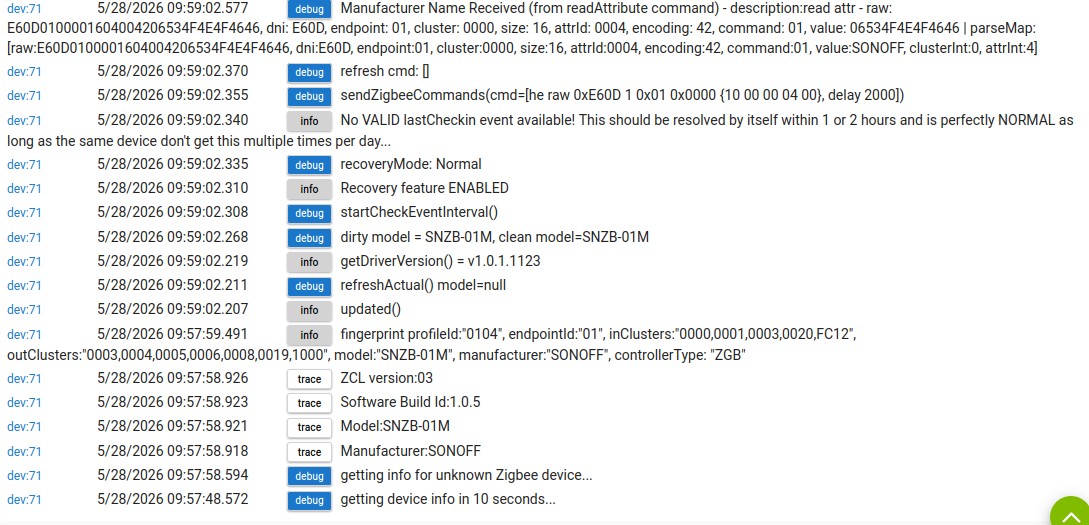
Here is the log:

… and some more errors:

Interesting. You can turn debug in the code, Line 81 enableDebug to true. enableRawEventDebug is available also.

Provide these steps to the user:

  1. In the device page, enable both debug and info logging.

  2. Click "Configure" on the device page.

  3. Press the button several times (single, double, long, triple).

  4. Check the Hubitat logs for any output from the driver.

  5. If there are no logs, try re-pairing the device or rebooting the hub.

  • If the logs show events but automations don’t trigger, check that the correct device and event type are selected in Rule Machine or Button Controller.

  • If there are no logs at all, the device may not be communicating with the hub (try re-pairing).

  • If logs show “unknown action” or “unhandled event,” share the log output for further debugging.

Can you zip up some logs and upload them.

Thanks

Gerard

Updated SonoffOrbSNZB01M.groovy to add more debug

Hey, Gerard,

Thank you for your reply.

What I did:

  1. Uninstall the driver in HPM
  2. Remove the device
  3. Install your code into driver code
  4. Reinstall the button
  5. “Configure”, and then “Refresh”

… and it works like a charm. Thank you, and thank you for your help!

You’re welcome.

I’m glad the issue is resolved.