I updated from 2.3.2.141 to 2.3.3.140 and ran into major issues with events flooding the queue and eventually causing me to revert back to 2.3.2. The biggest issue appears to be the Ecobee Integration, which starts logging LimitExceededException exceptions. Eventually this seems to flood the event queue, and all my devices stop responding. Given this is a built-in app/device, it seems surprising that I'd be the only one with this issue in 2.3.3. Any suggestions about how to resolve this issue in 2.3.3? Release 2.3.2 has been running without issue (when I reverted back to it all was fine again), but I'd like to keep current.
Here is a sample from the log:
app:138 2022-11-21 08:15:00.924 AM error  com.hubitat.app.exception.LimitExceededException: Too many events pending processing for DEVICE true on line 765 (method poll)
app:138 2022-11-21 08:15:00.876 AM error  Unhandled exception com.hubitat.app.exception.LimitExceededException: Too many events pending processing for DEVICE true in ecobee polling pollAttempt:1, isThermostatPolled:true, isSwitchesPolled:true
dev:180 2022-11-21 08:15:00.851 AM error  com.hubitat.app.exception.LimitExceededException: Too many events pending processing for DEVICE true on line 137 (method generateEvent)
180 is the Ecobee device
138 is the Ecobee Integration app
I don't have one of these, but I think you can set polling? What is polling set to, have you tried raising the time interval?
You may want to look at Device Stats and App Stats from the Logs tab, and see if this device is generating excess events.
What do you have Events set to in the Device page(s) for this thermostat? For the first two, I would set this as low as you can. There probably is not any need to store days or weeks worth of events. For the last, you might raise this slightly, but be careful as you can bog down or crash the hub if you ignore a runaway device.
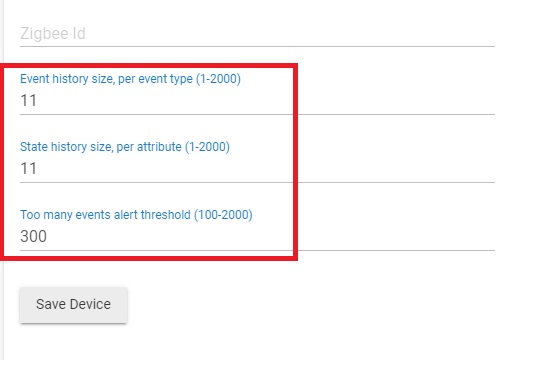
Sure, I can tweak those settings -- but, the exceptions are for the app as well, which I can't tweak. There is no polling setting for the Ecobee device.
The app and event states do indeed show the Ecobee Integration has one of the highest events (device) and time (app) usage on my hub. But what can I do about that, it's a built-in app?
I've been using the Ecobee Integration for several years now. 2.3.2 runs fine -- 2.3.3 generates a ton of LimitExceededException exceptions and eventually crashes the event queue.
FWIW I also run Ecobee Integration and have not seen these errors. I have my history sizes set as @neonturbo suggests and polling configured for 5 min in the app. Not only am I not seeing these errors but the ecobee app is way down the list in terms of usage.
Not sure how this helps other than it does not appear to be a general issue with the release, perhaps something more specific to your setup?
If you look at events coming from one of the sensors do you see them often, or once every 5 min?
1 Like
I also have the app polling at 5 minutes. I have five Ecobee remote sensors, nothing excessive on the reporting -- they report one or two events (temp, motion) once every 5 minutes. And same for the Ecobee thermostat.
@brad5 You're on 2.3.3 and aren't seeing any LimitExceededExceptions in your logs? How many remote Ecobee sensors do you have?
Correct. 2.3.3.140. I have 9 sensors.
Have you tried downgrading to the previous platform release and seeing if the problem goes away?
As I mentioned at the start, 2.3.2 works without issue.
Ah sorry missed that. I suppose you could try a restore from your most recent backup. That does a soft reset and ends up cleaning the database. It's a long shot but if all else fails you might give it a shot.
1 Like
After resetting my stats and running for over 3 hours, it sure seems like my hub is not overloaded, nor that Ecobee is causing undo stress:
- Total device load: 2m 11s busy / 3h 13m 3s total (1.1%)
- Total app load: 1m 58s busy / 3h 13m 16s total (1.0%)
- Ecobee thermostat device: 0.175% of the load
- Ecobee Integration app: 0.343% of the load
I'll upgrade again to 2.3.3 later this week and see if the event limit exceptions occur again.
Before upgrading to 2.3.3
Download a backup from settings>>backup
Do a soft reset and use the downloaded DB to restore when prompted.
Now do the platform update.
This will ensure there is no corruption being transferred to the new database format and that can be eliminated as an issue
Also are you using the built in ecobee integration of the 3rd party suite?
Built-in integration.
I will do a backup soft reset and restore before doing the 2.3.3 upgrade.
1 Like
Update:
I did a backup, soft reset, and then restored the backup. After a couple of hours, I upgraded from 2.3.2.141 to the new 2.3.4.114 release. Initially the upgrade gave me a scare, as it resulted in my hubitat to reverting back to setup mode! I had to restore a backup to get a working system after the upgrade. But I'm happy to report the LimitExceedExceptions I was seeing after the last 2.3.3 upgrade have disappeared.
The 2.3.4 upgrade is running fine, no issues so far. I'm pretty sure the soft reset corrected some issue with the database, so thanks @brad5 and @rlithgow1 for the recommendations.
2 Likes
This topic was automatically closed 365 days after the last reply. New replies are no longer allowed.

