My C7 Hubs Zigbee Radio isn't working anymore since the latest update, have tried rebooting, power cycle, Enable / Disable but nothing worked, I bought a new hub thinking I would be able to do a cloud back up and migrate. Subscribed but cloud back is failing. I have created a support ticket, sent an email but no response. Lots of my daily automation depend on some zigbee devices. @bobbyD @Hubitat_Staff @nghtly_strngr @support_team Can you please help ? TIA
Have you tried booting in safe mode? Also have you tried rebuilding the hub database?
To where? There is no email support.
The ticket system on the Support page in the upper right corner of this page, or to some extent here on the forums is also a way you can contact staff. I think you should have received an auto-reply from the support email with a ticket number or at least a basic "we received your ticket" message.
In addition to what @aaiyar said, you could roll back to the previous update by using the diagnostic tool in the Settings tab of the hub and see if Zigbee comes back.
I would be very surprised if an update killed Zigbee, it is more typical to have a bad device or database corruption, which could be fixed like aaiyar addresses in his post.
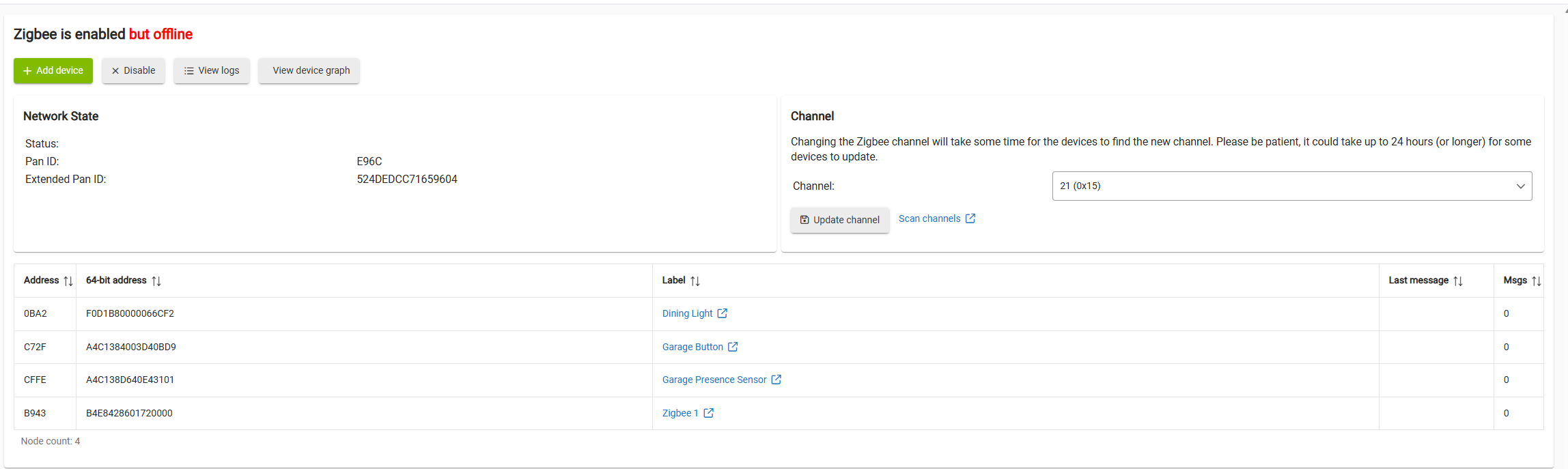
Like I said I had received email from Support@hubitat when i created a ticket last time years ago. This time when i created a ticket i didn't even get any email. I had already tried rolling back to previous update but that didnt help either. Worst part is I can't even crate a backup now for migration.
Hmm, I am fairly certain you should have received some confirmation.
I will tag @bobbyD, maybe he can look into this, and at least confirm your support case went through.
Thank you. I tried removing the last added Zigbee device after which I think Zigbee went offline, disabled zigbee, rebooted, re-enabled zigbee still the same. Log is empty as well. Hopefully BobbyD can help. At this point if I can just get migration ready back up working that would also be helpful. Thank you @neonturbo & @aaiyar for your help.
@neonturbo By the way I just submitted another ticket and didnt receive any email confirmation. Seems liek support system is down :-(.
Are you certain that completing one of the web forms at support.hubitat.com is supposed to result in an auto-generated email to be sent to the user?
It’s a reasonable expectation to have, but I’m not so sure that’s how it works.
Automated email confirmations are not sent when submitting a request through support.hubitat.com.
Selecting the appropriate form can significantly reduce response times. Platform issues are typically escalated for further review and may not receive an individual follow-up. If we confirm an issue, a fix will generally be included in a future platform update.
For warranty-related cases, please use the Warranty form. To file a Hub Protect claim, please use the Subscriptions form.
If the Zigbee radio is offline, the cloud backup cannot be completed. Restoring the radio should also restore backup functionality. Unfortunately, if the Zigbee radio remains offline, it likely indicates a hardware failure. If the hub is covered by an active Hub Protect subscription, you may be eligible for a free replacement.
I submitted the ticket using from and selected platform issues. There is no option in drop down menu to report a HW / Hub issue.
I already have a replacement hub with me, I just need a backup so I can restore/migrate. Are you saying in case of a Zigbee Radio hw failure there is no way to backup/restore ? I only have 3 zigbee devices that I can set up again if I can migrate all the zwave devices / drivers and apps etc. Is that a possibility at all ? It will be very disappointing if a HW failure blocks the back up, IMO that kills the whole purpose of having a backup.
When you say restore the radio, how do i do that ? I already tried disable / enable, reboot etc. It happened right after i added a zigbee device, device was added successfully but Zigbee radio got turned off right after that I think. It had happened before few years ago and you helped me. I don't remember what was done to restore the functionality.
Have you tried performing an orderly hub shutdown (from the settings menu). Then, once the LED on the hub is red, unplug the power from the hub for about 30 seconds. Then, plug the power back into the hub. This process ensures that the Zigbee and Z-Wave radios are fully rebooted, as just a normal hub reboot does not do this.
Yes I tried that a couple of times. Also tried that with disabling Zigbee radio first and plugged in power back on re-enabled.
I have submitted the support ticket with Hubs MAC ID. Can you please possibly check if you can find any issues ?
Thanks.
@bobbyD Hello, Is there any possibility you can access my hub and see if its really a HW issue, Also is the migration possible at all ? Its going to be a lot of work to set up a new hub  from scratch.
You only have 4 zigbee devices total? What about Z-wave, how many?
I have about 25 Zwave devices, Issue is all of these devices are connected to HA and all the automations run on HA. So I'll have to rebuild the whole structure.