I have had C-7 for some years and installed the in two different countries thousands of miles apart. All my devices could worked perfectly with the C-7 and I never had a single bit of problems in controlling my devices - ZWave as well as Zigbee
Therefore, when the C-8 Pro was released, I went ahead and purchased it. Installed it successfully and transferred all data from the C-7 to the C-8 Pro without any issues as well.
For several months everything was working fine in the same manner as with the C-7.
However, since the last couple of months or so the devices do not respond until after several attempts. The icons on the Hubitat App on the phone remain with an 'hourglass'. Sometimes the devices can be activated via the PC interface.
But the problem from the App as well as via the Google Voice App the devices do not appear to be available.
I have tried refreshing the Z Wave devices, uninstalled and reinstalled the Hubitat App but the same problem recurs.
So any suggestions on above issue if anyone has faced similar?
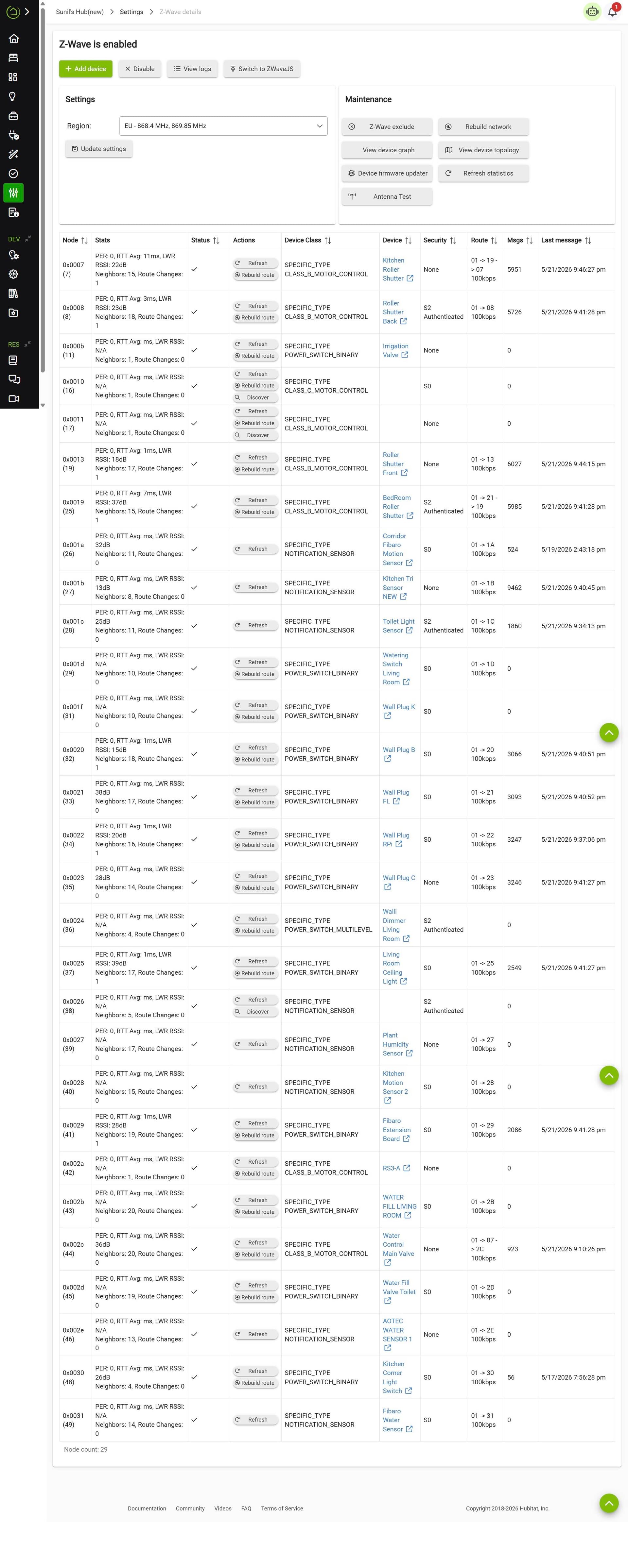
have you done a database rebuild? Can you post your z-wave details page in whole?
I have done the "Rebuild Network" once......Is this the same as "database rebuild"?
Attached are the list of Devices. I hope this gives all the Z Wave info?
(Most of the Devices are Z Wave) . To these devices are connected the Phillips Hue bulbs. They can still work by the Phillips Hue App even if the ZWave devices are not responding.
There are issues with your hub's z-wave mesh. Two major issues:
- There are three z-wave ghosts that must be removed: 16, 17, 38.
- There are several devices paired as S0. These should be excluded and re-paired with S2 security (if they support it) or with no security. S0 is really chatty, and depending on how frequently these devices report to the hub, they can inundate/overwhelm the z-wave mesh.
Both these issues will be easier tor resolve if you switch to ZWaveJS.
No. Do do a database rebuild go to yourhubip??settings>>reboot, choose " show advanced " then pick Rebuild database on reboot.
That said you have 3 ghosts in your table. 16, 17, 38.
They need to be removed or your mesh with be crap. Hit refresh on those lines then hit remove. You may have to do it a few times. If it doesn't remove switch to z-wavejs, reboot, shutdown and unplug for 1 full minute and power back up then attempt removal again. (Sometimes easier to remove in z-wave js)
Thanks. Will do all these steps and revert in a day or two.
Well noted. Many thanks.
Will proceed to carry out these steps as well and revert.
1 Like
@rlithgow1
@aaiyar
I have now completed the procedures provided by you and I am happy to report that the problem seems to have been resolved even without currently changing the security to S2. I will eventually carry out that as well gradually in any case.
Thanks very much for your help and assistance.
5 Likes
For giggles I would finally shut down the hub, unplug for 1 minute then power back up just to clear the radio.
I would also consider a Hub Protect subscription so you can back up the radios. Regular backups DO NOT back up the radios.
Thanks for this.
Yes I will do this too.
Another small question……can any C-8 Pro be adapted to any region of the world based on the initial setup?
I had once used a C-7 bought for Europe in India and it worked fine for nearly 2 years..
Can the C-8 Pro bought for Europe work in Japan in a similar way?
yes. Just set your z-wave for that region. That said your devices need to match that region as well. You don’t have that issue for zigbee. If you aren’t adding to your mesh, you can simply leave your z-wave at eu.
Perfect!
I think I will leave at EU as I have lot of spare Z Wave Fibaro switches and dimmers purchased here. I have just ordered another C-8 Pro to carry to Japan.
Many thanks for your help and assistance.
1 Like