...one of the reasons why I always assign a static to my hub. I was thinking that the hub would be on 192.168.0.55 still since lease expiration between disconnecting from the router and connecting to the laptop would be unlikely (unless the hub tries to renew on an interface bounce). It is VERY odd to me that there's no hub entry in the ARP table for a device that's responding to ping on what appears to be the same subnet. @user7118 Is 192.168.0.55 in your Mac's ARP table with some other MAC address? If so the problem is a duplicate IP.
Thanks for all the good thinking.
From my iOS (iPhone 16) I can access the diagnostic interface - but now that shows an error- reported as a network error.
I only have one network. The Mac is WiFi ping from there reaches the Hub.
Router Ping (TP-Link) also has a PING function. Labeled Habitat (my misspelling)
Habitat
34-E1-D1-81-86-C2
192.168.0.55
Router Ping reports:
PING 192.168.0.55 (192.168.0.55): 64 data bytes
Reply from 192.168.0.55: bytes=64 ttl=64 seq=1 time=2.144 ms
Reply from 192.168.0.55: bytes=64 ttl=64 seq=2 time=2.435 ms
Reply from 192.168.0.55: bytes=64 ttl=64 seq=3 time=2.572 ms
Reply from 192.168.0.55: bytes=64 ttl=64 seq=4 time=2.235 ms
--- Ping Statistic "192.168.0.55" ---
Packets: Sent=4, Received=4, Lost=0 (0.00% loss)
Round-trip min/avg/max = 2.144/2.347/2.572 ms
ping is stopped.
So it is the Hubitat responding.
There is no duplicate in the ARP table (I looked many times, here provided:
mhair@iMac ~ % arp -a
? (192.168.0.1) at 60:83:e7:df:b9:a0 on en1 ifscope [ethernet]
? (192.168.0.13) at 48:a6:b8:45:7d:29 on en1 ifscope [ethernet]
? (192.168.0.22) at 48:a6:b8:45:7d:29 on en1 ifscope [ethernet]
? (192.168.0.31) at d8:bc:38:79:30:78 on en1 ifscope [ethernet]
? (192.168.0.62) at 5e:ac:58:8f:87:ae on en1 ifscope [ethernet]
? (192.168.0.67) at c2:5c:98:b5:84:6 on en1 ifscope permanent [ethernet]
? (192.168.0.81) at a4:cf:99:af:a6:5c on en1 ifscope [ethernet]
? (192.168.0.96) at 54:2a:1b:d6:4a:10 on en1 ifscope [ethernet]
? (192.168.0.116) at 54:2a:1b:d6:4a:10 on en1 ifscope [ethernet]
? (192.168.0.122) at a4:cf:99:ac:84:6e on en1 ifscope [ethernet]
? (192.168.0.154) at 96:15:7f:29:5d:40 on en1 ifscope [ethernet]
? (192.168.0.166) at c0:95:6d:a5:d4:5b on en1 ifscope [ethernet]
? (192.168.0.180) at 54:2a:1b:48:35:dc on en1 ifscope [ethernet]
? (192.168.0.183) at 7e:8c:1e:fd:6c:48 on en1 ifscope [ethernet]
? (192.168.0.188) at 54:2a:1b:d6:4a:10 on en1 ifscope [ethernet]
? (192.168.0.212) at 48:a6:b8:8f:9f:c8 on en1 ifscope [ethernet]
? (192.168.0.235) at 8c:26:aa:dc:a8:41 on en1 ifscope [ethernet]
? (192.168.0.249) at 54:2a:1b:d6:4a:10 on en1 ifscope [ethernet]
? (192.168.0.255) at ff:ff:ff:ff:ff:ff on en1 ifscope [ethernet]
mdns.mcast.net (224.0.0.251) at 1:0:5e:0:0:fb on en1 ifscope permanent [ethernet]
mhair@iMac ~ %
(aside - not sure why report shows Ethernet. No Ethernet cable is attached to the Mac)
Mystery
So you could access it before but now you cannot? Now getting a "network error" ? What kind of an error, just a browser error saying not available or something else?
I can't explain how you can successfully ping your hub from your Mac, yet its ARP table doesn't show the entry. That generally means that the destination address isn't on the same network or the entry itself has aged off (which wouldn't be the case if you first pinged the hub then immediately after did the arp -a). Clearly from what you are showing, you appear to only have one local network which is 192.168.0.0/24 with your gateway at 192.168.0.1 and a DHCP server which manages most if not all of the remaining 253 addresses on that subnet. I'm inclined to consider the ARP mystery a red herring therefore and would continue to pursue this as a hub issue. I've read that you can clear up a diagnostic page unreachable problem by using the following endpoint:
http://192.168.0.55:8081/deleteDatabaseTraceFiles
It should return a one line response indicating files found/deleted. Then, you would need to reboot the hub to see if you can reach the diagnostic interface again. Rebooting the hub without being able to do a shutdown could risk corrupting the database however. I'd try the above command to see if you get a response then maybe try shutting down using the shutdown endpoint at http://192.168.0.55/hub/shutdown.
Good morning,
Couple of things:
The response times are way high on the hub. Should be 1ms for the most part.
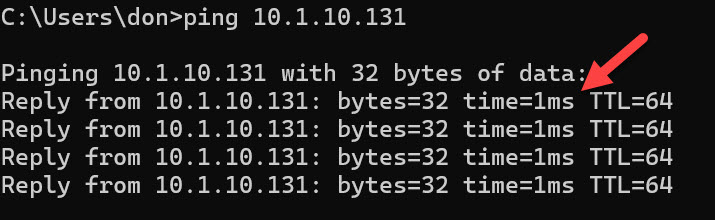
I apologize if I missed it reading through the thread but of the IP address on the hub is static you could try moving it and you MAC to a standalone hub or switch if you have one and try to isolate it that way.
1 Like
a ping to the broadcast address may get the devices to populate the arp table.
ping 10.0.0.255.
Or a ping sweep using nmap
nmap -sn 10.0.0.1-254
This way if a host is on an unexpected address, you can find it.
Thank you kindly - but I am going to abandon the Hubitat device. I sometime can get to it. Sometimes get diagnostic screen, sometimes get Home on device, could not get to where I could do a local restore. All on same network (Etherenet to Hub) wifi to all othere. Sometimes with iOS, sometimes with an intel MacBook Pro, sometimes with iMac, have not tried my iPads.
I will be replacing all 9 of my Z wave wall switches with Matter devices - the cost is less than getting a new Hubitat.
Thank you again for all your assistance. If anyone wants to further research, I am open to that - my original install of Hubitat to Apple Home via Matter was successfully assisted by someone in this community from NY area who fixed a bug in the Hubitat. Thanks for the couple of years working as expected.
I'm off to Matter World!
1 Like
I'd be worried about your network based on your post. There's something odd going on with Ethernet connected and WiFi devices sharing the same subnet. Your intermittent problem description would seem to re-enforce this. Generally this is not an inherent HE issue (I have the same setup where my hub is ethernet connected and I access via WiFi on the same subnet).
Good luck with matter/homekit!
1 Like

