Randomly my HE will stop controlling any and all devices. The only way i can get it working again is to reboot.
Do i have too many automations?
Is it load?
Has the HE run out of memory?
For example i have a goodnight scene. The logs show it activateing and completing but nothing happened.
I tried manually triggering rules. nothing happened.
i tried individual devices. nothing happened.
Try doing a reboot, when the reboot dialogue first appears select the checkbox to show advanced options, and then choose the option to rebuild the database during the reboot.
If that doesn't help, or doesn't completely solve it, then do a shutdown, full power from your hub when the LED is red and wait 30 seconds, and then plug your hub back in again and wait for some boot up and look at things again.
Also if you need additional help you need to let us know what hub you have what platform version you're on, and what types of devices you're trying to control (type, brand).
“Randomly” is a little bit vague. Can you please provide a little more detail as to the frequency of these events? After a reboot, what would you estimate to be the minimum amount of time before the problem reoccurs? Minutes, hours, days, weeks, months? Knowing this will help the community help focus the troubleshooting.
Also, if you look through your hub’s Past Logs, does anything stand out that might help point to the issue?
So it taking down both Zwave and Zigbee? Usually one or the other fails if it is a mesh issue, so your issue does seem more systematic.
I doubt you have too many automations. What hub are you on? I have a C8 that I push very hard with many automations, and hundreds of devices, so that seems unlikely.
Load shouldn't be an issue unless you have a misbehaving driver or app causing load issues.
I think you need to do more digging to provide more input here for diagnosis. Maybe try installing the Hub Info App by @thebearmay from package manager or from the code link below.
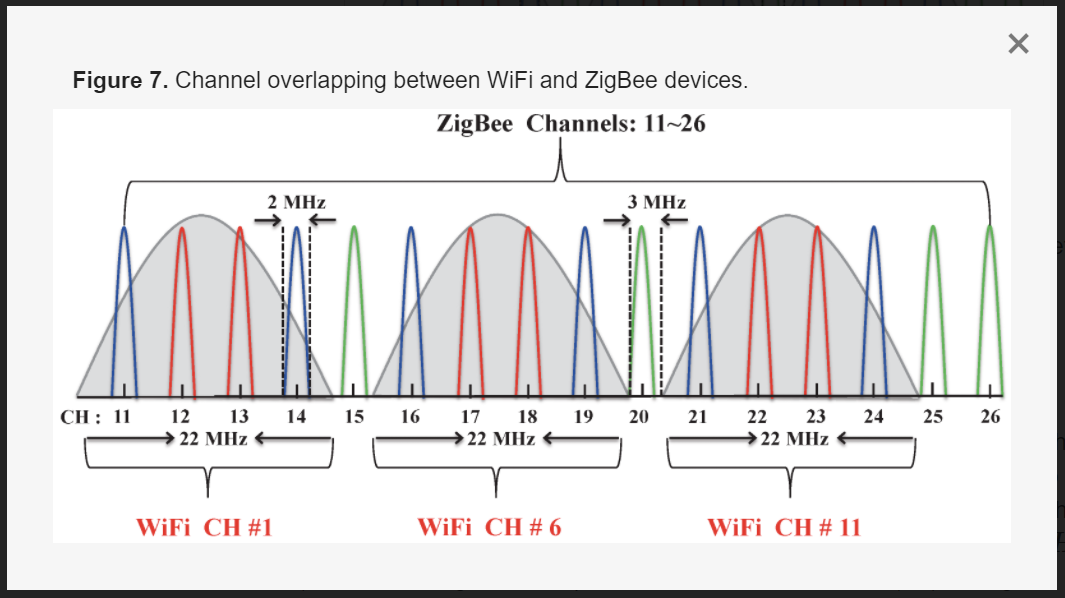
Also, check which channel your WiFi router is using. I have my WiFi router set to use channel 1 and my HE set to Zigbee channel 25 so they are as far apart as possible. The only time mine seems to lose devices is when the device's battery runs down and I haven't been paying attention. Either that, or some devices like my Iris V1 devices are no longer supported by the C8-Pro, so they are retired. Some other, older devices also stopped cooperating (Iris V2 Smart Fob, for example) so they are also retired.
After a reboot it will go days and sometimes weeks
I have C8.
Also when it acts up it's everything, BLE devices, zigbee devices, matter, etc...
zigbee channel is 20 power 12
z-wave is US-LR - 908.4 Mhz, 916 Mhz
i have multiple wifi routers so they are on 1, 6, 11
I would think if it was interference from other wireless things that it would happen all the time.
In the logs it looks like the commands are being sent but nothing happens. I do have a couple of errors but those devices are currently unplugged so i expect an error for those.
Your hub might be experiencing a slow memory leak. Hubitat has fixed most of these leaks, but sometimes it still happens and over time the hub's performance can become compromised. This is just a hypothesis as to what your hub might be experiencing.
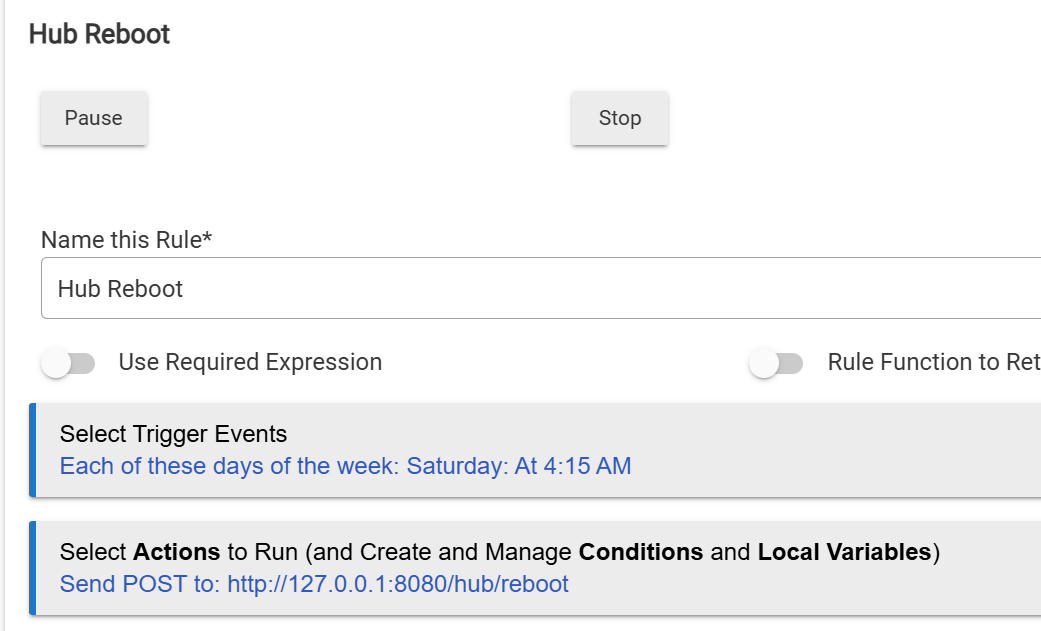
A very simple workaround for this is to simply automatically reboot your hub once a week using Rule Machine. It is a very simple trigger and action. I have been doing this on my Hubitat hub since back in the C-3 hub days of 2018. I am now running a C8-Pro, but I have left this rule in place as it hasn't hurt anything and my hub runs very smoothly.
Here is the rule I use. Your ACTION section would look exactly the same, as the 127.0.0.1:8080 address and port point to the local machine the rule is running on, regardless of the Hub's normal TCP/IP address.
I am a fan of the KISS principle. Thus, this very basic rule ensures that my hub is running smoothly every Saturday morning. I chose that day of the week as I knew I would be home should the reboot go awry. This has never happened, but always best to be prepared.
Others have chosen to use the Hub Info driver to monitor and then react to a low memory situation. IMHO, that just adds extra complexity to my system. Again, big fan of KISS here!
I said BLE because everything stops working. but in reality I don't even have any BLE. I replaced all those devices when i moved away from HomeKit. As for zigbee channels
WiFi Channel 1 overlaps with ZigBee Channel 11.
WiFi Channel 6 overlaps with ZigBee Channels 15 and 16.
WiFi Channel 11 overlaps with ZigBee Channels 25 and 26.
Yep, as long as you're using a 20MHz channel width on your 2.4GHz WiFi access points (WiFi channels 1, 6, & 11, ) Zigbee channel 20 should be in the clear.
I am using 20Mhz. Also scheduling a reboot every night has solved the problem. Besides the problem was not just related to zigbee devices. Everything stoped working.
i have 130 devices and only 8 of hem are zigbee.
this is not a zigbee issue when all devices stop working.
its not a Wifi issue. i have no overlapping networks and i have no neighbors.
it has to be something in the C8. either too much load or memory leak or something like that. A reboot always solves the issue.
You don't have a highly loaded hub, 130 devices should not be a problem at all on a C8.
FWIW, if you did want to get more details behind what do look like memory issues on your hub (since solved by nightly reboot), you could use an app to track your hub's memory over time. One excellent app that does that is Hub-a-Dashery, another is Watchtower, you can find both in HPM.