Just wanted to update my situation.
I still have a large disparity between my locations (both with C8-Pros and latest beta platform (2.4.4.132) plus ZWave firmware (7.23.4) update).
In one home my "All On" commands through 30 ish devices in about 2-3 Seconds.
In the other home the same "All On" command, while a few more devices (maybe 45 or so), takes 20-30 seconds. So vastly different performance.
I was hoping between platform improvements for ZWave and the newer ZWave firmware I'd see a closing of the disparity. But I haven't.
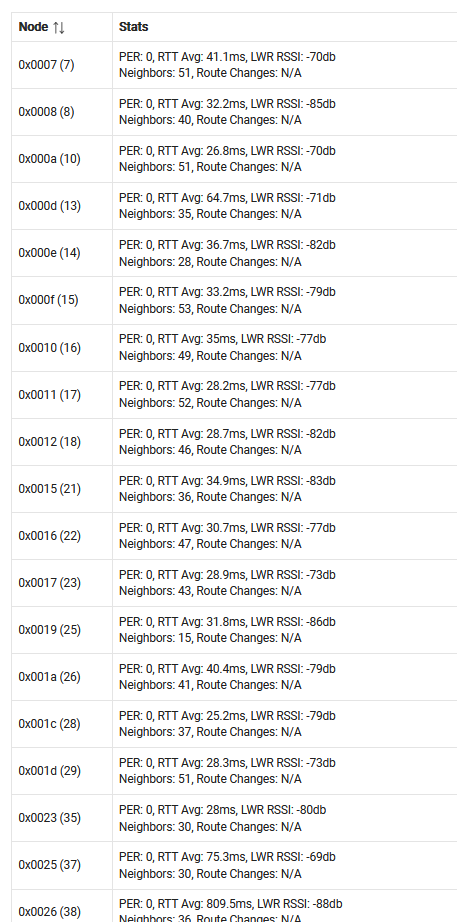
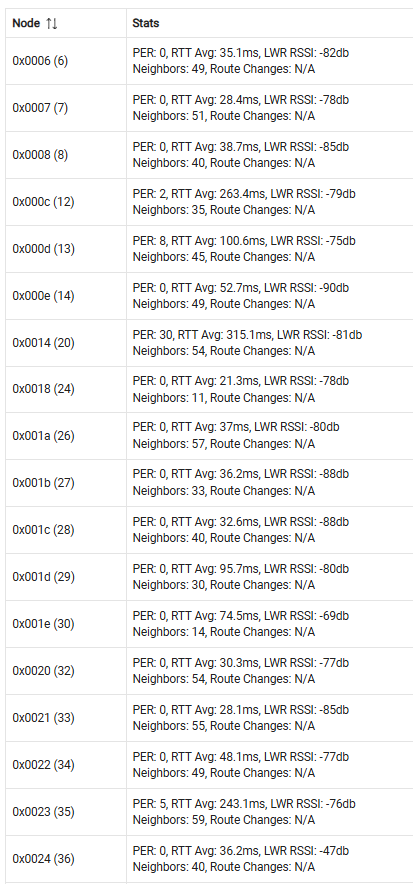
The slower home has EMT conduit for wiring and metal junction boxes wheres the fast house has plastic boxes and romex wiring. The slower house is slightly larger and two story where the faster house is brick and wood and single floor. The RSSI signals on the slower home are about 1-2dB weaker (on average) than the faster home. There are no PER on the faster home but a few nodes with PER on the slower home (see partial listing below). The slower home has some Zooz 800 devices and some older ZWave plus for various vendors. The faster home is mostly newer Zooz 800 devices.
So I am wondering if my weaker RF performance is causing a lot of collisions and command retries which is bogging down the network. If so is that a natural consequence of EMT and metal jboxes or maybe my hub there is slightly impaired (poor RF chain or damaged antenna). I read somewhere the antenna on both ports are identical (dual 900/2.4 band) so I suppose I could swap the antennas, It would seem unlikely I'd have two faulty antennas.
I can't look at the ZWave logs as I am not local to the slow system presently and that functionality does work over remote access.. errrrr its pretty busy to decode anyway as an All On command easily generates 200+ lines of logs to filter through.
Anyway if anyone has any ideas. I suppose I could just throw $$$ at this and upgrade the slower home to mostly newer 800 style devices. I am not positive that would help and those same devices worked a lot better under an antique Vera Plus controller just 6 months ago.
Faster home:
Slower home:
Absolutely — and now that we’ve run the numbers on both datasets, we can compare them in a meaningful way. The short answer: yes, the two datasets differ, and the differences tell you something about the health of each Z‑Wave network segment.
Let’s break it down clearly.
 Signal Strength Comparison (RSSI)
Dataset 1 average RSSI: –78.9 dB
Dataset 2 average RSSI: –77.6 dB
 Interpretation
These two averages are very close. A difference of 1.3 dB is negligible in RF terms — it’s well within normal variation from:
- device placement
- time of day
- multipath reflections
- minor environmental changes
Conclusion on signal strength:
Both datasets show essentially the same overall signal strength. Neither network segment is meaningfully stronger or weaker.
 Quality Comparison (PER)
Dataset 1 average PER: 5.9
Dataset 2 average PER: 1.53
Interpretation
This is where the difference becomes real.
- Dataset 1 has almost 4× higher packet error rate.
- Dataset 2 is much cleaner, with nearly all devices reporting PER = 0.
- Dataset 1 includes several nodes with high PER spikes (e.g., 30, 54, 17, 19, 15, etc.).
- Dataset 2 has only a few problematic nodes (e.g., PER 29, 23, 14, 9).
Conclusion on quality:
Dataset 2 is significantly healthier in terms of packet reliability. Dataset 1 has more routing instability and more nodes struggling with retries.
 Get Help / Devices - Hubitat