Since Zwave migration from a C8 to C8 pro appears to be broken and there doesn't appear to be any movement on fixing it, it seems i'll need to tear my Z-wave mesh down and rebuild it (about 40 devices, 10 or so Z-wave LR).
I know how to exclude battery devices fine, but how do I exclude hard wired switches and dimmers (Zooz zen 73 and 73 's mostly)? Im hoping I dont need to go full nuclear and physically removes them. Am I over thinking this? Please help! Thanks
The overall exclusion process is the same for battery or mains devices -- the nitty-gritty details (button mashes) of course vary by device.
But there should be no need to physically remove a wired device for exclusion.
The one caveat would be any ZW devices originally added via SmartStart -- unless thier SS entry is disabled (i.e. via Jeff's SS-Manager app), they will - as I understand it - try to immediately re-include via SS (IF currently powered or when power is next applied)
Edited to add that last blurb about being powered
is there a way to avoid that? Probably half if not more were added with smart start.
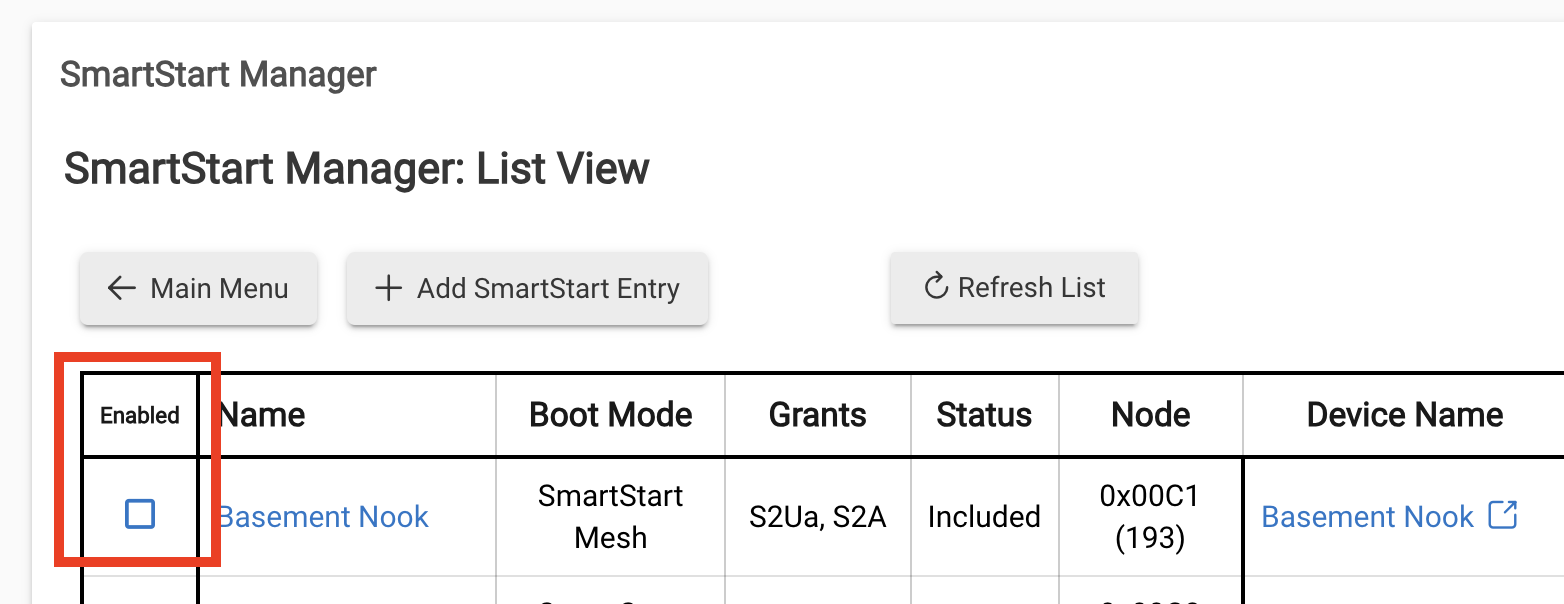
To avoid that, remove them from the Smart Start app before excluding them.
I would also add that you may have enabled multi presses on the Z73. In that case the normal three presses to exclude/include won't work. You'd probably want to restore that option to default and then exclude.
This might be the safer way when dealing with mesh z-wave, rather than putting a device reset to factory, which is still available even with multi presses enabled, in the mix. I think ghosts are still a thing with mesh, even with zwjs, but I'm not certain.
My terminology might not be 100%, so don't shoot me.
Im not worried about ghosts. I have busted enough of those I could almost do it in my sleep. I’m more disappointed than i need to rebuild the mesh from the ground up.
So just unchecking those will prevent the issue ?
As I understand it (though @jtp10181 's confirmation would be best), unchecking that box will prevent SS from trying to auto re-include.
Yes, that is correct. When you uncheck it in my SS app it actually deletes it from the hubs SmartStart list but keeps a copy of the data saved in the app itself. So you will only see it in my app once disabled, in the Hubitat mobile app it will be deleted. So the hub will no longer try to include that device while it is disabled. You can also just delete it totally but I like to keep it handy for when I am ready to include again.
If you check it again the app uses the saved data to put it back on the hubs list same as it was before.
Perfect - thank you, sir!
Just reread this. For some reason I was thinking there was something about removing power, or am I confusing that with removing ghosts?
Neither exclusion or ghost removal requires powering off the device. Exclusion needs the device to respond, so must have power. Ghosts are presumed to be dead nodes with no physical device attached, so there is no device on that node ID to power down. The whole powering down devices for ghost removal is a myth based on anecdotal stories.