Hi Folks!!! Cool news, I've implemented a few updates to HousePanel, starting with the feature inspired by newbie @Automation_Ken that allows GET or POST calls used in the customizer to return values that show on the tile. The way this works is any values returned by GET or POST in string format are shown directly in place of the request. If an object is returned, the object fields are scanned and if the name of the field is found as a key in the object, that key's value is used and shown in the tile. If no fields match the key, a key of "value" is attempted and if found it will be used. If that isn't there, then the default placeholder of "GET::field" will be unchanged. I made this such that ANY field in the tile that matches a key in the returned object will be replaced by that key's value. For example, let's say your GET call returns a JSON object: {id: 123, flow: 67.4, pressure: 23.8}. You can show the flow and pressure values by naming your GET field "flow" and adding a custom TEXT custom field named "pressure".
I also updated the way the Options screen works. There are now 2 options screens. One for various setup parameters and one for modifying which devices are in which rooms. The frames and weather tiles are configured on the first type. This was simplified too, by allowing you to paste in any random block of code to be save to one of the framex.html files, where x is an integer. The new block looks like this:
Notice that you still have the option to use the old-school weatherwidget.io and Accuweather settings, but it is a lot easier to just launch those websites and copy/paste the widget code blocks into the Option 2 window.
[EDIT] The Frame2 tile associated with Accuweather uses a legacy access code and widget that is no longer available on their website, but the existing setup still works, at least for now. I recommend skipping this and using a supported widget like weatherwidget. Frame2 AccuWeather tile auto-generation will be removed from future versions of HP.
Finally, this version cleans up and enhances the LIST graphics and table a bit. Behind the scenes the code underwent a major cleanup thanks to the modern AI code assistants available these days. I also made some architecture changes to streamline things and speed things up a bit. For example, LINK tiles no longer use a "sidecar" element which was a big reason things slowed down when lots of links were used, but no longer. I also fixed an old bug in the Rules engine that prevented multi-step rules from running properly. Now you can string together as many rules as you like and it works.
Bottom line, this version has had some TLC and worth a look if you're using an older version, or if you've always wanted to try out HP, now is a great time to do so.
Here's a reminder of how cool your dashboard can look with HP!!!
I have a request from a user to add Ambient weather support. Their API looks simple enough and others have written apps for Ambient. Anyone else interested in this?
Grab the latest with the usual pull from the HousePanel repo. You'll need to update your groovy app for this update. To use it, provide your Ambient Weather API key in the groovy app and then a new weather tile will magically show up in your list of devices.
[EDIT] I just checked and realized that HPM automagically updates itself with the latest version pushed to github, so HPM is in fact updated to reflect this new version.
[EDIT] Here's what the new Ambient Weather tile looks like after a little bit of tile styling in the editor.
Thanks @MikeW707 for the kind words and for your feedback about things that needed attention in HousePanel. I'm pleased to let everyone know that I uploaded Version 3.5.10 today to the HousePanel repo. The groovy file wasn't changed so no need to update your HPM; just re-pull the latest from Github and do a npm install and restart your server, and you'll be good to go.
This version includes on-screen resizing in south, east, and northeast directions, in addition to free movement on the page. Three arrows will pop up when you hover over a tile in edit mode as shown below.
The biggest change is a major rewrite of the underlying architecture for handling on-screen updates based on changes happening on the hub. It worked before, but it wasn't efficient and it was fragile to not working for some users. With this update it hopefully will work out of the box for most people.
I'm in year 8 of development on this app and my documentation has not kept up with the features, so there is so much that HousePanel can do that I haven't told anyone about. My favorite example is the LIST custom tile element. In the Tile Customizer, you pick a LIST type and then point to what you want to list, and HousePanel will make a graph of the parameter over time. For example, you can make a graph of the weather in your city over time using this feature. HousePanel also reports an average in the on-screen print that pops up when you click on the link. That's just one example. There are so many more. My goal over the next few weeks is to update the online docs at https://housepanel.net so stay tuned for that.
If anyone grabbed HousePanel recently you should grab it again because a nasty bug was found and fixed. The corrected version is V3.5.12 so if you have any version lower than that, please update by pulling it from the main repo as usual.
Hi Folks... dropping Version 3.5.14 of HousePanel tonight. This version includes a powerful new feature that allows users to specify any CSS formatting they want in the Tile Editor via the new "Custom" button that is now in that dialog, shown here:
Just hit the "Custom" button and specify your styling in the dialog box shown above, such as: color: blue; You can string any number of styles together separated by semicolons. Any valid CSS styling command can be given, including but not limited to those you can set with the other controls. If you later use the other controls it may override what you specify here.
This version also includes native support for Harmony hubs if you have the Maddox API running somewhere, but I'm not happy with the look and feel of it, so I'm not documenting it yet.
I’m having so much fun jamming new features into HousePanel even though I know not many people use it these days.
Right now I’m adding new editing features and an AI mode where HousePanel formats the device updates in JSONL format used to fine tune AI models. I figured the app captures activity to update tiles, why not save that activity to train an AI model about how you move about and control devices in your home? I’m still working on it but it’s such a big thing I wanted to tell folks about it now so you interested parties can work on getting up to speed on HousePanel now.
Okay, so before I get to the "fun" stuff of finishing my AI implementation, I had some long-standing dragons to slay as bug fixes and unfinished features. Posted Version 3.5.17 that addresses the following:
Hub refresh now works when you specify a hubtimer value
Power change detection was broken and is now fixed
Subscriptions were not properly throttled so people with a large number of devices would see warnings or errors. This was fixed
Obscure rare bug in color bulb updating not working was fixed
Typos in code comments and debug statements were fixed
Inline formatting now works as it should in the Tile Editor
This bugfix is worth grabbing if you're an active user.
Posted another "meaty" update to HousePanel tonight that includes a major overhaul of the Options page. This update makes it easy for users to upload their favorite photos and videos into the image and video custom tiles, and simplifies the process of modifying other options. This also cleans up how Frames and Weather tiles are configured.
Here's what the Frame editor now looks like, including a preview:
And this is what the Image editor now looks like. The old editor used to repurpose the "name" field for the url. The new approach adds a url field so you can use the name field as a tile name as normal. The new video editor is similar. Image and Video editors also include preview windows.
My understanding of how Docker works is that each app needs to run in its own container, so I don't think you can run HousePanel on the same Echo Speaks container.
It should co-exist just fine on the same RPI with Echo Speaks and other applications. I have multiple apps running on my Debian Linux machine alongside HousePanel without any issues.
I don't know the exact requirements but the load is small. One core is all that is needed. It is a Node.js app and most data stays in the sqlite3 database until it is needed, at which point it is loaded dynamically
That should work fine. The main requirement is the OS must be able to run the sqlite3 database and have a working Node and NPM installations. Everything you need beyond that is in the github repo and is installed when you clone and do npm install.
That container isn’t running echo speaks, per se. It’s running the cookie refresh server for echo speaks, which consumes practically no resources.
Sounds like HousePanel is very lightweight too, so it’s unlikely you’d have a resource problem (although I guess it depends what’s allocated to the lxc container).
I believe most people run different services in different lxc containers to isolate them from one another.
Yes that is true. It’s just code so sure you could run HousePanel alongside anything in the same container but I don’t see any advantages in doing that. Just make a separate HousePanel container. And yes, HousePanel is very lightweight.
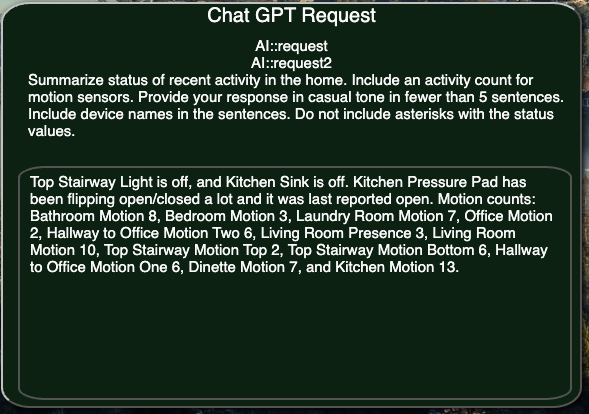
AI in dashboards is finally here! I have successfully integrated Chat GPT into HousePanel using the Open AI API. The code keeps a rolling context window of the last 25 events (or however many you set in the config file) and feeds that for context. In the customizer you add a new AI field to any tile and a TEXT field named “response”. The value of the AI field is set to the prompt and chat GPT will populate the response field. Behind the scenes I keep a second rolling context for noisy motion sensors and track the count and latest active motion. Finally I wired up the tools function to learn how to call the Hubitat hub to get info directly and to optionally control devices per the prompt.
In my early testing this worked great - I asked for a 4 sentence summary of activity in the home and “voila” I got it. Here's the screenshot of my custom tile outfitted with the AI features:
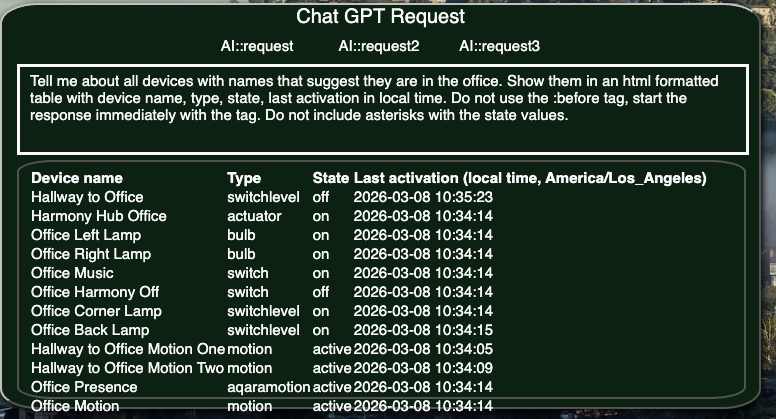
Here's another one where I asked for all devices associated with my office presented in a html table.
The action testing is still underway. This is next level stuff folks and I can’t wait to share it with the Hubitat world. My next post will show you some screen shots of how it works. The GitHub repo hasn’t yet been updated because I need to do more testing but I just couldn’t wait to tell everyone this is coming. To use it you’ll need an Open AI api key since this uses the bring your own key model. For now I use gpt-5.2 as the model with reasoning set to low. This gives fast results that are also very thoughtful.
Finished round 1 of testing and debugging this powerful new feature. I have the hub query function working. Here's an example where the prompt included instructions to query the hub for the thermostat status since I knew it wasn't in the context. Devices only show up in the context if they change state and my thermostat has been idle. Here's the result.
Pretty cool eh? To make this tile it was simple. I just added a Custom tile to the page, then used the Tile Customizer and added three AI trigger fields, each with a different prompt set as the value. Then I added a prompt TEXT field to hold the prompt and a "response" TEXT custom field to hold the result. These TEXT custom fields are important because you won’t see the prompt and response without it. Actually the response will show up replacing the trigger AI field. Then I used the Tile Editor to set the sizes, colors, and placements of all these custom fields. Here's what the Customizer Tile looks like:
I’m considering making a specific AI tile type with built-in prompt and response fields to simplify the flow. Thoughts on that? I sort of like the flexibility of adding an AI prompt to any existing tile.
I'm uploading this version in a branch called "aisidecar" for those brave souls who want to try it out. I still have some hardening and more testing to do before I will merge it into main. To use this you need to edit housepanel.cfg and provide your openai_api_key value. You can optionally also provide the other 4 config keys and set them to your liking:
And finally, yes, you guessed it -- all the AI stuff happens in a Python file call hpsidecar.py that you have to launch separately and keep running in the background. So you'll need Python installed. I'll document all this more clearly later in the usual place on the housepanel.net webpage.
Updated the aisidecar branch to include a patch that sets up the pythonURL path immediately to avoid errors when the hub starts sending messages before the user loads a dashboard. Also now include a bash script to launch both the sidecar in python and the main hpserver.js Node app. I use this in my service setup file but you can use it from the command line just as well. It works best when you set the HP_VENV and NODE_BIN environment variables before calling the script. I do that inside my hpserver.service file. The others can stay at their defaults. Here's a copy of the script:
#!/usr/bin/env bash
set -euo pipefail

WORKDIR="${WORKDIR:-$(cd "$(dirname "$0")" && pwd)}"
PYTHON_APP="${PYTHON_APP:-hpsidecar.py}"
NODE_APP="${NODE_APP:-hpserver.js}"
HP_VENV="${HP_VENV:-$HOME/venvs/housepanel}"
NODE_BIN="${NODE_BIN:-node}"
PYTHON_BIN="${HP_VENV}/bin/python"

if [[ ! -x "${PYTHON_BIN}" ]]; then
  echo "Missing virtualenv python at: ${PYTHON_BIN}" >&2
  echo "Create it with: python3 -m venv ${HP_VENV}" >&2
  exit 1
fi

if [[ ! -f "${WORKDIR}/${PYTHON_APP}" ]]; then
  echo "Missing sidecar app: ${WORKDIR}/${PYTHON_APP}" >&2
  exit 1
fi

if [[ ! -f "${WORKDIR}/${NODE_APP}" ]]; then
  echo "Missing node app: ${WORKDIR}/${NODE_APP}" >&2
  exit 1
fi

cleanup() {
  if [[ -n "${PY_PID:-}" ]]; then kill "${PY_PID}" 2>/dev/null || true; fi
  if [[ -n "${NODE_PID:-}" ]]; then kill "${NODE_PID}" 2>/dev/null || true; fi
  wait || true
}
trap cleanup EXIT INT TERM

cd "${WORKDIR}"

"${PYTHON_BIN}" "${PYTHON_APP}" &
PY_PID=$!

"${NODE_BIN}" "${NODE_APP}" &
NODE_PID=$!

# If either process exits, shut both down so systemd can restart the service.
wait -n "${PY_PID}" "${NODE_PID}"
exit 1