Without any "traditional" chime box. But the manufacturer of the video-doorbell provided what they call a "power box", and here's how to connect it. Instead of the chime, in the schema below, I used the SAGE sensor. Then I configured the video-doorbell as an "electronic chime".
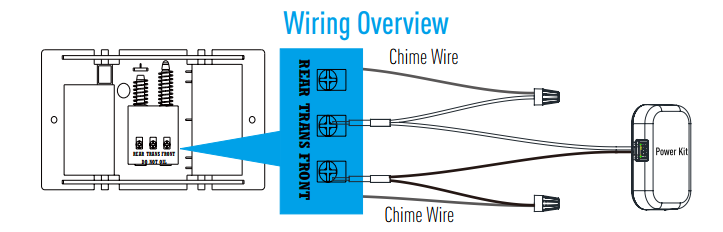
This is a more detailed schema. The chime represents the SAGE sensor.
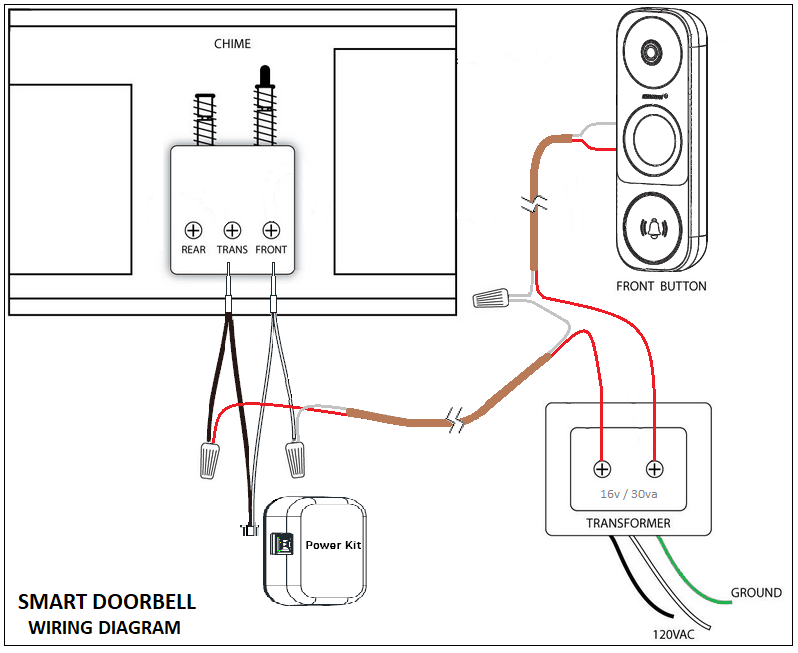
With the official driver, it only worked after the pairing of the sensor. With the user developed driver, it works pretty stable. Only thing I noticed is that when I turn off/on the transformer (simulating a power off/on event), the sensor doesn't trigger, I have to turn it off and then on removing the battery, but no pairing is needed, just a reboot, then it starts working perfectly.
I'm waiting for this other sensor: Doorbell Modernizr to be shipped. Difference is that is powere by a 5V transformer and it works via wifi, not zigbee. Uses MQTT as interface. Unfortunately HE is not the right hub for MQTT, but I read some threads about a possible MQTT client implementation for HE.
Hope it helps anybody with my same installation requirements. 