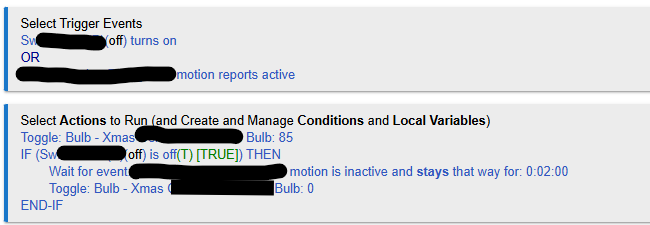
I am trying to write a motion rule, using Rule Machine, to turn on a bulb and no matter what permutation or combination I use, the bulb turns off when I don't expect it to. What am I doing wrong?
Three devices are involved:
The zigbee bulb that I am trying to turn on and off. Device is Xmas bulb in the below.
An overhead light controlled by a switch - device is SW in the below. If the light is on, the zigbee Xmas bulb should go on to 85%.
A motion sensor. If overhead light is off, the Zigbee Xmas bulb should go on to 85% when motion sensor reports active, and go off 2 minutes after the motion sensor reports inactive.
The problem: Light constantly goes off after 2 minutes no matter what, and I have to retrigger the motion sensor to get it back on. I want to use Rule Machine because I want to understand what I am doing wrong. I am starting to suspect I need two rules - one for turning the Xmas bulb on, and another for turning it off, but I'd rather learn how to do both in one rule.
Do you having logging on as that would be the first place I would check. With that said, I see a problem right away. What is the length of time for your motion sensor to go from active to inactive? If I had to guess, that first toggle command is constantly being triggered and turning off the bulb. Your rule might not even make it to the wait command. Toggle will always turn off a bulb if it is on and turn on a bulb if it is off. You could try something like the following:
Triggers
Switch turns on (only if Private Boolean is True)
Motion Active (only if Private Boolean is True)
Actions
Set Private Boolean to False
If overhead light is off,
set bulb to 85%
Else
set bulb to whatever % it should be if overhead is on
End-If
Wait for Events
Turn off bulb
Set Private Boolean to True
I think you need the Private Boolean to prevent your rule from running multiple instances, but it is tough to say without seeing logging.
@JB10 Thank you. I think I finally got it fixed, based on what you wrote in your response - calling out the "Toggle" command.
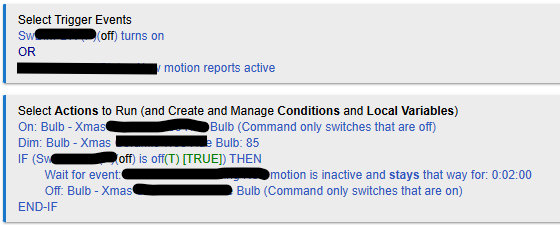
When I wrote the rule, I selected bulb, since that is what the device I'm trying to control is, and there was no on/off option, only a toggle option. I thought when toggle was followed by the dim level (ie 0 or 85) it would go to the proper level, but that is not the case. Toggle just turns it on and off. So I changed the rule to the following which seems to work great:
I'm glad it seems to be working! It can be slightly confusing, but bulbs (and dimmers for that matter) will also be found under control switches. That is where the On/Off commands live for them. The Set Dimmers/Bulbs actions are for the features that help differentiate dimmers/bulbs from just switches (level, CT, color, fades, etc...).
What is even more fun is that depending on the device/driver combination, a setLevel = 0 command will turn off most bulbs/dimmers. Also, a command of setLevel = 85 (as per your rule) will usually send an ON command and a LEVEL command at the same time (depending on the device/driver). You might want to play around and see if it works for your device as this would allow you to potentially combine the first two actions.
Thanks. For now I need to leave it as I've been advised if it stops working again it's getting a regular bulb installed and will be lit 24/7 during Xmas....
I'll try to play around with it after Xmas when it is not such an apparently sensitive issue...