I have tried to remove these devices using the refresh + remove option, but the remove button (which you can see in the bottom picture) eventually comes back without any action. The logs show "Z-Wave Network responded with Busy message." for this operation.
I have tried the combination multiple times, and multiple reboots, all resulting the same.
The devices no longer exist (they stopped working), so I cannot do an exclude with them.
I have gone through the process of trying to use a Z-stick as per the published PDF. The Simplicity Studio software installed without issue as well as the PC Controller module, and the stick was detected fine (ZOOZ 800).
However... when trying to 'discover' the stick, the hub eventually times out the process and the stick is never added. To clarify - the PC Controller software never shows any difference but the stick does create an additional ghost device.
Yes, I do understand that the stick doesn't have to show as a device or anything on the hub, but I can not see neighbors or anything within the PC Controller software so I am unable to use this method to attack the ghost too.
I have followed the PDF to the letter -
Given that the hub tools do not allow me to remove the ghost devices, and the Z-Stick is not an option, is my only recourse at this point to factory reset?
// I have the Aeotec Z-stick so this may not be relevant.
That said, my Z-stick does show as a formal device like any other when included (and I'm always certain to exclude it albeit not really necessary given it doesn't present as a repeater but hygiene and all). However, to get it to include, I've found I need to be very near the hub. The one time it failed inclusion, I gracefully shutdown and cold-booted the hub and waited 2 mins before bringing it back up--the next attempt to include the stick worked and ghost removal proceeded.
Try a full Z-Wave repair as well and then give it a day or so and see if the 'Remove' option naturally presents and goes through.
The only other approach that I'm aware of if the Z-Wave details screen is still refusing to remove it is to switch (temporarily or permanently) to Z-Wave JS. However, this is only supported on C8 Pros. Copilot or ChatGPT, etc. can provide the manual steps to enable it but this is unsupported and may be risky so ensure you have a solid Z-Wave-intact backup--I know a few folks are using it on C7s/C8s apparently without issue but your mileage may vary.
If you're unable to get the UZB stick to join, you can try changing your hub temporarily to z-wavejs, try to remove the ghosts using the built-in tools on the Z-Wave Details page, and then switch back to zip gateway. The change back and forth between Zip Gateway and ZWJS is easy and won't cause any issues.
You can switch a C8 over to zip Z-WaveJS,
To enable zwavejs:
1. Use the following endpoint to enable the new Z-Wave library:

	IPAddress/hub/zwave2/enable
After enabling Z-WaveJS there will be a button to disable it on the Z-Wave Details page you can use to switch back to Zip Gateway after you remove the ghosts.
I don't think this works on my C8 hub - this is the response I get:
{
  "success": false,
  "message": "ZWaveJS installation is invalid"
}
I am thinking that given the requirements such as memory, Hubitat have completely blocked the option any anything but the C8 Pro?
I have ordered the C8 Pro (shame I have to buy a new hub to try and fix an issue), so hopefully I can shift everything over to the C8 hub, enable the option and fix the issue.
Believe it or not, it's easier to buy a new hub rather than factory reset and start again
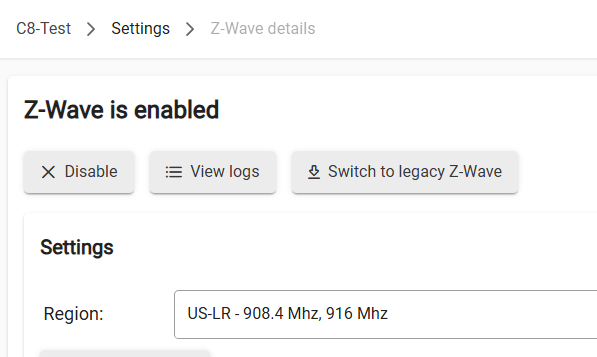
AFAIK the option to enable on the C8 does work...it's enabled on my C8 test hub at the moment...I have the "Switch to legacy Z-Wave" button (i.e., revert back to ZipGateway):
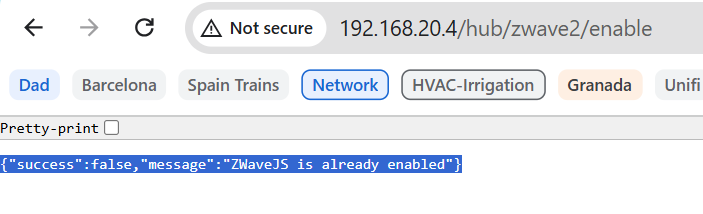
Results from running endpoint below - I get a "false" on the end point to enable since ZWJS is already enabled:
Initially I had the same issue as you that the stick would not include. What I did on the Z-Wave PC Controller is first reset the Stick, then set the Hubitat in exclude mode and did a NWE on the stick. Although I could not see the stick, the hubitat did say it excluded something. After that I could include the stick (without security) and remove the ghost that would not go. I am using an Aeotec Gen 5 stick.
Confirmed this AM that there is an updated Z-WaveJS install endpoint that was shared in beta that I had forgotten about. If you're not in the beta I can share it w/you via PM to allow you to force the install on your C8. You can try that path, and potentially cancel your C8-Pro order. (I'll PM the endpoints to you.)
I think the C8-Pro is a great hub that you'll really like, and I've found having two hubs (I actually have a C8-Pro, C8, & C7 running) can be very useful for testing/troubleshooting, splitting up devices by radio (Z-Wave vs. Zigbee vs Matter) or by activity type (LAN/Cloud integrations vs. Local), and by location (upstairs vs downstairs). Up to you of course!
My C8 Pro hub arrived so i'll just keep it at this point - I agree with your point about having 2 hubs anyway. I need need to find some time to migrate from the C8 to the C8Pro over the next few days...
I have applied for the BETA program but haven't been accepted yet - it will happen
I'll give the C8 Pro a shot and come back if i'm still having issues.
Cool...just remember that ghosts are transferred in a hub-to-hub migration, so you might want to try removing them on the C8 (change to Z-WaveJS, try the built-in ghost remove options on the Z-Wave Details page) before you do the migration, as that will simplify things. If removal while using Z-WaveJS doesn't work on the C8, you can always try it again on the C8-Pro after the migration.
Thanks @danabw yes I did change back to zipgateway after trying everything last night to get the hub working again. Powering down and waiting didn't help the devices when in ZWave JS.
Both of my devices were on 2.4.3.131 when I did the migration.
I appear to asking you the same question repeatedly...sorry, shouldn't be trying to communicate when I'm still on my first cup of coffee.
Migration issues were a fix included in 2.4.3.131...wonder if @bcopeland would like to look at your logs or ask any questions about your migration/Z-WaveJS.
The migration seemed to have gone great - as in everything worked fine after the migration.
It's only when I switch to using zwave-js that everything stops working. Once I switch back, everything works again.
My primary objective to upgrading from the C8 to the C8 Pro was so that I could use zwave-js to hopefully get rid of my ghosts, but that doesn't seem be possible. That said, the hub is noticeably faster, especially responding to commands and turning devices on / off etc so i'm not really that disappointed that I upgraded.
I really would like to get rid of these ghosts though and i'm at a loss.
@bcopeland please do let me know if I can provide any information that could help?