I thought I read somewhere the locale change was not usually needed anymore, did you try using the defaults at all before you switched it to the au domain? I included it in my guide in case it is needed for anyone but since I am in the US I am not sure how it works exactly.
Yeh i tried that as well, no luck, i get the cookie received successfully message and it re-directs back to the page after 5 seconds but instead of seeing authentication good message it just says the login again, and in the logs of the container i see this:
| 2025-11-11 00:21:20.909661+00:0011-11-2025 - 11:21:20am error: | generateAlexaCookie: You can try to get the cookie manually by opening http://192.168.4.31:8091/ with your browser. |
|---|---|
| 2025-11-11 00:21:20.910215+00:0011-11-2025 - 11:21:20am debug: | Alexa Login Status: There was an error |
| 2025-11-11 00:21:21.855506+00:0011-11-2025 - 11:21:21am info: | ** ServerVersion Sent to Hubitat Endpoint Successfully! ** |
| 2025-11-11 00:23:02.642076+00:0011-11-2025 - 11:23:02am info: | Server Wakeup Received |
i might have found more on the error in the logs of the container
37 verbose stack HttpErrorGeneral: 404 Not Found - GET https://registry.npmjs.org/echo-speaks-server - Not found
37 verbose stack at /usr/local/lib/node_modules/npm/node_modules/npm-registry-fetch/lib/check-response.js:95:15
37 verbose stack at processTicksAndRejections (node:internal/process/task_queues:96:5)
37 verbose stack at async RegistryFetcher.packument (/usr/local/lib/node_modules/npm/node_modules/pacote/lib/registry.js:92:19)
37 verbose stack at async View.getData (/usr/local/lib/node_modules/npm/lib/commands/view.js:203:20)
37 verbose stack at async View.exec (/usr/local/lib/node_modules/npm/lib/commands/view.js:111:28)
37 verbose stack at async module.exports (/usr/local/lib/node_modules/npm/lib/cli.js:78:5)
38 verbose statusCode 404
39 verbose pkgid echo-speaks-server@latest
40 verbose cwd /usr/src/app
41 verbose Linux 6.12.15-production+truenas
42 verbose node v16.18.1
43 verbose npm v8.19.2
44 error code E404
45 error 404 Not Found - GET https://registry.npmjs.org/echo-speaks-server - Not found
46 error 404
47 error 404 'echo-speaks-server@latest' is not in this registry.
48 error 404
48 error 404 Note that you can also install from a
49 error 404 tarball, folder, http url, or git url.
50 verbose exit 1
51 timing npm Completed in 203ms
52 verbose code 1
53 error A complete log of this run can be found in:
53 error /root/.npm/_logs/2025-11-11T05_02_32_413Z-debug-0.log
Where are those logs from? My container logs look nothing like that. The package.json in the github repo specifies to use github for echo-speaks-server so not sure why its trying to use npmjs.org ???
Those logs are from a .npm file stored within the container. I am actually setting this up for a friend, I have the same install working for some time on a synology and even a working instance has the same logs in the same file location. So those logs might be a bit of a misleading error. I believe the main issue is the ones saying
2025-11-10 06:43:41.077461+00:00Alexa-Cookie: Response (401)
2025-11-10 06:43:41.078191+00:00Get User data Response: ""
2025-11-10 06:43:41.078888+00:0011-10-2025 - 5:43:41pm error: generateAlexaCookie: Unexpected end of JSON input
It seems I can not get past that. As the other thread is stating it might be a change on the Amazon side and since this instance has never got the cookie to begin with it can’t now? Are you able to spin up a new instance and get it working still? Because it seems like existing instances still work but new ones don’t. At least that’s from what I can see
I have to reinstall my cookie server but then I noticed that my cookie hasn't been updated in over 280 days and the app still works. Is the cookie updater still needed? How often does it need updating?
By default it is supposed to update every 5 days. If it does not automatically update, that's usually a sign of an issue with your setup. However, that being said, people seem to run without a cookie update for days on end without any issues. Please be aware that there has been a change on the Amazon side of things that is preventing new instances of Echo Speaks from working. How long Echo Speaks will continue to work in its current state is anyone's guess at this point.
Also see here:
I would honestly not touch anything right now, especially DO NOT delete the Hubitat app or echo devices, it will not be able to add them back again, due to the issue @jkudave linked to above.
I think just fixing your cookie server should be ok and not break anything, but keep a hubitat backup handy in case you need to go back to a working setup.

Thanks for letting me know. I tried installing a new setup and as you said, it didn't work. I then restored a backup to get everything back to how it was before and I won't touch it. I have it working for now with a cookie package older than 280 days. My backup plan is to switch to Sonos for speaking rules when it breaks.
By the way, I tried basically everything to get it to work, using ChatGPT as my assistant. It was scary good at making good suggestions for things to try. It knew a ton about how Hubitat works and the history of Echo Speaks. Crazy stuff. After an hour of troubleshooting I told it "I give up" and it consoled me like a friend, telling me it was impressed at how patient I was at trying so many different things. LOL... this AI stuff is crazy. I'm sure it scanned this community for advice...
I decided it was time to switch from Alexa Speaks to using Sonos. The only issue is the Sonos voice is awful. After some research I learned that the awful voice is not a Sonos issue at all. Better voices can be used to make Sonos sound as good or better than Alexa. So I fired up my ChatGPT friend and got to work. I made a custom App that installs a child device for each Sonos speaker that used high quality Microsoft edge-tts voices. Check it out here:
I'll make a new thread for this, but wanted to post it here first for a few early adopters to try it out first. Full install instructions and workflow are explained in the ReadMe file. Let me know what you think.

Yes I know, but they're all pretty bad. The Microsoft Edge TTS voices used in this new app are far superior. Besides, it was a fun project to tinker with, and now that I have it I can use any voice I want including my own if I take the time to train one on my local GPU.
[EDIT] I posted the Beta Release here:
thaniks but not a solution for everyone i have echos in 5 different locations and need them to work as i am not replacing 30 or so odd of them with sonos
I get that... I have 12 Echo devices and 15 Sonos devices in my home, so either works for me so it was a no brainer to switch over. I hope someone finds a fix to the broken cookie issue because I'm sure one day the old one's will stop working.
Can i use Docker desktop for mac, instead of windows?
Sure, should work about the same.
Greetings to you. My Echo Speaks with Raspberry Pi 3 had been working without any issue since 2023. Due to performance issue, I had to replace with Pi 4 last weekend. I followed the instructions and did all the step carefully. The IP address for the Pi4 is 192.168.0.59 but local server IP address is showing 192.168.0.57. How can I change IP address to 192.168.0.59? Thank you
Where do you see the wrong IP exactly?
The instruction already include how to set the IP.
Sorry I forgot to add the image. Please see attached
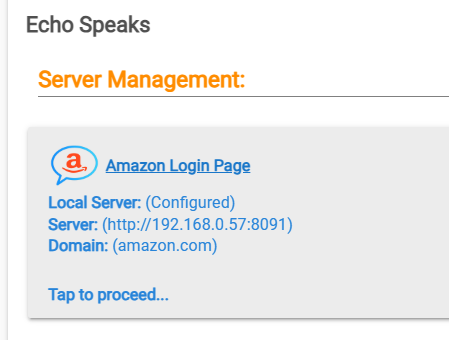 it shows 192.168.0.57:8091 but the new IP is 192.168.0.59.
You will have to reset the config in there and go through the setup again. There is a toggle to reset the server setup.