I have an issue where a Group Bulb Dimmer-2.1 device is not correctly reflecting the state of the group. Specifically all the group devices are on, their individual device status shows as on, but the group device does not. Ideally I would think there would be a refresh option for the group device for it to poll the children and update it's status but it does not have a refresh option.
Since it seems like a refresh command is not an option, how do people deal with this issue? Or am I somehow the only one having this issue.
Tried searching topics and could not find a match for this. But to be honest the terms I have to put in to search are very generic so it pulls up a lot of topics that are unrelated to this issue.
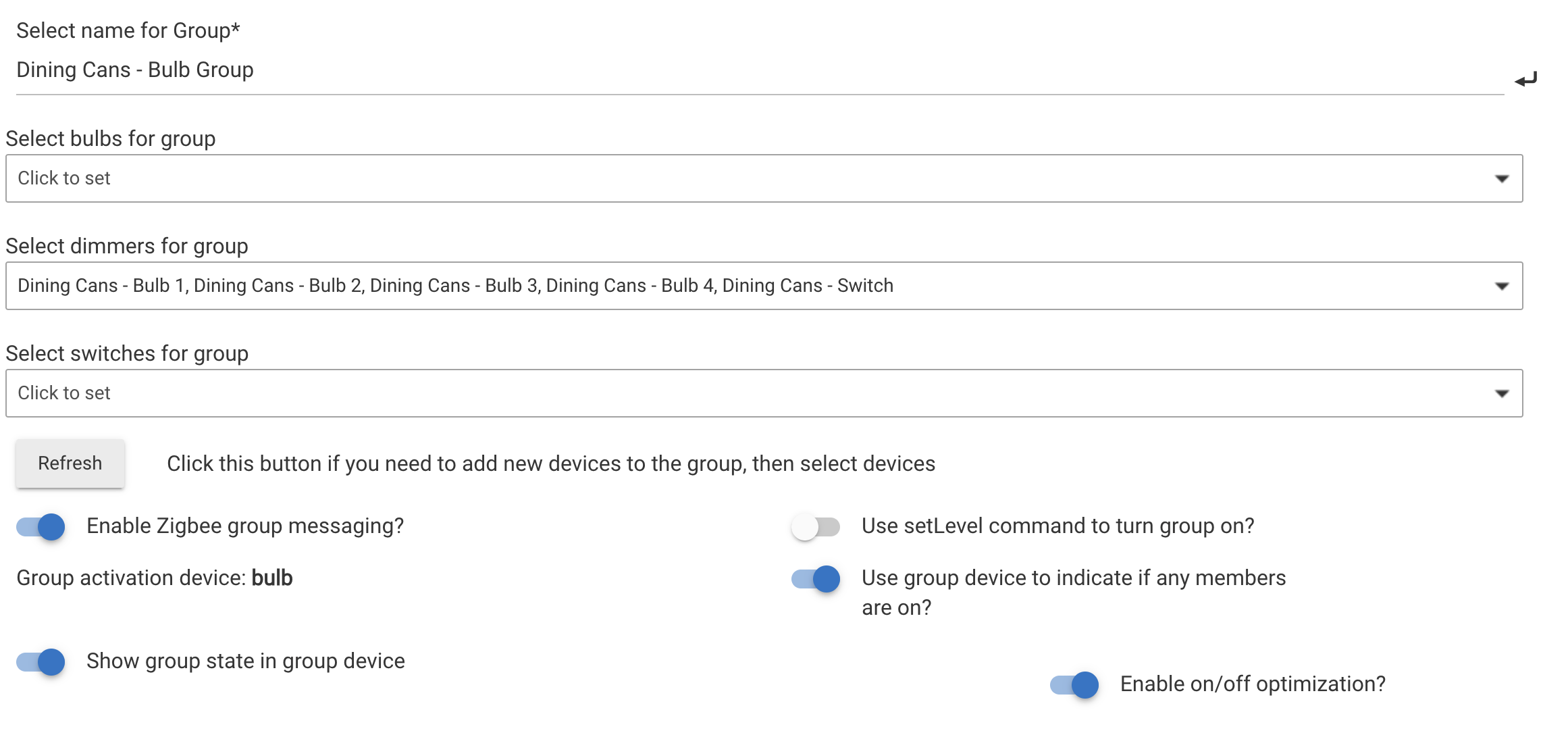
What settings are you using for the group? Specifically "Use group device to indicate if any members are on or ..... off" A screenshot of the group would be helpful. I have found that certain devices don't like some of the group settings like optimization, etc.
Here is an example one. The majority of the groups are the same, an Inovelli switch grouped with bulbs (mostly Sengled). I could try turning off optimization but honestly I don't think that will eliminate the core problem which is that these group devices have issues maintaining a correct state against the devices in its group.
I reported the same thing a while ago in the beta forum, but there was no response. I've added a link to this thread and asked the dev team to look into it.
Groups and Scenes has been effectively replaced by Room Lighting and is unlikely to receive new future development (it has not been changed in over 3 years). Room Lighting would be my suggestion for new setups. You can also import existing Group or Scene instances into Room Lighting, creating an identical configuration, as a starting point -- or quite likely the end goal in your case.
If you still have problems with Room Lighting, that could be addressed; I wouldn't count on it for this app, where it's quite likely any existing behavior is entrenched as a feature.
I installed Room Lighting and took a look at it. I agree it's overkill for what I am need, Zigbee Groups. But if that resolved the issue for me I'd be open to making the switch. Having said that, after I set one up and reviewed it, I have two questions.
Does it use Zigbee groups to turn off devices? The way it positions things in the UI it would seem like it only uses the Zigbee groups when turning on "Activating" devices.
It doesn't look like Room Lighting has a refresh option either. Does it have some method itself to ensure things stay correct that Groups and Scenes does not?
I have almost 40 groups that would need to be converted and I would hate to do that if it does not solve the challenge I have of the group device not matching it's child device states and still no refresh command.
Regardless of how it's created (RL or GS), it is (or ought to be) the responsibility of the group device to keep its state current and correct. Usually it does, but not always. Perhaps there are cases where it can't, but then a refresh command would certainly make sense.
Have you tried turning off Enable zigbee group messaging and or Enable on/off optimization? I have seen some odd things happen when I have either or both selected. Might need to try each one or neither a few times to see if it makes a difference.
I have to have Zigbee group messaging on. It's the whole reason I'm using it. I have tried changing optimization and it's not made noticeable difference.
At this point I've got answer I needed which is that there is no refresh option for either of the two Apps available for this and it doesn't sound like the option for one is not really being considered for either app.
Given that G&S sounds like it's being "deprecated to legacy" (and I use it as well, as I also find RL as sort of overkill to just create a group), has HE staff considered releasing the code for G&S to their public GitHub (aka publish the source), that would allow HE to focus entirely on RL, and let some community person take over G&S.
It's not really all that hard to see creating a G&S app from scratch, then it could be extended with Refreshes, etc. - But it would definitely be faster if the current deprecated App was just released for the community to further extend it (JHMO) - As I would love to extend it to cover shades+blinds (which RL does already support)
The Groups and Scenes app uses some magic that is not available to user apps, particularly regarding device selection, so releasing it for user code probably wouldn't help much.
What about just converting one to start, rather than all 40, and seeing if that solves your problem? In any case, even if it doesn't, a demonstrable problem with Room Lighting will get attention, so you're likely to get a fix -- in contrast to the Group app. That being said, if you can figure out a particular combination of settings that does (or doesn't) seem to matter in either app, that might be helpful to isolate things.
A "Refresh" shouldn't be necessary for either, as it should simply subscribe and respond appropriately to changes in state. While such an addition could be a workaround, fixing the actual problem, should there be one, the best solution -- and that's far more likely with Room Lighting.
Honestly if Room Lighting does not have a refresh option there is no point in me moving them. I have other ways I'm handling, or working around this. I was just exploring if there was low lift option like a refresh command to help mitigate this versus what I am currently doing, or spending time of trial and error to isolate the potential cause of this issue, which I do not have.
While I get that in theory a refresh command should not be needed, I'd say that same argument could made for pretty much any device in Hubitat and yet we know having a refresh command is a common option and nothing works absolutely 100% correct, 100% of the time. As I see it there is no downside to having a refresh command and it is an easy way to handle instances where it does not work as expected. If the powers that be do not agree I am not going to try and convince them otherwise. Either it's added or it's not.
Regardless, I got what I needed to know from this thread. Others can have whatever continued conversations around this topic they want but for myself I consider the topic done.