I wasn't sure where to post this as the developer and custom apps looks like real stuff and I'm just experimenting.
So I've been experimenting with AI writing my own custom app to control lights and I'm having issues with it controlling mixed light groups with switches and dimmers. I tell it that it's not controlling the dimmer and it revises the code to control each member of the group individually which makes sense. Can someone tell me why the below is not controlling the dimmer. I've added tracing, etc and still it never logs that it is setting the dimmer.
Hi Jeff, have you tried running it through a second AI. I use Co-Pilot to get things going but when it gets complex or fails, I drop it in to Claude which is much more competent. Free use is restricted on Claude, so I use it as my quality checker.
It is important though to take the time and explain exactly what you want with AI, and rein it in when it thinks it knows what you want.
1 Like
I’ve been using Google AI and yes it is quite an iterative process. When the dimmer wasn’t working I explained that the group contained switches and dimmers so it modified the code as seen and added the comment you see. As a software guy myself it “seems” like it’s trying but logs never show it recognize the dimmer havein the setLevel capability and thus never sets the dimmer. I could try other AI but just wanted to get a groovy expert to comment why this should work or not. I just need to provide the right prompt to google AI.
It’s pretty amazing what it’s doing btw.
That looks like it should work. Is traceLog() a method that exists somewhere? You could just do log.trace if you wanted to see for testing/development, without relying on having this method defined or any checks that might happen there, then remove it when you know what's happening when.
It would also be good to know what lights is. You probably have something like input "lights"... or input name: "lights"... if you don't know what to look for. Logging that might be helpful, too, or sharing what does get logged as-is or with these extra entries.
There this about the lights
input "lights", "capability.switch", title: "Lights (Pick the individual devices OR the Group)", multiple: true, required: true
That "capability.switch" kind of bothers me. I don't understand this syntax but it looks like it would only take switches and only affect switches. Remember that AI is generating this and it might have not updated something as I iterated with it.
And this about tracelog()
def traceLog(msg) { if (traceEnable) log.trace "${app.label} [TRACE]: ${msg}" }
I also just did a bit more investigation and change the lights from the group to just the dimmer and it set the dim level on the dimmer as desired and the log showed it doing so. Setting the lights back to the group of lights that contain that dimmer does NOT affect the dim level. The trace shows "My Office Lights: smartSetLevel: Propagating 20% to all devices." but there is no "setLevel(20, 0)" for the dimmer in the group. So it is not test the commands available for each device in the group from what I can tell.
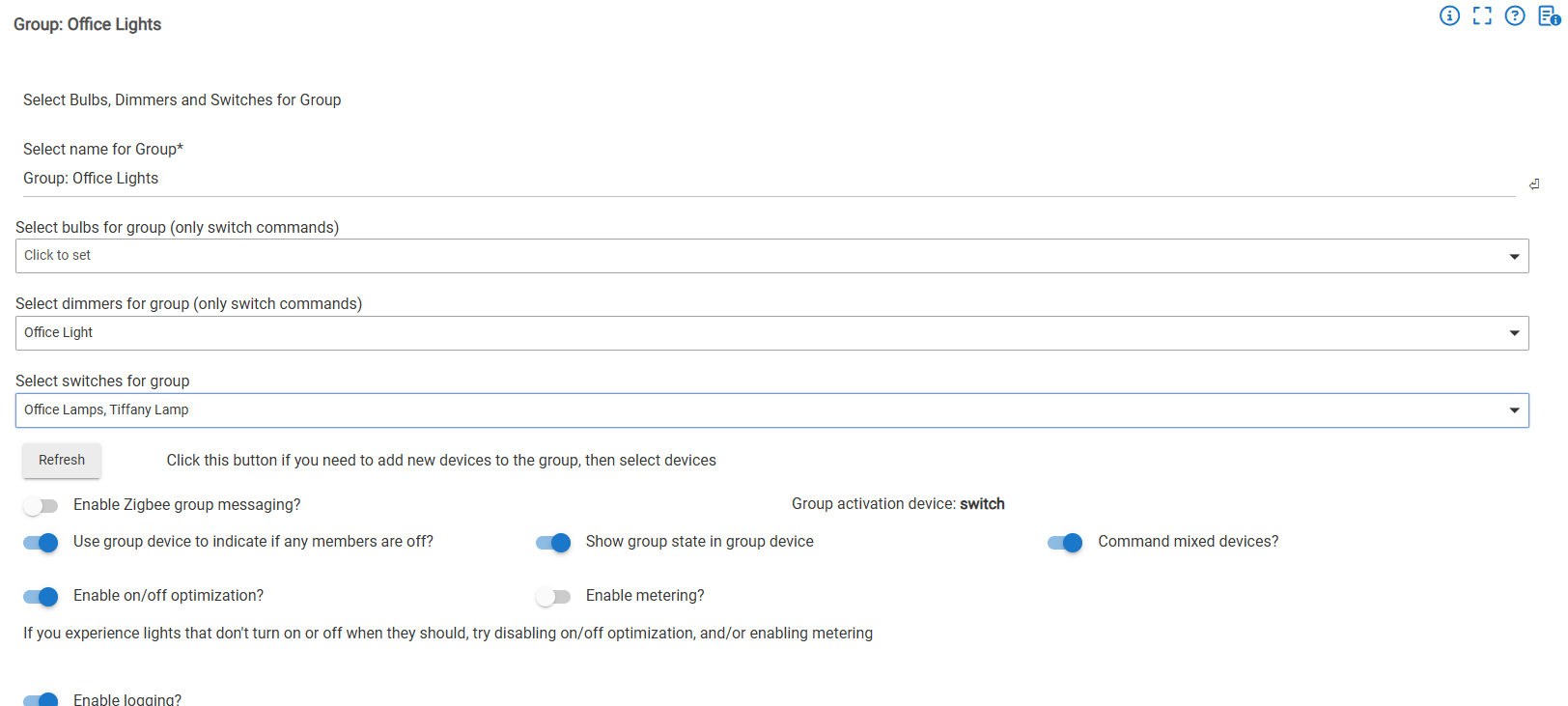
I have tested the app with choosing the devices within my group and it works as one would expect, This is the group I originally selected...
I note this " Group activation device:
switch" However, using RM to generate the automation seems to work.
That information is helpful! That would explain why this is happening, then:
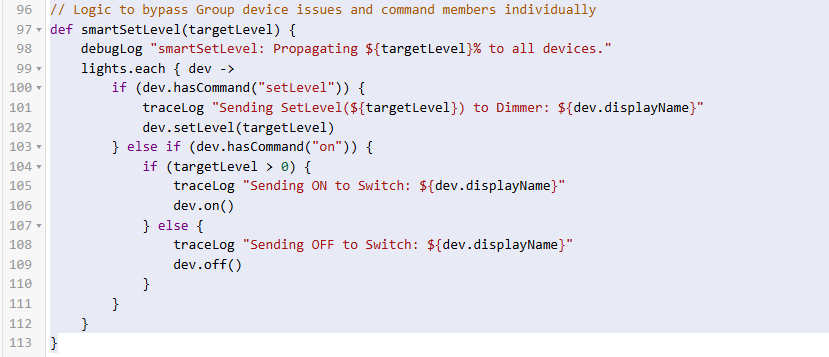
The code that sends setLevel() to the device (and that logs that you are about to do so) is guarded by a check for whether the "setLevel" command exists -- line 100 in your screenshot above. A switch-only device won't have this command. A way you can verify this is by looking at the device detail page for your group device: you'll see commands/buttons like "On" and "Off" but not "Set Level." Your app is working as written.
If you want the group device to be able to control level as well, you'll have to create a new group (this can't be changed after the group is created), then use that device in your app instead. Of course, you'll need to make sure that all the devices in your group can work this way or use the appropriate options in the Group app to make them work how you want. (It might also be good to explain what you do want since it's not clear what your app does and maybe there's a way you can do this without that, but this is what's happening with your app and why, at least.)
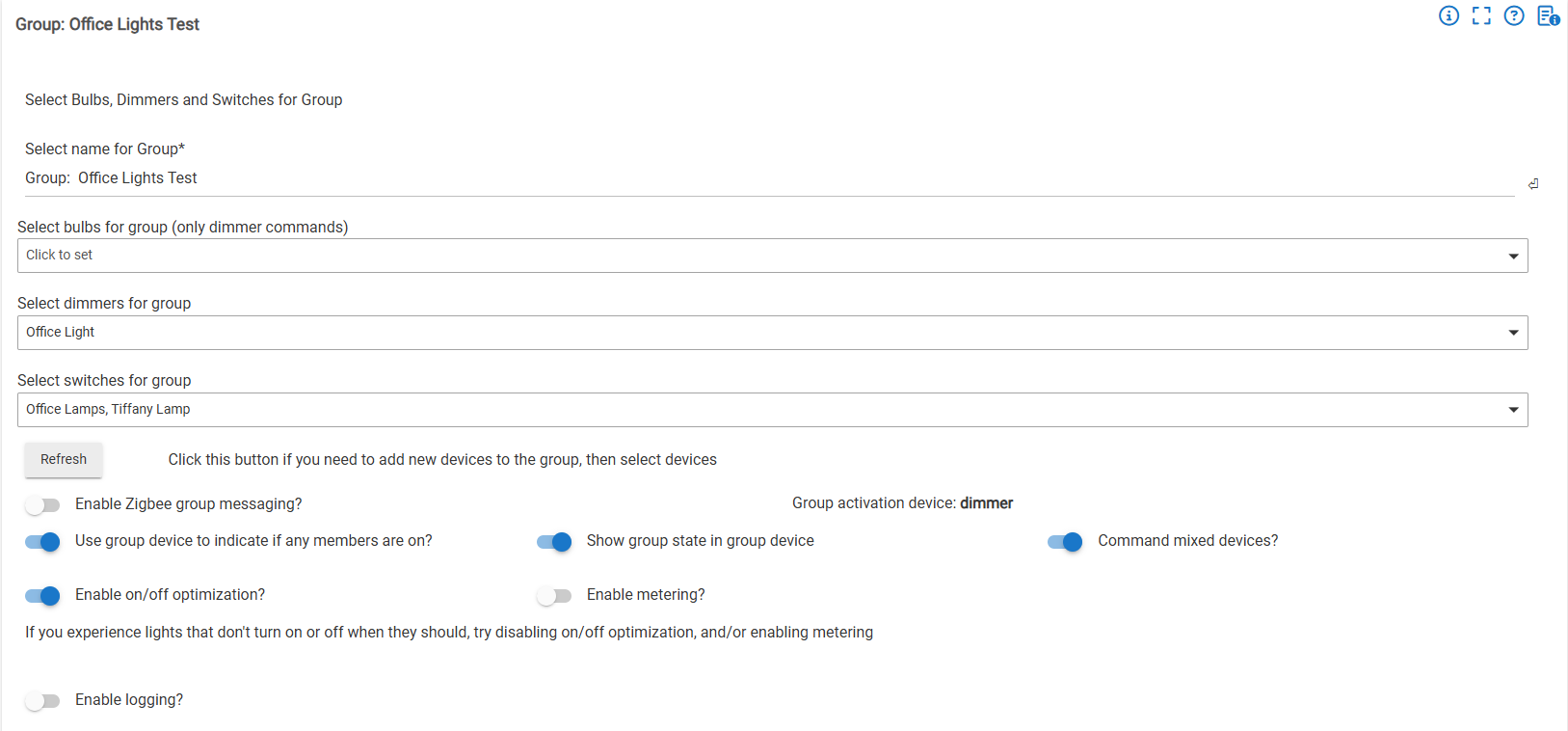
Yes, that was what I was thinking that the group only acted as a switch and therefore did not support the setLevel command. I just needed verification. I created these groups so long ago I didn't realize that you can create the group as a dimmer or switch etc. I see that now based on your excellent guidance. I recreated the same group with group activation device: Dimmer. It's interesting you cannot change that after the group is created, but I am sure there's some reason.
It works as expected now. This probably explains a lot of grief I've had with the behavior of groups with mixed devices in them. Arg. Lots of replacing to do now. Thanks
I was really just tinkering. I've got several rooms with motion sensors that are used to activate lights to different levels based on illuminance, time of day, etc. I also have the wall dimmers/switches/scene controllers that can operate them as well. My idea was to combine all of my desired functions in an app to make them less complicated to setup instead of having complex rules for each. I've tried some of the existing lighting control apps and while they get close, there's always something missing. I also have switch/scene controller LEDs that are red for off, green (at dim level) for on that get updated whenever there is a change in lighting and some switches that are red when the alarm is set and green when not. It creates a lot of traffic because I have one routine that sets all of the LEDs each time there is a single change. I was thinking I could add that LED control in the app and it would only hit the LEDs tied to that child instead of updating all LEDs every time. I'm really playing around and learning at this point.