Govee Integration V2

@mavrrick58

Can you point me to a copy of the code before you added the retry logic?

For the first time in a very long time I woke up to the lights being on this morning instead of off. I was unable to turn them off using HE even after a reboot and power cycle of the hub and the lights. It finally dawned on me to try using the Govee app and they responded immediately. I then tried using HE and they still don't work.

It's on me for updating during a test cycle but I don't have a much free time in December for troubleshooting so I would like to reinstall the old code for now.

UPDATE: I did a repair to reset the driver and I can now control the lights again. I was/am on the latest version which you posted last night to update and reboot which I did before bed. This info is probably helpful since it looks like things can still get into the same state as @danabw had earlier even after the recent update.

If possible, I would still like to revert to the prior version of possible.

Thanks

1 Like

That sounds like the issue I was working to fix. A HPM repair should correct the issue. Perform HPM Repair and then reboot the hub just incase a app used the device and got in a bad state

If you do want to go back the below URL would take you to a build that is before the retry logic, along with some other improvements.

Hubitat-by-Mavrrick/Govee at abd50f203f60a5889fefce3a5eb24a7fbe4a94eb · Mavrrick/Hubitat-by-Mavrrick

Thanks. Much appreciated. After the holidays I'll have time for my "hobby" again.

That is correct...I updated to the newest code and rebooted w/database rebuild last night. This AM woke up to find that only two of the four devices I was running in a Light Effects app show from 5-11 (one of two net lights and one of two strip lights) had turned off at 11 as set in . I turned the two off via the Govee app.

I hear you. The timing could be better for these issues to creep up.

Actually I posted one more update this morning about the same time @danabw posted the screen shots above. A change I identified last night didn't appear to make it to Github. I found that this morning and fixed it as soon as i could. I am struggling to reproduce the problem on my dev hub, and between that and the steps need to download the library files the update got only part of the updates, some didn't make it to github. It is there now though.

1 Like

I'll do a repair and leave it for tonight and see what happens. I need to look up how to reinstall a bundle anyway since my first attempt failed. LOL

Thanks for work @mavrrick58 . All of your efforts are truly appreciated. The code base with the driver's is getting large. I can see the effort required just managing the number of files now required.

1 Like

Well it is no longer a single bundle. You would need to install the Govee_Integration_V2. zip bundle file and then all of the drivers and the integration app by themselves.

Even with the current working code that was posted this morning there is currently still a drawback mentioned above with the way the drivers are very sequential and can make automations with many devices very slow to activate.

The modifications i have now made since this morning seem to have fix that, but i want to let this update back a bit more before sending it out to everyone. My RL instance that manges my Master Bedroom lights now activates in less then a second vs 30-40 seconds that it did earlier.

1 Like

I just ran an "Update" in HPM and it reported nothing to update. So maybe HPM is still updating itself, or ?

image

This is the version info the integration shows at this point:

The changes are in the Library files and not in the main app. You would need to do a repair to refresh those files.

1 Like

Completed changes and verified that I can control Govee devices, I check again on it later today. Thanks!

1 Like

Hello all. I just wanted to check if anyone else having issues with the Govee Cloud right now?

My lights via cloud control are still working.

From Hubitat, or from your phone. I am talking about hubitat with the integration. Your phone uses Amazon AWS which i think are different URL's

No, o I mean through your app, via Hubitat. Had to revert to cloud control for stability as lan kept failing. Not tried the latest update though.

Ok thanks for the info.

I am seeing some timeouts with devices talking with the Govee developer API. It is clear though that some transactions are going through. On my dev hub i changed my test decice to the cloud and it didn't get the scenes downloaded. Then a hour or so later it worked, but when checking logs abother decice had a timeout. I wonder if therr API is getting overrun and failing to respond at times.

I would probably hold back myself if i was watching what unfolded the last day or so with the retry logic.

At this point if you haven't already upgraded i would wait for my next release. So far testing of it has been going very well today and has been very promising. No impromptu hub reboots needed today. And for the most part things are running very fast.

2 Likes

Ran repair..will let you know how things are working.

I have the Govee outdoor lights running from a virtual switch toggled by Room Lighting. The virtual switch on/off triggers a rule in RM to load the desired effect or turns the Govee LED lights off. Maybe this is why everything is working well with the updated code on my end…room lighting is not dealing with the Govee device in the list of various Christmas lights called on or off by RL. The virtual switch and rule machine make it possible to call Govee parameters vs just an on/off in room lighting. The virtual switch also makes it easier to toggle on the outdoor lighting, again via RM, if any of my exterior motion triggers outside the normal lighting periods at night.

In RM, I’m separating any commands to the lights in sequence with a 1 second delay.

Hope that helps. I’ve been updating or repairing as per your advice in this thread and everything has been working great over the last three days.

@mavrrick58

The 6172's ran perfectly this evening, cycled as programmed, then shut off at 10pm as they were supposed to. I'll see how they do in the morning but it's basically the same as tonight with different start/end times.

Thanks!

UPDATE: I noticed that even though one of the lights were off, the state still showed as on. I turned it on/off a couple of times but the state never changed and the driver eventually got in that weird unresponsive state again. I repaired everything to regain control and to turn off the light. The state still showed as on. I remembered I had a backup from the 26th before I updated to the latest firmware and the Govee app. I'm going to load that backup until after the holidays.

My Govee Christmas Lights have been returned to duty for their purpose. They have been used elsewhere since January and just turned on/off as a white light.

The Node Red flow I created for last year to randomly switch between scenes isn't working so I tried using the Device Panel instead and it doesn't work either. I can start DIY, Set Color Temperature, Set Color but not Scenes. I am using Scenes/DIY's/Snapshots from the cloud API.

Any suggestions? Is there something that has changed since Christmas last year that I might have missed?

Here are logs:

dev:10112025-12-04 08:21:35.271infocommand failed
dev:10112025-12-04 08:21:35.268debugsendCommand(): Response data is [capability:[instance:lightScene, state:[errorCode:400, errorMsg:value is valid, status:failure], type:devices.capabilities.dynamic_scene, value:14085], code:400, msg:value is valid, requestId:10c80e60-0660-42e1-b613-ca60991f2b97]
dev:10112025-12-04 08:21:34.950debugsendCommand(): lightScene, devices.capabilities.dynamic_scene, [uri:https://openapi.api.govee.com, path:/router/api/v1/device/control, headers:[Govee-API-Key:b56b862e-6444-4cb4-9834-775exxxxxxxx, Content-Type:application/json], contentType:application/json, body:{"requestId": "10c80e60-0660-42e1-b613-ca60991f2b97", "payload": {"sku": "H70C5", "device": "19:2B:C5:75:1D:EC:83:98", "capability": {"type": "devices.capabilities.dynamic_scene", "instance": "lightScene", "value":14085}}}]
dev:10112025-12-04 08:21:34.947debugrandomUUID(): random uuid is 10c80e60-0660-42e1-b613-ca60xxxxxxxx
dev:10112025-12-04 08:21:34.911debugsetEffect(): Device found in built in scenes.
dev:10112025-12-04 08:21:34.908debugsetEffect(): Keyset list [15263, 15262, 21542, 21541, 21540, 14100, 14101, 14104, 15315, 14105, 15314, 14102, 14103, 14108, 14109, 14106, 14107, 14272, 14030, 14273, 14031, 14270, 14271, 14276, 14034, 13980, 14277, 14035, 14274, 14032, 14275, 14033, 13989, 13983, 13984, 13981, 14278, 13982, 14279, 13987, 13988, 13985, 13986, 21534, 21533, 14281, 13990, 13991, 21539, 21538, 21537, 14280, 21536, 21535, 13994, 13995, 13992, 13993, 13998, 13999, 13996, 13997, 14096, 14250, 14097, 14251, 14094, 14095, 14254, 14012, 14255, 14497, 14013, 14098, 14252, 14010, 14253, 14099, 14011, 14092, 14093, 14090, 14091, 14258, 14016, 14259, 14017, 14498, 14256, 14014, 14257, 14015, 14499, 14018, 14019, 14261, 14262, 14020, 14260, 14265, 14023, 14266, 14024, 14263, 14021, 14264, 14022, 23498, 23499, 13978, 13979, 14269, 14027, 14028, 14267, 14025, 14268, 14026, 14029, 14111, 15322, 14112, 14110, 23500, 23501, 23502, 23503, 14115, 14116, 15324, 14113, 15323, 14114, 14119, 14117, 14118, 14085, 14086, 14089, 14001, 14122, 15453, 14002, 14087, 14120, 14088, 14000, 14121, 14126, 14247, 14005, 14248, 14006, 14003, 14004, 14009, 14249, 14007, 14008]
dev:10112025-12-04 08:21:34.884debugsetEffect(): Setting effect via cloud api to scene number 14085

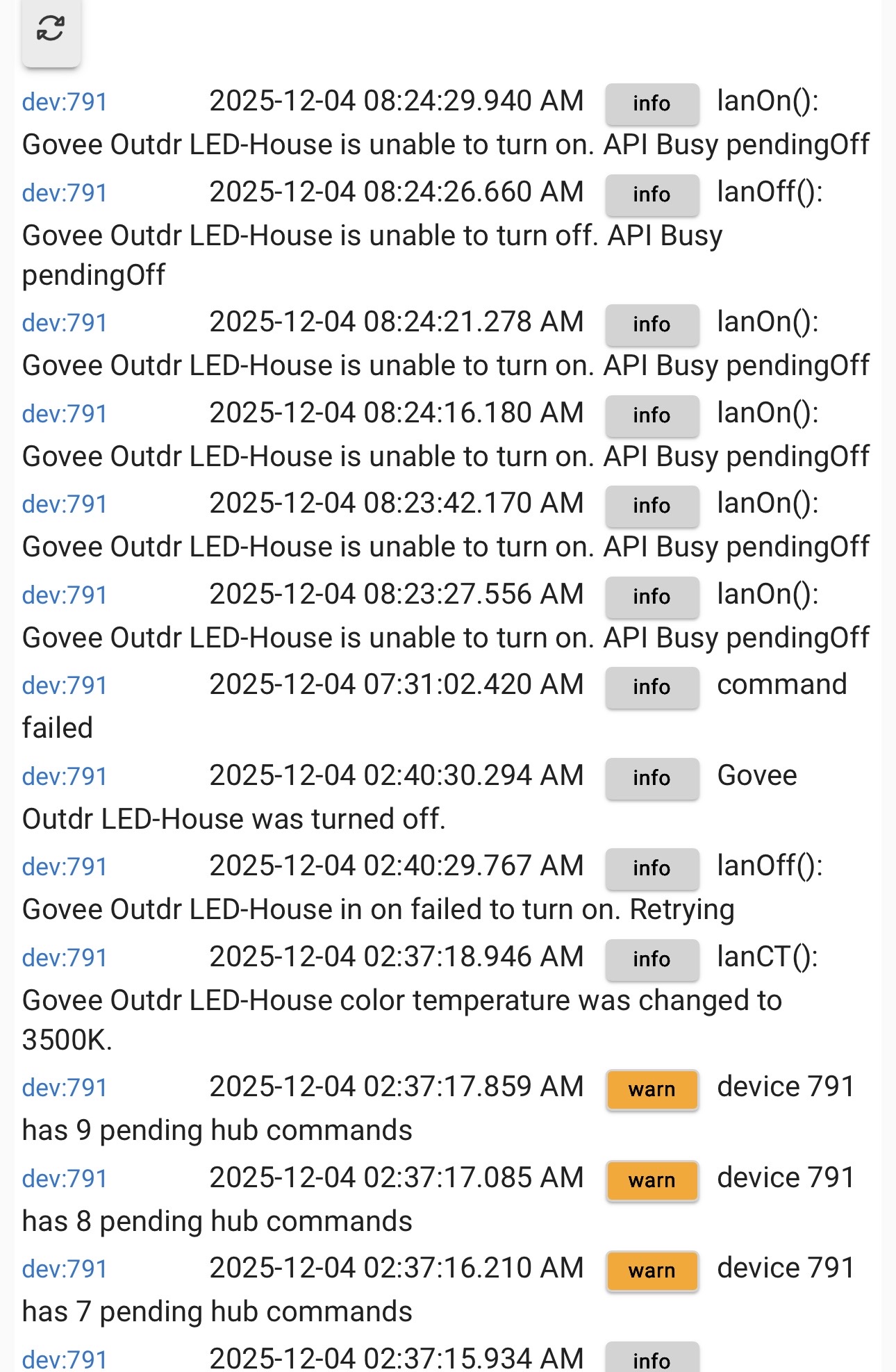
Lights were not responding this am after the HPM repair last night.

Motion routine at 2:40 am (on and color temp via LAN control) worked fine.

However at 7:30 am the call to load an effect did not work, and I suspect the driver was stuck after that. I have lan control on, but not local scene LAN.

Since you are using the Cloud API It isn't linked to my recent changes. The Commad Failed message you see indicates that something was wrong with the call. i don't see anything wrong with that call give me some time and i will test it. It looks like it should have worked fine. it isn't that complicated