Ok, I have 9vdc close and I used a buck boost device to keep it at 6v. Then with that at 6vdc, I added the resister to the+motor line. Actual output volts is ~2vdc.
I have tried adjusting the settings but nothing seems to help.
Ok, I have 9vdc close and I used a buck boost device to keep it at 6v. Then with that at 6vdc, I added the resister to the+motor line. Actual output volts is ~2vdc.
I have tried adjusting the settings but nothing seems to help.
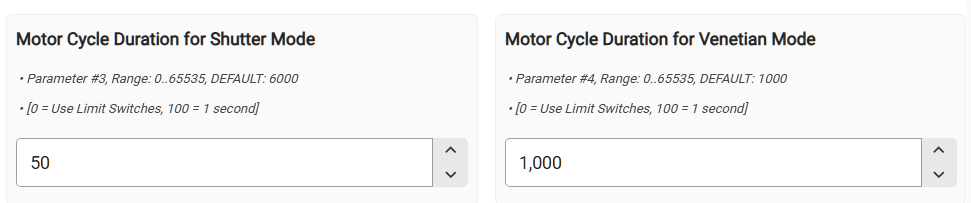
Well, I don't know what to tell you. It looks like electrically everything is correct (i.e. voltage, resistor, wiring, etc.). If you are not using custom driver, please install it and use it. Finally (and I am sure this will work) adjust a travel time manually. Smaller value will/should reduce time for motor ON for open/close moves. Automatic (i.e. calibration values may not be detected correctly). Set one of these (I forgot which one is actually used):
Thanks. I will try that when I get back home later today. As for the driver, I believe I used the one in hpm. Is that right or is there a different one?
It could be multiple drivers in the HPM. And as of today it could be a built-in one. I am using driver designed by jtp10181. This one works just fine.
Ok, I changed the zen53 controller with the second I purchased. Now it is working. I setup a couple of rules for it, like if <=65 then open vent. The next time the HVAC starts, it will leave it open until it is >=66 in the other rule to close the vent.
I am having another problem. Under basic rules, I can not even see the zen53. Same with simple rules, etc. the only one that could see the device for automations.
Thanks.
Do you have a link to the driver you are using? The one it picked automatically was the built in one that shows zooz zen53 DC motor controller in hpm.
Thanks again for the guidance.
Oh,and I took the other vent apart and got it setup too. It even looks pretty good to.
I am glad, you got it working.
I installed a custom driver via HPM. I don't have any links to the drivers other than using HPM.
All my automations are 100% based on RM (Rule Machne). I am not using anything else so I have no idea why ZEN53 is not seen in Basic Rules, etc.
BTW, you can control opening by percentage (0-100%), not just fully open or fully closed.
Ok, will try that in the rule.
I have no idea what happened with the first vent but after I took it all apart and reassembled them and now it works too.
I setup a couple of rules for each vent like
When m-bath temp sensor is <=65 then open vent for when the HVAC starts back up.
Another rule says when the tempos >=66 close vent for when the HVAC turns back on.
Same setup on M-bed.
So far, the four apps is setup for heat and I have four more to use when it's to cool open and close.
Still getting used to this platform. I used to tinker with Arduino a few years back. I just need to get someone to show me how to use the esp32. I do have a few ideas for devices I can use if I can figure out how to get the parts installed. Like I said, I need to find or build a zigbee device for measuring angles, and another one to show me the battery voltage.
Thanks again for the assist. They do seem to be working properly now.
Yeah, I am looking for a "module" that can measure the angle of my panels.
Actually, I have some zigbee double relays that can be used for the motor control.
Now, angle module. How about a bubble level with esp32. Wait, there are some esp32's with zigbee. I wonder if that would work. An adc with esp32 and connect it somehow with some home made brackets. How about a potentiometer with a lever that could hold it and mount the electronics in a project box.
Yep, I am going off the reservation lol
I forgot, I just checked and firmware on the zen53's and one is 1.3 and 1.4
I downloaded the app for firmware updates but I do not know where to find the actual firmware?
Simple search for "zen53 firmware" instanly revealed this link to all Zooz devices firmware files (sorted alphabetically):
https://www.support.getzooz.com/kb/article/1158-zooz-ota-firmware-files/
You do need V1.40 because it has separate timers for both directions (artificial parking will not be needed). Unfortunately Limit Switches still are not supported.
If you are familiar and OK to deal with Arduino IDE than use it and simply point your sketch to the ESP32 device. many details are available on the "Hubduino" topik on a forum.
Single Hubduino device/project will cover Actuator Control, Actuator Positioning and Battery Menagement.
For the Angle Sensor (actually actuator position instead of angle because these two are directly tied together) you can use a rail with holes attached to the Actuator. Each hole location will represent a desired angle. Simple optical sensor could be used to detect holes. This sensor could be attached to the say, Zigbee Contact Sensor if you don't want to deal with Arduino/ESP32.
ESP32 with Zigbee iz not quite ready for the public.
Certainly you can use a potentiometer but the mechanics will be more complicated vs rail with holes. Basicaly you are looking for Linear Encoder. Certainly you can bye ready to go Limear Encoder or even an Actuator with built-in Encoder but these toys are not cheap.
PS.
If you keep this conversation in a public you will have much better support and definitely many different ideas.
I didn't think about everyone else chiming in, but sometimes that just brings new headaches. Lol
Linier encoder, that sounds about right. Since the wreck 13 years ago, my mind has been affected. Mainly memory problems.
Thanks again for the advice. Btw, how can I make this public?
Yes, sometime going public creates more noise rather than helping.
But if you filter out all noise you may end up with something really useful.
I have no idea how to convert private chats into public.
I guess bobbyD (a support person) can help with this.
Yeah, @bobbyD
How can I change this private chat to public? Thanks.
Thanks @BobbyD
Download the Hubitat app