I like where EZ Dashboard is going, but it's not usable for me yet...
Too many devices aren't supported
I'm pretty reliant on Tile Builder to get cleaned-up state text; that's not supported at all currently. The devices simply aren't supported, so I can't get the text to present.
As a result, I can't show "Last Movement" with a contact/presence sensor. I can show "Last Updated", but a sensor toggling back to unoccupied is an update.
If the icons can be customized/selected, it's not obvious how. I tried importing (copying) a pre-existing dash and even those icons all defaulted to just standard ones. For example, I have icons matching the type of light or room - a bathtub icon, window icon, etc. Those aren't available on EZ.
I'm looking forward to additional enhancements of EZ to get there.
Unrelated, at some point the forum software got updated to try to guess my sentences while composing. That's annoying. Is it easily disabled?
There's no shortage of messages suggesting improvements to the new Dashboard code. Years of advice to Hubitat to the legacy Dashboard got us to this new version, so continue with these specific needs.
But for context, the version released is targeting new customers. It's possibly not yet good enough for that audience but the path has been delineated, I believe. In the next release I happy to assume there will be additions, we already know of two. But I think the focus on "my very first dashboard for my new Hubitat with 7 devices" is likely to dominate the development for a while. Obviously I don't know any more than you, but since we've both been around this community for 5 years or more, we've seen the pattern of continuous improvement. Perhaps, when new customers get a little more experience, they will need a better Dashboard and the things learned from Easy Dashboard will ease the hurdle to whatever fills the "A-Bit-Harder Dashboard Builder" niche next year.
Absolutely with you on everything you wrote. I'm not disappointed at all that EZ Dash doesn't meet my needs; just providing my feature request list for it. My only concern is, I don't want regular Dashboard development to cease while I still need it.
I like EZ Dash for setting up a custom buttons only dash for some old cell phones converted to room control panel. My main dashboards still require the legacy dashboards because I display a lot of data in tiles that I embedded HTML. I have a crap load of older Moto G7 phones that I have "Velcro" to the wall next to the intercom boxes for power and have setup two so far with EZ Dash.
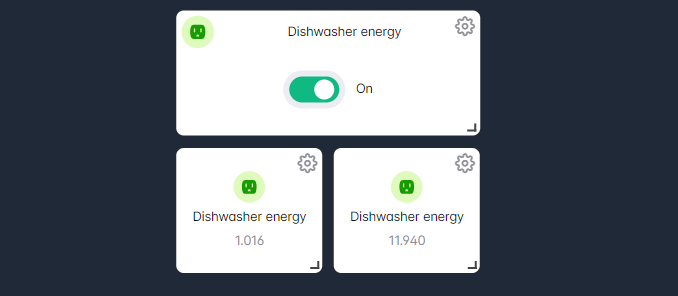
This is basically my impression of it as well. I was interested to play with it but after just a few minutes I realized it's not going to work for me. I monitor several plugs and I like to see power and energy usage. With a simple dashboard I created below as a test, there are a couple of issues. Each tile is a copy of the original tile. If I edit the tile it says rename tile, but if I rename any one of the tiles it renames all three. I want one tile for state, energy and power. I guess another option would be able to present multiple attributes in one tile. If you spread them out I see the state and the one selectable attribute, but I can only select one at a time. I can't add any kind of units so it is not obvious which tile is power and which is energy.
Just STOP dev right now. EZ sucks period. Fix the original per what people have been asking for all along. Stop trying to reinvent the wheel. All that has happened is the updates have managed to break consistent app support for "legacy" dashboards, so local/remote is fudged. I've reverted because of the amount of aggravation this has caused. If EZ is the direction HE is going, don't count me for a 8 Pro purchase, which I was considering. Tile movement is too twitchy, options are lacking, no colorization, and too many unsupported devices.
Well no one says you have to use it. Also nothing has been broken for the legacy dash. That said, they are made for different audiences. The original dash system isn't going anywhere any time soon. Also not seeing where things are twitchy. Very smooth for me. I would also recommend you give it some time instead of flying off the handle at the first release of something.
That is the first I have heard of that. In fact, EZ dash presently isn't even available in the mobile apps, nor remotely, so I am not sure what you are seeing here.
Well apparently it is where they are headed, or they wouldn't have published this app. But what you are leaving out is legacy dashboards are remaining as-is. Nobody is forcing you to use the new EZ dash, it is simply another option like Basic Rules is compared to Rule Machine.
Hubitat has never required a migration from one app to another, I don't see them doing it now or in the future for dashboards. Rule Machine is a good example of this, there are what, 4 or 5 revisions now? (I forget which) The old RM 3.0 I have from way back in 2019 still work fine.
Try moving the tiles, you'll see "twitchy". Making legacy redundant to EZ has broken Hub App access for legacy users, even when resetting tokens. The fact the original dash isn't going anywhere is not lost on users; haven't seen any improvements since I bought a C-7 2 years ago. Suddenly throwing a half-built EZ at us just says devs don't have a clear focus on future development. Want to fix things, separate the 2 dash apps completely and restore legacy to what it was. Don't like it, rename it to legacy and leave it alone. People will eventually warn up when EZ is out of ALPHA/BETA release.
They are separate. Not sure what you are seeing here. Even the link to the dashboards are different, the new dash is 192.168.0.000/dashboard/select and the legacy is 192.168.0.000/dashboards
I wouldn't say this is half-built. It is meant to be basic and easy, not fully featured, nor have every option that the old one has. They had to draw a line somewhere between easy/basic, and fully featured, and I think they have done a good job at that.
I have only built a couple EZ dash, mostly for Beta testing. I haven't messed with nor do I plan to delete any existing dashboards. They work the same as always. Nothing has changed there, you can continue to use these as long as you wish.
Have built a few in beta and post beta and have yet to see twitchy.
Not having that issue at all. Can get to my legacy dashboards local and cloud. Haven't had to reset tokens at all. This is with the current release of the app as well as the beta release....
Your opinion. Again, this isn't for advanced use. Its to create a simple easy dash. You want more complicated? Look at HD+, great dash program...
So you propose just dropping it and pretty much destroying everyones custom dashes? Got it...
Again it hasn't been touched. Don't like it? HD+ is available...
The easy dashboard is the Basic Rules of dashboards, if you prefer Rule Machine, we recommend Hubitat Dashboard
Tell you what, I reverted to 2.3.8.134. Take a look between that and 2.3.9.136 and you'll see the weird changes on how legacy is accessed. As for the mobile App issues, upgrading gave me code errors until I reset tokens, however my wife's phone still couldn't access after that. Had to clear cache and data and logout/login to fix. This only after I gave up and reverted. Honestly, a new dash isn't gonna make much difference in how people use HE, but expanding the driver base would. Example, Tuya has a HUGH base of device classes that they support, and one user had the great idea to integrate with their service, but his/her development stopped only at their interest for their specific devices. It also doesn't help that the dev decided to move on to another platform.
Look at their device API list and their is a lot of potential plus ideas for building generic device drivers.
Here's just their sensor category list:
Can I politely ask what you mean by this.
I'm on the latest build and all my legacy dashboards, all 26 of them, are behaving exactly as the did pre 2.3.9.xxx.
I have built an EZ dashboard, just to have a play, and everything continues to work as before.
I've even defined a link on my legacy dashboard that opens my 'test' EZ dashboard. Still no issues.
Is there something you are trying that is messing things up? Just wondering.
Same here, I have not noticed any problems with my pre-existing dashboards (when opened locally or remotely). And I had no issues with creating and using a new easy dashboard, also just to see what it was like.