Extend built in Unifi Protect integration to support nfcCardScanned and fingerprintIdentified events

From reading various posts, these two events may not have been present when the built in integration was created. However, now that they’re present, it would be ideal to support these event types for triggering actions. I believe these events work for both the Protect Doorbell Pro and other protect NFC sensors (but I don’t have the latter)

Scenario 1:
Rule machine could nicely see that a NFC card was scanned by a trained user and turn on an outlet for a piece of machinery.

Scenario 2:
The house cleaner approaches the front door and uses her fingerprint to unlock the front door.
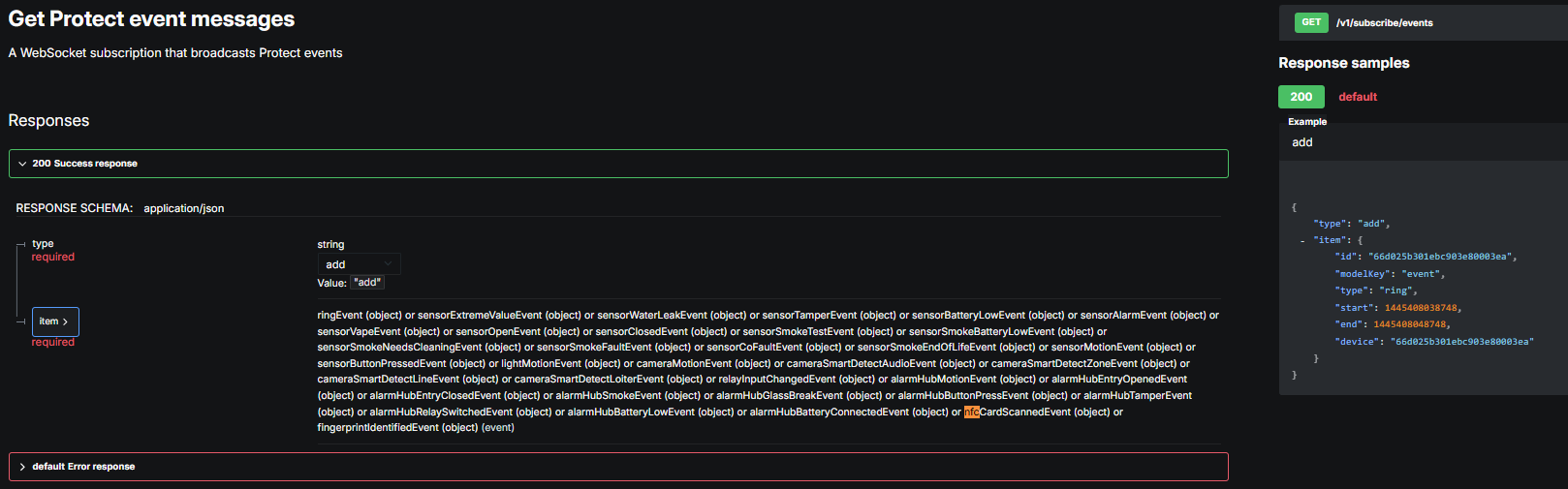
Here’s the debug information in case a device isn’t handy. Please advise if I can provide anything else useful. (IDs changed to protect the innocent)

Fingerprint Read:

app:11425/29/2026 2:01:46.737 pmdebugParsed JSON: [item:[metadata:[fingerprint:[ulpId:null]], start:1780077705421, end:1780077715421, id:abcd56789abcdef123456789, type:fingerprintIdentified, device:123456789abcdef123456789, modelKey:event], type:add]
app:11425/29/2026 2:01:46.735 pmdebugcomponentParse: {"item":{"id":"abcd56789abcdef123456789","modelKey":"event","type":"fingerprintIdentified","start":1780077705421,"end":1780077715421,"device":"123456789abcdef123456789","metadata":{"fingerprint":{"ulpId":null}}},"type":"add"}
app:11425/29/2026 2:01:46.111 pmdebugparseNvrJson()

NFC Read

app:11425/29/2026 2:04:58.019 pmdebugParsed JSON: [item:[metadata:[nfc:[ulpId:null]], start:1780077896725, end:1780077906725, id:987656789abcdef12345abcd, type:nfcCardScanned, device:123456789abcdef123456789, modelKey:event], type:add]
app:11425/29/2026 2:04:58.017 pmdebugcomponentParse: {"item":{"id":"987656789abcdef12345abcd","modelKey":"event","type":"nfcCardScanned","start":1780077896725,"end":1780077906725,"device":"123456789abcdef123456789","metadata":{"nfc":{"ulpId":null}}},"type":"add"}

Additional request to round this out – the ID of the fingerprint or NFC card should be read to translate it into the assigned end user.

I think that’s done either via parsing the user data from this endpoint /proxy/protect/api/users which does reference the assigned IDs, or perhaps via this credential call. Not sure at present.
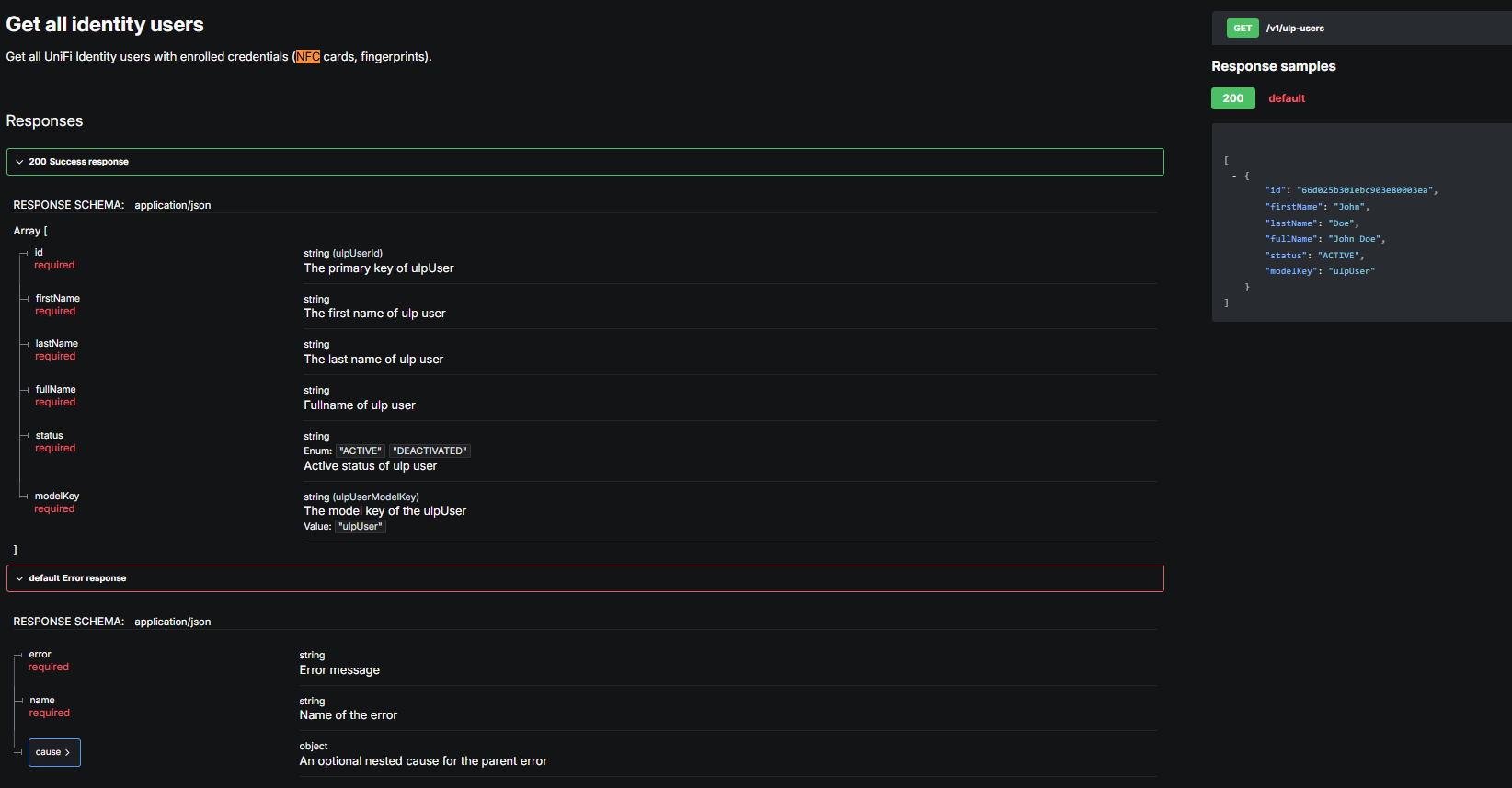
Thanks for the information! I don't see an endpoint in the Protect API that enumerates NFC or fingerprint reader devices (like, say, /v1/cameras does for camera devices), so I'm not sure how to get a list of these devices by ID and present them in the UI as devices you could add to the hub -- the idea being that, like cameras, they could be matched to events based on the matching ID from "device" in the JSON sent on a fingerprint or NFC read, etc. But ... I imagine some devices show up as cameras that actually have these features (some/most doorbels? probably not any sensors, but that's the other endpoint the app currently looks at). If so, does that ID match the camera ID, as you'd see in the DNI if nowhere else?

That's one hurdle.

Another is that "ulpId" appears null in your data, but I'm not sure if that's because it was redacted or not. If not, that would be a hurdle towards matching it up with an actual user since I think that's the one you'd need to match these up with Identity users/fingerprints/etc. I suppose at least some event would be possible without that, though.

Someone with these devices digging around in the API might help figure out at least the first thing; otherwise, I think there may need to be some debugging pages added to the integration app that pokes around and prints some more things out to Logs to see for sure. :thinking:

Unfortunately not redacted. It’s empty because the User isn’t known as I understand it. The only redaction done was the IDs as they’re actuals here but their returned length of hex values are the same.

Agreed - even if presented with an ugly string I’d accept that, although we could present a non-ID based identity other ways. The most likely (and maybe best?) way in documentation I have found indicate that we’d have to read the entire user base (in a home, pretty small) at the /proxy/protect/api/users endpoint, and within the returned user blob there are attributes that indicate the fingerprint/nfc ID as an attribute of user, thus indirectly giving us a user/ID list. My speculation on the other API call “Get All Identity Users” is just that and I’d have to fire up a local VM with the bits to quickly do this (most in house is windows, and tbh I’d use linux to do any probing at that API if you like)

I agree that there doesn’t appear to be anything to enumerate. It’s a limited list of devices however: G4 Doorbell Pro & G4 Doorbell Pro PoE (the difference is minimal, really packaging I think) that are under the Protect API. They are the only Ubiquity products supporting fingerprint and the only 2 Protect devices that do NFC, with one caveat to the “product lines support”...

There are 2 other doorbell devices that stradle the Protect line for camera support and the Access line for NFC reporting (from what I could find, they don’t report the NFC via Protect at all) I don’t have a G6 entry product, but you may wish to “expect” them to register cameras via Protect API in any regard. As they move more into commercial usage, perhaps its acceptable to ignore them for now.

The 2 doorbells fully in the protect line are really one bit of hardware, which I do have.

Promising! Can you confirm that the ID you see in Logs for these matches the ID of these devices? Assuming you have them added to your hub, this is the GUID or similar-looking thing at the end of the DNI.

Still also not sure about users vs. Identity users, but their docs make it sound like the latter is the place for fingerprints or NFC (in the former on mine, it's just the users who can log in to the app/web UI).

Threw AI at the user problem just to see what else might surface:

WebSocket packet parsing — Protect sends binary messages with two back-to-back frames (an action frame and a data frame), each with an 8-byte header encoding the payload format, a zlib-deflate flag, and a 24-bit length. The parser handles both compressed and uncompressed payloads.

Fingerprint event detection — The script watches for action.modelKey == "event" packets whose data.type is one of:

  • fingerprintIdentified

  • fingerprintUnidentified

  • fingerprintAuthAttempt

The fingerprint ID is pulled from data.metadata.fingerprint.fingerprintId (with fallbacks for older firmware layouts) - within the py it generated, it’s done via:

Normalise a raw API user object into a ProtectUser.

Fingerprint IDs live in different places depending on the firmware:
  • raw["fingerprint"]["enrolledFingerprint"][n]["fingerprintId"]
  • raw["fingerprint"]["fingerprintIds"][n]

Confirmed, the device: matches the doorbell’s DNI string

(I can send ya the generated AI py script if you’d like, but again, I haven’t tested it yet as I don’t have a setup handy)

Thanks for confirming that the device IDs match! That makes things a bit easier (and is probably the only kind of devices you'd expect for a Protect integration anyway, one that doesn't claim to be Access). I think AI made up the thing about binary above; it's all JSON into the websocket, like you see in your logs -- there's no special processing -- so I'm hesitant to trust the rest of what it claims. :slight_smile: In particular, the data.metadata.fingerprint.fingerprintId key it's talking about isn't in your data at all -- the only thing under fingerprint is ulpId, which is null (the docs suggest this is supposed to match an Identity user; maybe you don't have Identity set up, or maybe it requires Access too?).

The "ID" redacted is likely a unique ID per event, not anything tied to the device or user. (I suppose you could confirm with additional logs, but this matches other events unless I'm getting confused. You may see it a few times in logs if there are multiple entries related to the same event, like a start and end, but otherwise it would be different for each.) Without an ID tied to a user, I'm not sure what could be done except note that a fingerprint or NFC unlock was performed on a particular device -- but nothing about who, etc., that I imagine many people would want.

I suspect you could do something with webhooks in Alarm Manager with more specifics (maybe hit a Maker API endpoint on your hub; there's nothing built in to the integration for that, though I'm open to ideas if anyone has a particular idea of something that would make sense), if you're looking for that or some way to at least use it now. Otherwise, that's what I'm thinking could be done based on what I see above! :thinking:

Yah. Thus why I threw it out there as “AI”. It hallucinates a large chunk of the time in my “professional” use of it where I’m always calling something into question and it “suddenly agrees” - but it does spit out a bit of usefull stuff now and then.

I’ll take a look. I’ve actually got 3 sites and this site has identity turned on but not really vetted yet. All local users, so the output provided covers standalone.

Happy to get back to you on this after I confirm. I just took the overly cautious tact of not exposing IDs on my running system. I’ll iterate a bunch more over some time and let you know.

I actually am using webhooks to trigger a door unlock via api (and have a side request Feature Request: Pass LOG MESSAGE with Webhook calls to allow webhooks to pass an entry to syslog for the purposes of logging the long ID) You’ve correctly called out that people will want to know what the triggered ID is… I’ll work on finding a way for you.

I guess even if we were to do nothing more than dump out the ID of the triggered event, knowing a legit event happened and treating it as a “button press” could at least move this into the native support and log the ID.

I’ll set up and play with the AI-dreampt-up stuff and see how much is real.

Believe these will be the only devices to support NFC and fingerprints in Protect. Seems the push now is to use Access for that with the new G6 Entry and Pro Entry supporting both Protect and Access applications. Neither support fingerprints but they do support NFC and the Pro has Face ID.